YOUR AIALREADY KNOWSHOW TO FIX IT.
Mygom SEO ships a hosted MCP server that connects your audits to Claude Code, Claude Desktop, Cursor, Codex — any MCP-capable client. One command, one API key, and your agent can scan a site, pull structured findings, and write the fixes. No copy-pasting reports. No guessing.
Six tools, structured findings, a workflow the LLM already knows.
Six Audit Tools
preview_site, start_audit, get_audit, list_findings, get_fix_plan, get_page_detail. Every tool is registered automatically on connect — no manual setup, no tool picking.
Built-in Workflow
The server sends instructions to your LLM on connect. It already knows to preview first, pick smart strategy for large sites, poll until done, and lead with the top three fixes. Zero prompt engineering.
Structured Findings
Every issue ships as a stable code (meta.description.missing, security.hsts.missing) with severity, impact, effort, category, recommendation, and raw evidence. Perfect input for a coding agent.
One-Command Install
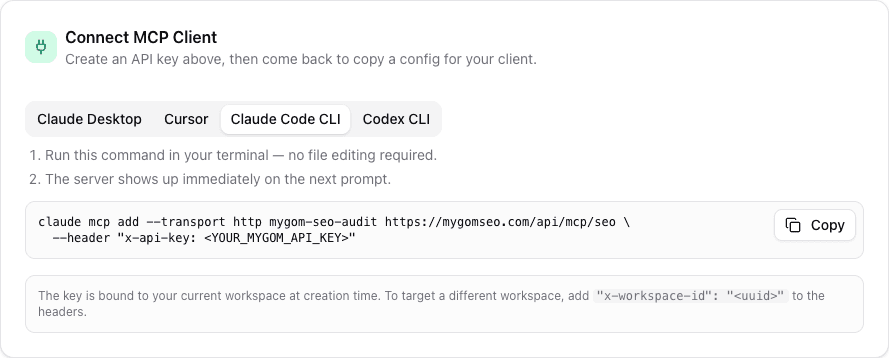
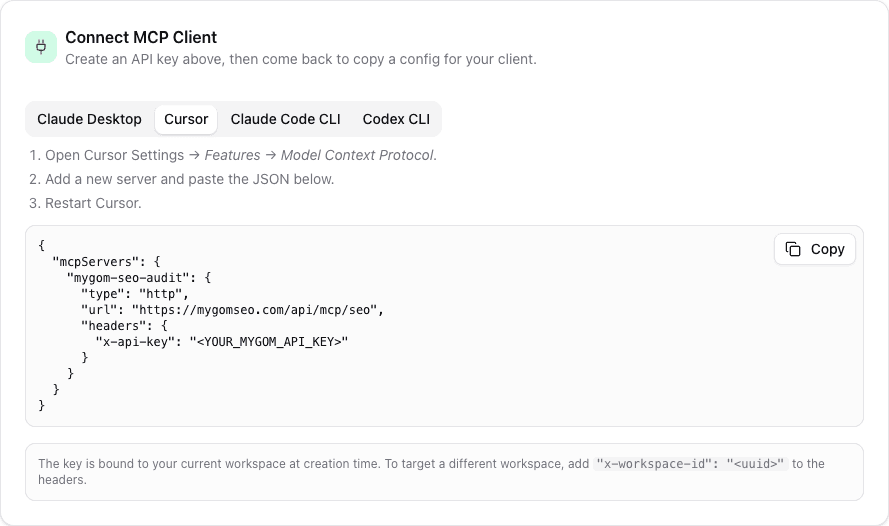
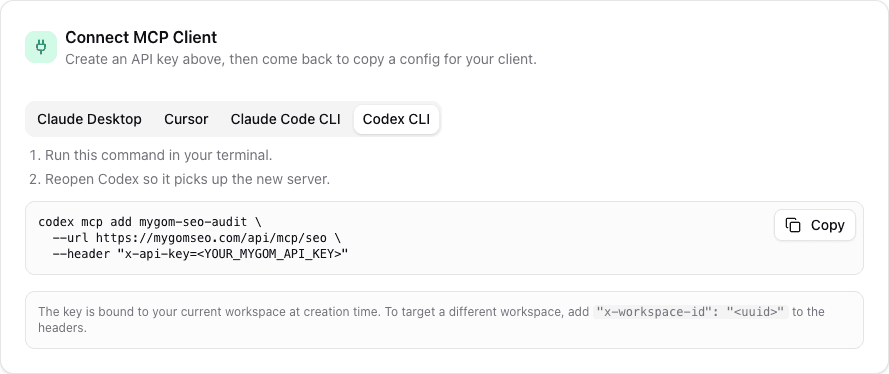
claude mcp add --transport http mygom-seo-audit … and you are live. Same for Cursor, Claude Desktop, Codex, and any JSON-config MCP client. One env var, one key, done.
Workspace-Bound Keys
Your API key is bound to a workspace at creation. The agent queries your site, your scans, your integrations — not a sandbox. Revoke anytime from settings.
Slash-Command Fallback
An mcp native prompt (seo_audit_guide) ships with the server. Even after long conversations where system instructions get compacted, the agent can re-invoke the guide on demand.
For SEO agencies — analyze clients at conversation speed
Drop a prospect's URL into Claude. The agent previews the site, picks smart crawl strategy, runs the audit, and comes back with an executive summary, prioritized wins, and per-page evidence. Use it on sales calls to qualify leads, in pitch decks to show what you'd fix first, and on active clients to turn weekly reporting into a five-minute conversation. Everything the agent sees is real data from your Mygom workspace, not a generic scan.
- ·Live prospect audits during sales calls — paste URL, get a score and top fixes in 30 seconds
- ·Turn audit data into client-ready deliverables without leaving the chat
- ·Batch-audit competitors with a single prompt, compare findings side by side
- ·Sharable workspace keys — assign one per analyst, revoke when they leave
For engineering teams — ship fixes with Claude Code or Cursor
Your coding agent already writes code. Give it the audit and it will write the fix. Claude Code, Cursor, and Codex connect to the same MCP endpoint — the agent scans your staging site, reads the structured findings, and edits meta tags, opens pull requests to add HSTS, rewrites thin content, and fixes alt text across the codebase. Because findings arrive as stable codes with recommendations and evidence, the LLM has everything it needs to act without hallucination.
- ·Findings ship with concrete values — sizes, headers, attributes — not vague advice
- ·Scope the agent to one page, one finding code, or the full site
- ·Re-run get_audit after a deploy to verify the fix landed
- ·Works in CI prompts: scan preview URLs on every PR and comment the top issues
For growth, sales, and support — put SEO inside the tools you already use
The MCP endpoint is not just for developers. Plug it into any MCP-capable assistant — Claude Desktop on a marketer's laptop, Cursor for a technical PM, an internal Slack bot, a ChatGPT custom GPT via a bridge. Anyone who can chat can ask for an audit, a fix plan for a specific URL, or a quick sanity check on a landing page before it goes live. No dashboard hopping, no new tool to learn.
- ·Marketers run pre-launch audits on landing pages without opening the app
- ·Sales teams qualify inbound leads by pasting their site into a chat
- ·Product managers check site health during standups with a one-liner prompt
- ·Support agents confirm whether a customer's rank drop correlates with a site issue
For content teams — quality-gate every draft before publish
Wire the MCP endpoint into your writing workflow. Before a draft goes live, your writing agent calls get_page_detail on the preview URL, reads the content, performance, accessibility, and social findings, and fixes them inline — meta description length, heading structure, missing alt text, OG tags, internal linking. Every publish is already a ninety-score article. No separate QA pass.
- ·One-prompt pre-publish audit across all 40+ checkers
- ·Agent fixes findings automatically: meta, headings, alt text, schema
- ·Run against preview URLs from Vercel, Netlify, or your CMS
- ·Catch schema and OG regressions before they ship
Three steps. Under a minute.
Create an API key
Open Settings → API Keys, create a key, and copy it. The key is automatically bound to your current workspace — no workspace ID juggling.
Install with one command
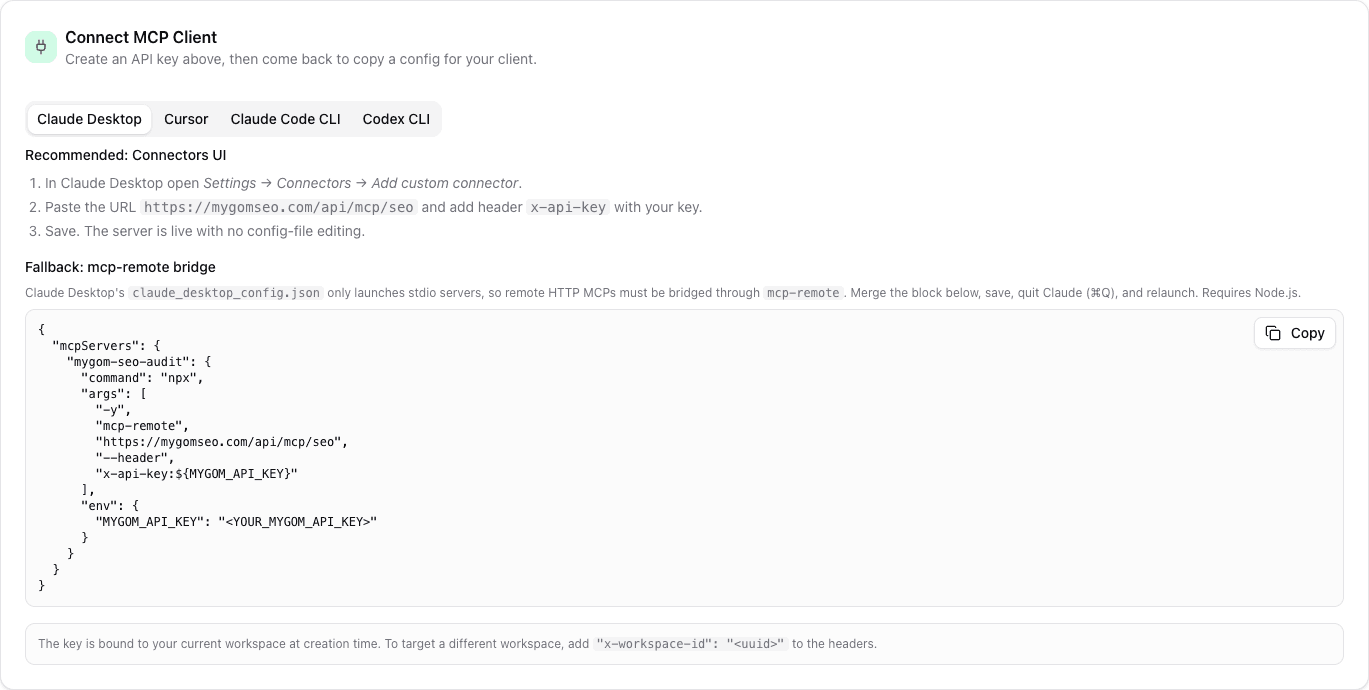
Run the install snippet for your client — Claude Code, Cursor, Claude Desktop, or Codex. We generate the exact command with your key pre-filled, ready to paste.
Ask your agent to audit
Say 'audit mygomseo.com' to your LLM. The server instructs it through the full workflow — preview, scan, poll, summarize — and returns structured findings it can act on.
Frequently asked.
Model Context Protocol is an open standard for connecting LLMs to external tools and data. Instead of asking an AI to imagine your site's SEO issues, MCP lets the AI actually run an audit, read the findings, and act on them. Claude Desktop, Claude Code, Cursor, Codex, and a growing list of clients already support it natively.
Anything that speaks MCP over HTTP. We ship tested snippets for Claude Code CLI, Claude Desktop, Cursor, and Codex. Any client that accepts an mcpServers JSON config with an http transport and a header for your API key will work — including custom internal agents and bridges to ChatGPT or other providers.
No. The endpoint is hosted, the install is one command per client, and the agent receives workflow instructions automatically on connect. You only touch code if you want to embed MCP in a custom agent or CI pipeline.
Six: preview_site (scope and strategy recommendation), start_audit (begin a scan), get_audit (poll status), list_findings (full structured issue list), get_fix_plan (prioritized remediation grouped by finding code), and get_page_detail (per-URL evidence and findings). Each returns JSON with stable codes, severity, impact, effort, recommendation, and evidence.
Claude Desktop's claude_desktop_config.json only launches local stdio servers — it rejects http/sse entries. Use Settings → Connectors → Add custom connector to register the MCP endpoint through the UI, or bridge the HTTP endpoint through mcp-remote in the config file. The install card in Settings → API Keys shows both options with your key pre-filled.
The MCP key is read-mostly — it can start and read scans on your workspace, not modify billing, delete data, or access other workspaces. Keys are workspace-bound at creation, rate-limited server-side, and revocable from settings. Every call is logged.
A pasted report is stale the moment it lands in the chat, and the model cannot re-scan, drill into a URL, or verify a fix. Over MCP, the agent runs tools live — it re-audits after a deploy, pulls fresh evidence for a specific page, and reasons over structured data instead of a PDF.
Yes. Point any MCP-capable agent at a preview URL, instruct it to run a scan and comment the top findings on the PR. Claude Code and Codex both support non-interactive invocations suitable for GitHub Actions or similar runners.
Yes, per-key throttling is applied at the controller. Normal interactive usage is never affected. High-volume automation should coordinate scan scheduling through a service account key.
Better with the rest of the platform.
Website Audit
40+ technical checks per page. The MCP server exposes the same engine to your AI.
Learn more →AI Marketing Agent
Prefer a hosted agent over your own? Mygom's agent uses the same tools internally.
Learn more →Content Analyzer
On-page scoring your writing agent can consult before every publish.
Learn more →Start
Free.
Full access for 7 days.
Zero commitment.
Starter
Full Feature Comparison
Everything included in each plan at a glance
| Feature | Starter $49/mo | Growth $99/mo | Scale $179/mo |
|---|---|---|---|
| AI | |||
| AI Agent messages | 15/mo | 50/mo | 150/mo |
| AI image generation | Unlimited | Unlimited | Unlimited |
| Brand voice learning | |||
| Extra message credits | Purchasable | Purchasable | Purchasable |
| Social Media | |||
| Platform connections | 3 | 5 | Unlimited |
| Compose & schedule | |||
| Per-platform customization | |||
| Carousels, reels, stories, threads | |||
| First comment (LinkedIn/IG) | |||
| Social analytics | |||
| Best-time-to-post heatmap | |||
| Follower growth tracking | |||
| Posting frequency analysis | |||
| SEO | |||
| Website audit (all checks) | |||
| Scheduled auto-scans | Weekly only | Any frequency | Any frequency |
| Keyword tracking | 100 keywords | 300 keywords | 500 keywords |
| Keyword sync | Weekly | Daily | Daily |
| Keyword boost (purchasable) | |||
| Backlink monitoring | Current status | Full history + daily | Full history + daily |
| Content analyzer | |||
| Google Search Console | |||
| Content | |||
| Article generation | 30/mo | Unlimited | |
| Article credits (purchasable) | |||
| CMS auto-publishing | 13+ platforms | 13+ platforms | |
| Content calendar (articles) | |||
| Content calendar (social) | |||
| Support & Extras | |||
| Support level | Priority | Dedicated | |
| API access | Coming soon | ||