SPA SEO in 2026: The Developer's Guide to Getting JavaScript Sites Ranked

Single page application SEO is what separates a fast, polished app from one nobody finds. If your app runs on JavaScript, single page application SEO decides whether search engines see your content or skip it.
That matters because most SPAs hide key signals. Content, routes, and metadata often load too late for crawlers. Most modern websites rely on JavaScript frameworks like React, Vue, and Angular. SPA SEO: How to Get Single Page Applications Indexed explains that this creates real visibility problems when content loads client-side.
So how do you make a single page application SEO friendly? You make it crawlable, indexable, and clear to search engines. In this guide, you’ll follow a setup-to-action-to-verification flow. You’ll fix technical blockers step by step and measure progress at each stage.
Prerequisites for Single Page Application SEO
What tools you need before you start
Open Google Search Console first. If you don't have access yet, request it from your site admin or set it up using Google's verification process. Then install a crawler like Screaming Frog or use Google's URL Inspection tool. You'll also need your browser dev tools and access to your CMS or codebase. For example, if marketing owns content but engineering owns routes, you need both sides ready before changes start. For framework notes, record whether you use React, Vue, Nuxt, or another single page setup.
Can Google crawl a single page application? Yes, but you should not assume it will crawl and render every route well. SPA SEO: How to Get Single Page Applications Indexed · Nuxt SEO explains that JavaScript-heavy pages can create indexing gaps when rendering depends on client-side behavior.
What access your team should have
Confirm who can edit templates, metadata, routing rules, redirects, and the XML sitemap. Give marketing view access to performance data. Give engineering access to deploy and test fixes. If ownership is fuzzy, write it down now, like you would on a handoff sheet for a Structural Software Engineer.
What a successful baseline looks like
Create one benchmark report before touching anything. Record indexed pages, current organic clicks, route structure, and whether key pages render without user interaction. Also note if key URLs handle 404s properly and whether important content appears on load.
What is the best way to audit javascript SEO? Use these three steps: 1) Crawl key routes with Screaming Frog or Google Search Console. 2) Inspect rendered HTML using Chrome DevTools. 3) Compare user view against bot view using Google's URL Inspection tool or 'Disable JavaScript' in DevTools. For example, open a priority page, disable JavaScript, and check what disappears. At this point, you should see your priority URLs, current indexing status, and who owns changes across marketing and engineering.
Step 1 Fix Single Page Application SEO Crawlability

Choose rendering that bots can process
Pick a rendering method that exposes content fast. For high-value pages, use SSR or prerendering first. For example, product pages, service pages, and feature pages need content in the first response. Client-side rendering is not always bad for SEO, but it is risky when bots get an empty shell and must wait for JavaScript.
For most single page applications, SSR is the safer default for pages that change often. Prerendering works well for stable pages, like pricing, about, or location pages. Nuxt SEO explains that SSR and prerendering help bots see content without relying on delayed JavaScript execution.
A simple rule helps here. Use SSR when content changes often. Use prerendering when content stays mostly fixed. If you keep client-side rendering, make hydration reliable and fast on important routes. With this approach, every key page will have a clear rendering strategy.
For a visual walkthrough of this concept, check out this tutorial from Laracasts:
Expose real content on key routes
Map each important route to a unique URL. Then load real headings, body copy, and internal links in the rendered HTML. Do not hide core text behind tabs, scroll events, or click handlers. Bots should see the page value at once.
For example, /features/reporting should show its own H1, supporting copy, and links to related pages. The rendered source should not show only a root div and script tags. In javascript seo, visible HTML still does the heavy lifting. How developer's can help seo | PPTX reinforces the need for crawlable links and content at the route level.
This is where many page applications fail. The route exists, but the content appears only after app state loads. At this point, your top pages should behave more like documents than app views. You should now see route-level content for every priority URL.
Clear route structure helps both users and bots navigate your app. Each URL should point to one specific piece of content, much like clear BIM links in technical documentation.
Remove blockers from robots and scripts
Check your robots.txt file first. Allow crawling on the folders that hold your valuable routes and assets. Then review noindex tags, blocked scripts, and failed JavaScript requests. Any one of these can break rendering.
According to A Developer's Guide to Building a React Single Page Application, 0% content in the initial shell gives bots nothing useful to parse. That is the core problem you are fixing here. Remove blockers before you test again.
Use a bot-friendly renderer or URL inspection tool to verify results. Expected result: your main pages should render meaningful content, not just an empty app shell. When you view source, you should see H1 tags, body paragraphs, and navigation links in the HTML - not just <div id='app'></div> with script tags. Verify that you can see crawlable text, visible links, and route-level copy in the rendered source before proceeding.
Step 2 Add SPA SEO Signals for Every Route

1. Write unique titles and meta descriptions
Start by assigning each route a unique title and meta description. For example, /pricing should not reuse the same copy as /features. Use your router, head manager, or framework SEO module to update metadata on route change, not only on the first page load. Check the browser tab to confirm each route shows its own title and verify the page source displays route-specific descriptions.
If you use React, Vue, or another page application framework, map metadata to route objects. For example, store title and description values with each route config, then inject them when navigation happens. Keep titles clear and specific. Keep descriptions focused on one intent. Verify that each key URL returns different metadata before you proceed.
2. Set canonicals, internal links, and structured routes
Add one canonical URL per route. Point it to the preferred version of that page, including the full path. This prevents duplicate signals when tracking parameters, filters, or alternate paths appear. You should now see one consistent canonical on every priority page.
Use crawlable anchor links for navigation. Do not rely only on click handlers, button taps, or JavaScript events that may hide paths from bots. For example, link from /services to /services/technical-seo with a standard <a href=""> element. Internal links absolutely matter for single page application SEO because they help bots discover routes and understand page relationships. Verify that your menus, cards, and footer links all expose clean anchor URLs.
Keep routes readable and grouped by topic. For example, /blog/seo-audit-checklist is stronger than a vague parameter string like /content?id=482. Structured routes help users and bots understand page hierarchy at a glance. If you need a model, look at how content hubs organize related paths, similar to BIM links.
3. Build XML sitemaps and handle pagination carefully
Generate an XML sitemap that lists your priority routes. Include only indexable pages with self-referencing canonicals. Update the sitemap when new routes launch or old ones retire. At this point, your sitemap should act like a clean route inventory for search engines.
Handle pagination with care. Give each paginated URL its own crawlable path and useful title pattern. Avoid pushing endless items into one scroll state with no URL change. For example, page two of articles should load on its own route, not hide behind a load-more action. According to A Developer's Guide to Building a React Single Page Application, performance gains can reach 200%, but speed alone does not replace clean route signals.
Expected result: every important single page route now behaves like a landing page. Verification checkpoint: you should see distinct metadata by URL, consistent canonicals, and a sitemap that lists your priority pages.
Conclusion
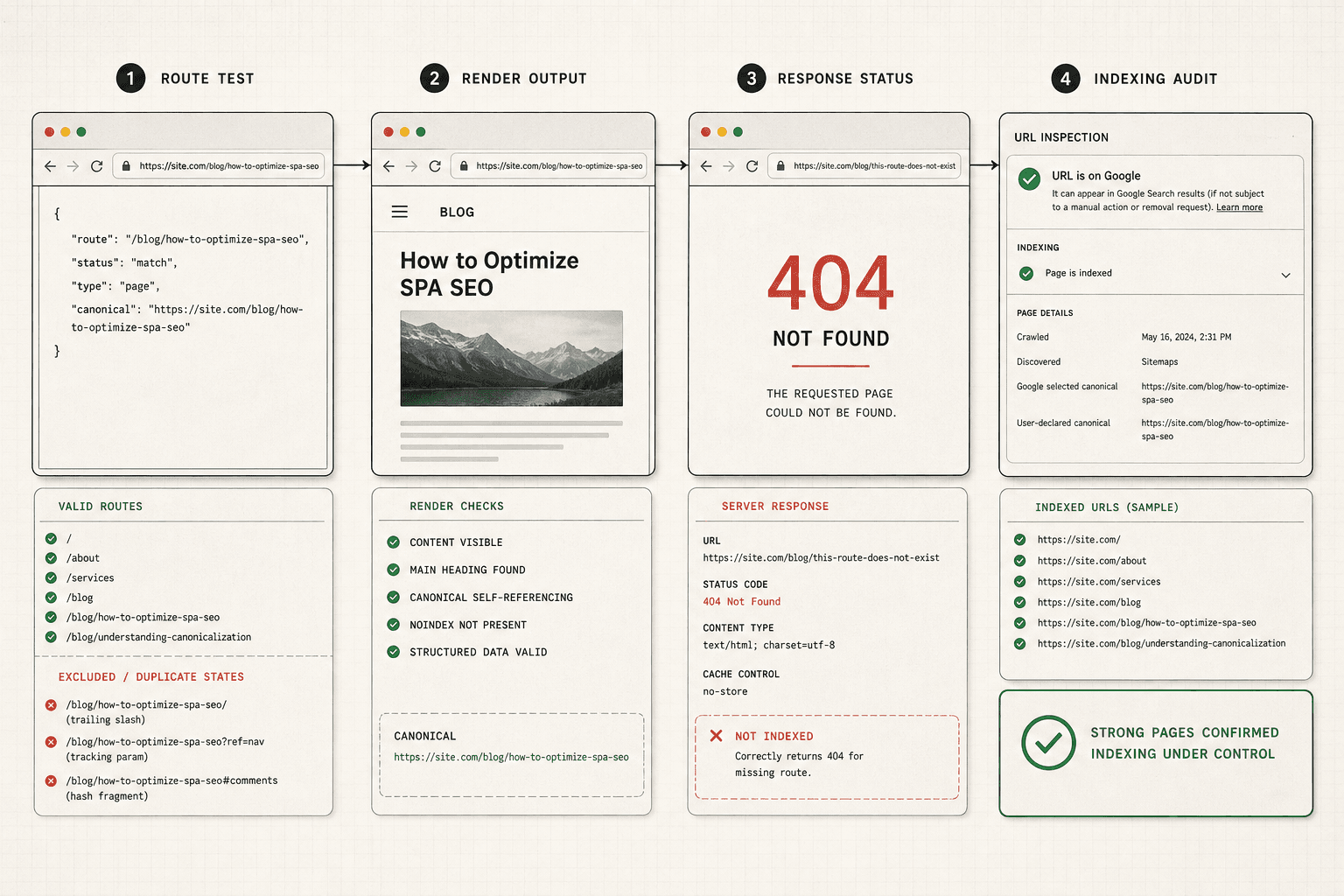
The last step ties the whole system together. When you verify indexed routes, compare rendered output to live pages, and fix route errors, you move from guesswork to proof. You can see which URLs deserve to stay in the index, which ones need stronger signals, and which ones should disappear. That is where a lot of growth gets blocked. Not by content quality alone, but by broken route handling, duplicate parameter states, weak canonical control, or pages that only load after a click. If important content stays hidden behind app interactions, you make search bots do extra work. Most will not bother.
The big takeaway is simple. Treat every important route like a real page with a clear job. Give it a usable URL. Make sure the rendered output matches what users and bots should see. Return real 404 status codes when a route does not exist. Keep duplicate states out of the index. Verify that your strongest pages stay available without taps, filters, tabs, or delayed JavaScript events. When you do that, single page application SEO stops being a framework problem and becomes an operational process you can repeat.
Your next move is also clear. Check Search Console again. Review route coverage, indexing errors, and status responses. Confirm that broken URLs resolve cleanly and that your key pages are the ones getting indexed. At this point, your app should be easier to crawl, easier to understand, and easier to surface when users ask AI tools or search engines for direct answers. That is the goal. Not more pages. Better visibility for the pages that matter.
Keep going. The teams that win with javascript seo are usually not the teams with the fanciest stack. They are the teams that remove friction, verify output, and keep their single page applications understandable to both bots and humans.
Want a simple next step? Use Google's Mobile-Friendly Test to check how bots render your key pages and verify your SPA SEO setup.