How to Build a Zero - Spreadsheet SEO Workflow

SEO automation cuts the grunt work from modern marketing. It is the process of replacing spreadsheet-heavy SEO tasks with repeatable workflows. Manual tracking, audits, publishing, and reporting burn hours and invite mistakes. According to SEO Templates, Worksheets & Spreadsheets to Drive Success, customers use an average of 10 sources before they convert. That kind of messy path makes manual SEO ops break fast. You need a system that tracks changes, flags issues, publishes updates, and reports results without copy-paste chaos. In this guide, you will build that system step by step. You will also see a clear checkpoint after each stage, so you can verify what works before moving on. Keep reading if you want cleaner ops and fewer SEO fire drills.
Step 1 Prerequisites for SEO Automation Setup
Gather the tools and accounts
List every tool each workflow will touch before you build anything. You need a rank tracker, a website audit tool, your CMS, analytics, and an SEO reporting destination. For example, your stack might include Ahrefs or Semrush for rank tracking, Screaming Frog for audits, WordPress for publishing, GA4 and Search Console for analytics, and Looker Studio or Slack for reporting.
Next, confirm access and permissions for each tool.
- Assign one owner for each platform.
- Verify admin, editor, or API access.
- Confirm logins for shared team accounts.
- Choose where automated outputs will land.
You should now have a clean tool list and working access. Verify that each workflow has one owner and one reporting destination before proceeding.
Map the SEO tasks you want to automate
Write down your current manual tasks in plain language. Focus on rankings, technical checks, content publishing, and reporting first. For example, note who pulls ranking data, who runs the weekly crawl, who uploads blog posts, and who builds the monthly deck.
Then map each workflow with four fields:
- Owner
- Trigger
- Output
- Review cadence
A simple example works well: “Technical crawl, owned by SEO manager, runs every Monday, sends issues to Slack, reviewed weekly.” This is where workflow automation gets practical. You should now see a short list of clear, repeatable processes instead of a messy task pile.
Set your baseline metrics before changing anything
Capture what the team does today before you automate it. Log hours spent per week, pages monitored, reports produced, and time spent on content uploads. Record the current process in one shared sheet or doc.
According to SEO Templates, Worksheets & Spreadsheets to Drive Success, integrated organic workflows can drive major gains, including a 487% increase in organic traffic in one example. That is useful context, but your first goal is measurement, not hype.
At this point, your team should have a simple workflow map, the right permissions, and a baseline. Verify that everyone can name the owner, trigger, output, and review cadence for each workflow before moving on.
Step 2 Build SEO Automation for Rank Tracking and Audits
Automate rank tracking by keyword group
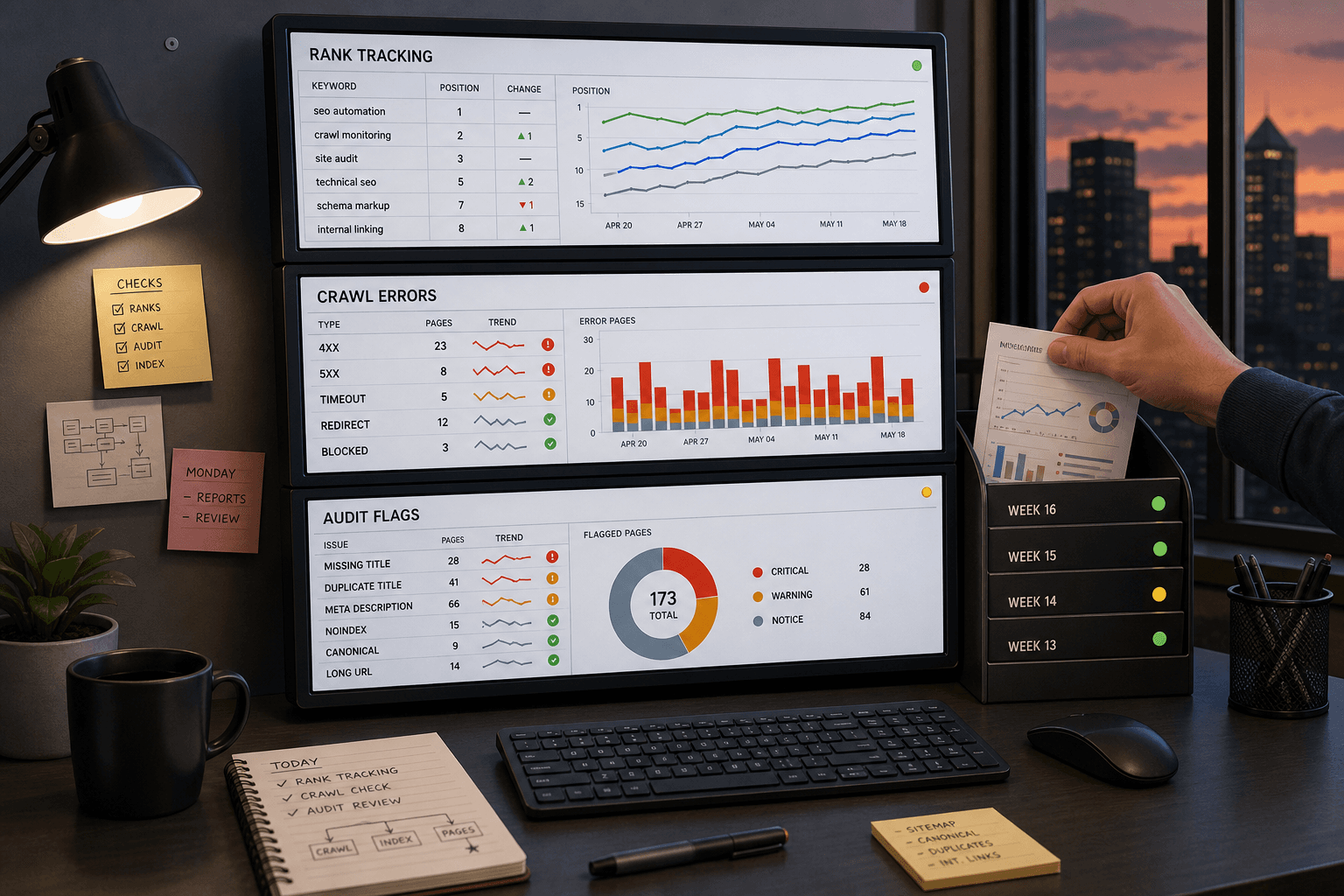
Start with rank tracking that matches how you report work. Group keywords by page type, priority cluster, and market. For example, split product pages, location pages, and blog posts into separate views. Then tag each group by country, city, or device if those changes matter.
Next, connect each keyword set to its target landing page. This makes keyword monitoring useful without extra sorting later. You can spot when one template slips, not just one term. At this point, your dashboard should show rankings by segment, not one long export.
For a visual walkthrough of this process, check out this tutorial from Amit Tiwari:
Verify that rankings refresh on the schedule you set before proceeding. You should now see automatic updates for each keyword group. If data looks mixed, check your tags and landing page rules first.
Schedule website audit tool scans
Configure your website audit tool to scan on a fixed schedule. Use daily scans for high-value sites and weekly scans for smaller sites. Flag the issues that usually create cleanup work later. Focus on broken links, missing metadata, indexability problems, and slow pages.
Set scan depth and crawl limits based on site size. For example, crawl priority folders first if your site has thousands of URLs. Send the results to one dashboard or shared inbox. At this point, your seo automation setup should surface technical issues without spreadsheet exports.
Research from SEO Templates, Worksheets & Spreadsheets to Drive Success shows 36%, but that figure does not define your setup here. Your goal is a reliable process, not a vanity metric. Verify that one scheduled scan completed and logged issues before moving on.
Create alerts for sudden SEO changes
Add alerts for the changes your team must see fast. Create triggers for ranking drops, traffic anomalies, crawl errors, and page changes. For example, send an alert if a priority page drops five positions in one day. Also alert when title tags, canonicals, or index rules change.
Route alerts to the place your team already checks. Email works, but Slack or Teams is faster for active workflows. Can SEO be fully automated? No. seo automation handles detection and routing, but your team still decides what to fix and why.
You should now see ranking updates and audit findings flow into one place. Verify that a test alert fired, rankings updated automatically, and a scheduled scan ran successfully. If one check fails, fix the trigger before adding more workflows.
Step 3 Connect Marketing Automation to Publishing Workflows
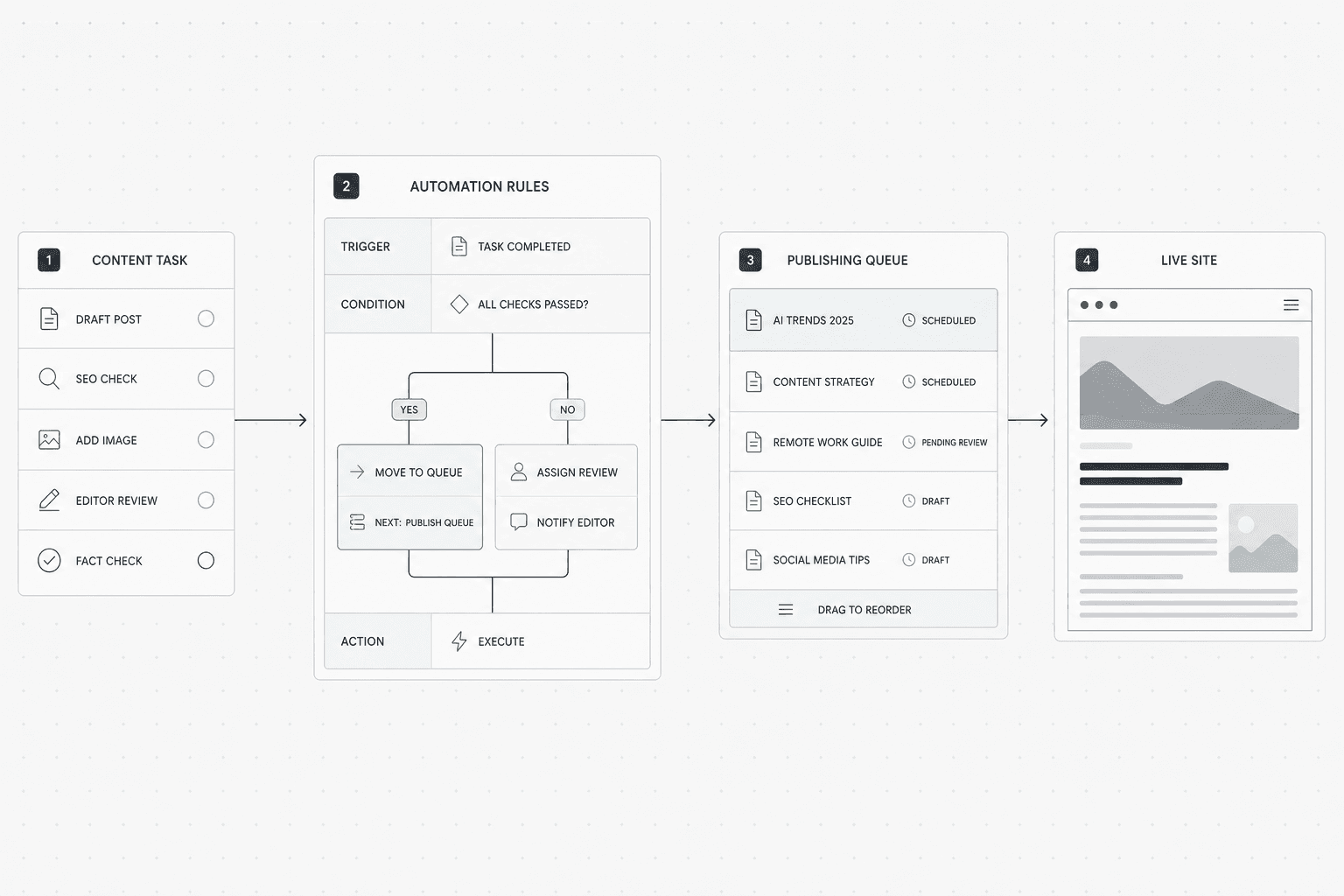
Set content triggers and approvals
Define the events that should create a content task.
- Create a trigger for each common content need.
1.1. Add a trigger for a new target keyword.
1.2. Add a trigger for a page that needs a refresh.
1.3. Add a trigger for a technical issue that blocks performance. - Assign the next action to each trigger.
2.1. Route keyword opportunities to a draft queue.
2.2. Route outdated pages to an update queue.
2.3. Route technical issues to content and SEO owners.
For example, if your website audit tool flags a page with missing title tags, create a task for a content refresh. If rank tracking shows a priority page slipping, send that page into review. You should now see each trigger create a clear next step. Verify that every trigger has one owner, one due date, and one status.
Automate publishing to your CMS and channels
Use marketing automation rules to remove manual handoffs.
- Connect your workflow tool to your CMS.
1.1. Send approved drafts to your content publishing queue.
1.2. Set publish dates based on campaign or channel needs.
1.3. Push status updates back to your task board. - Connect the same workflow to your channels.
2.1. Send the published URL to email or social tools.
2.2. Notify stakeholders when the post goes live.
2.3. Mark the task complete after publication.
Think of this like a relay race. Each handoff needs a lane, not a spreadsheet. For example, a brief moves to draft, draft moves to approval, and approval moves to scheduled post. At this point, your approval workflow should move work forward without copy-paste updates. Verify that one test item can reach your CMS draft stage automatically.
Keep human review where it matters
Do not automate judgment. Automate movement.
- Add review checkpoints before anything goes live.
1.1. Check brand voice.
1.2. Check factual accuracy.
1.3. Check on-page SEO elements. - Limit approvals to the people who matter.
2.1. Assign one editor for message fit.
2.2. Assign one SEO owner for metadata and links.
2.3. Assign one final approver for publish readiness.
Research from SEO Templates, Worksheets & Spreadsheets to Drive Success shows 91% in one case tied to stronger search visibility and content strategy. The point is not more steps. The point is better control with fewer bottlenecks. You should now have a publishing process that moves from idea to approval to publication with clearer ownership.
What SEO tasks can you automate? You can automate draft routing, publish scheduling, status updates, review requests, and channel notifications. You can also automate content refresh prompts tied to seo automation signals. Verification checkpoint: a test content item moves through the full workflow and publishes with no spreadsheet tracker involved.
Verify SEO Reporting and Scale Your SEO Automation
Build reports that pull from the workflows you already set up. Include ranking movement, site health trends, publishing output, and task completion. Send them on a fixed schedule to the people who need them. Keep each view focused. A marketing lead needs progress and blockers. A founder needs pipeline, output, and risk. An SEO manager needs issue detail and ownership. If people need a separate explanation every week, the report is not done yet.
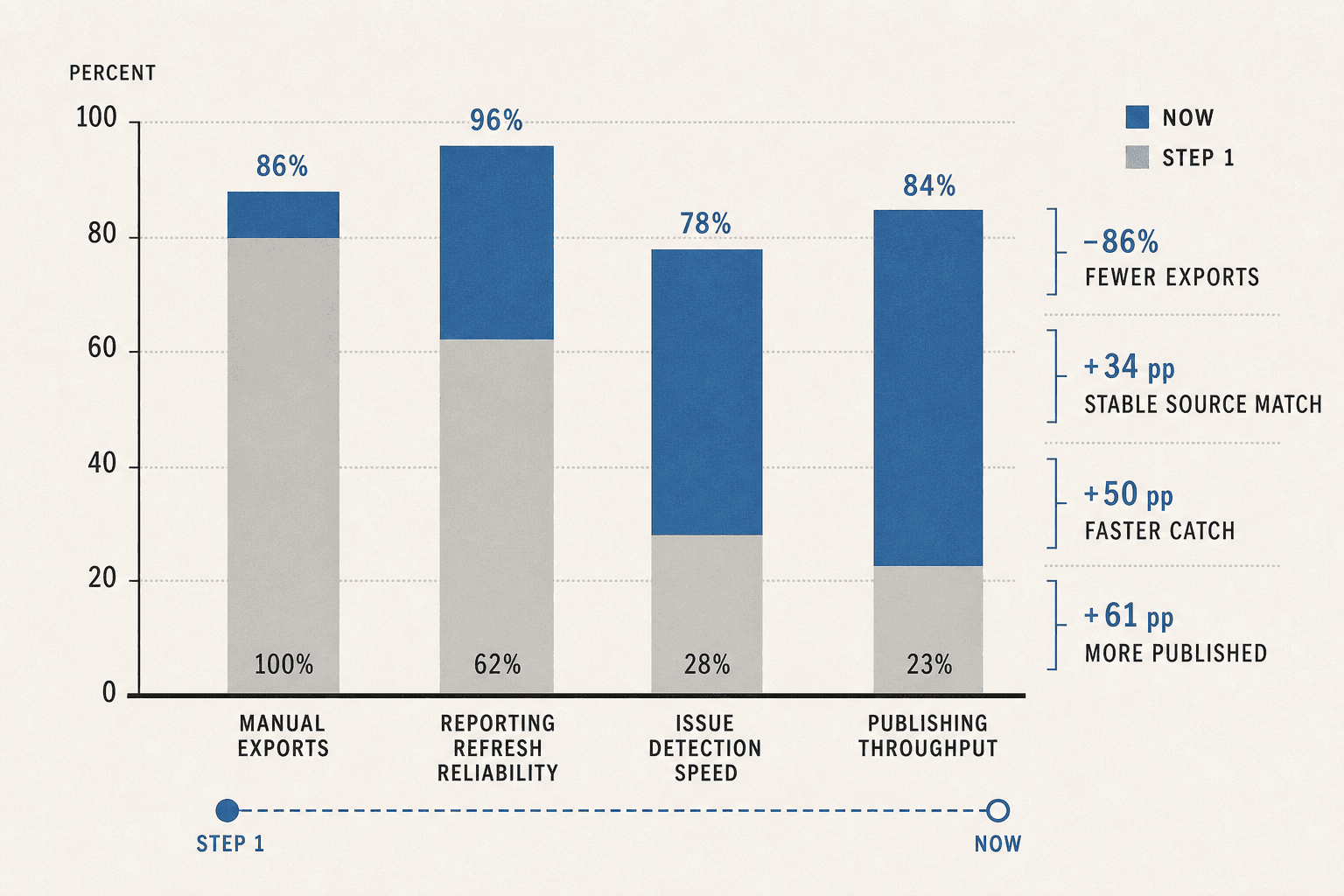
Next, compare your live results against the baseline from Step 1. Measure hours saved from manual reporting. Measure how fast your team catches technical problems. Measure how many pages or updates move through publishing each week. Measure whether reports now match the source data without cleanup. These are the signals that show your setup is working. They also show where friction still hides.
Do not scale chaos. Scale only what stays stable. Once your first workflows run cleanly, expand with intent. Add more keyword groups. Add more page templates. Add more reporting views for different teams. Keep the logic consistent across each new layer. That is how you grow without dragging spreadsheets back into the process.
At this point, your workflow should feel different day to day. You should see fewer manual exports. You should catch issues faster. You should publish with less back-and-forth. Most important, you should now have a repeatable SEO operations process your team can trust and improve. Verify that your reports refresh on schedule, stakeholders can read them without clarification, and your team can name the next workflow to automate. If those three checks pass, your system is ready for the next stage.
The big takeaway is simple. Good seo automation is not about adding more tools. It is about building a system that removes busywork, surfaces problems early, and makes progress visible. Start with the highest-friction tasks, prove the workflow, then scale what works. That is how you turn SEO from a spreadsheet habit into an operating system.
Keep going. Small workflow wins stack fast, and that is where durable growth starts.
Want to learn more? Learn More to explore how you can build a cleaner, faster SEO process.