How to Turn One Keyword Into a Blog Post, Social Thread, and CMS Draft in a Single Workflow

What if one keyword could power your whole content engine? Social media automation turns that idea into a repeatable system. Instead of copying briefs, drafts, approvals, and posts between tools, you build one workflow that moves faster and breaks less. That matters because most teams still waste hours on manual handoffs. According to Automating blog management with AI: A step-by-step guide - Sedestral, a draft-to-publish automation can run in under 10 minutes. In this tutorial, you’ll learn what social media automation is and how to turn one keyword into multi-channel publishing. More important, you’ll learn why each step exists, so you can adapt the workflow to your stack, not someone else’s template.
What You’ll Build and Prerequisites
What You’ll Build
By the end of this tutorial, you’ll have a simple social media automation system. One keyword goes in. Channel-ready assets come out. That includes a planning doc, draft copy, post variations, approval steps, scheduled posts, and cms publishing.
Think of it like a small assembly line. For example, one keyword can become a blog brief, LinkedIn post, X thread, and newsletter intro. Content repurposing keeps the message aligned while each channel gets the right format. Content Repurposing: One Piece, Ten Formats Guide
What You’ll Learn
In this section, you’ll learn the core moving parts before you build anything. You’ll see how the planning doc sets direction, templates speed production, approvals reduce risk, and the scheduler keeps your editorial calendar moving. You’ll also see why lightweight marketing automation works better than a bloated stack for small teams.
That matters because complexity creates drag. Research from Your Content Workflow in 2026: Automation That Works shows marketers boost productivity by 44% with AI tools. The win is not more software. The win is fewer handoffs and clearer steps.
Prerequisites and Accounts
By the end of this section, you’ll know what you need to start. You do not need code skills. A small team can set up social media automation with no-code tools, as long as you have clear owners and publishing access.
Keep your stack light. You need a spreadsheet or doc tool, a content workspace, one approval method, a scheduler, and CMS access. For example, if your team can edit content, approve drafts, and publish posts, you already have the basics. The Complete Guide to WordPress Content Automation: A to Z
Part 1 Build Your Social Media Automation Foundation

Choose One Keyword and One Goal
By the end of this section, you’ll know what to automate first in social media marketing. Start with one keyword, one campaign goal, and three channels. That could mean one search phrase, one lead generation goal, and posts for LinkedIn, X, and Facebook.
This works because tight scope removes guesswork. For example, if your keyword is “email deliverability,” your goal might be demo requests. Your outputs stay fixed: one short post, one longer post, and one scheduled promo asset. Fixed inputs and fixed outputs make workflow automation easier to test, improve, and trust.
Create the Core Workflow Map
By the end of this section, you’ll understand how to create a social media workflow. Think of your workflow like an airport conveyor belt. Each item moves to the next stop without anyone wondering what happens next.
Map the steps in order. Start with keyword research. Then move to brief creation, draft writing, review, approval workflow, and social scheduling. If you also use content repurposing, define that step clearly so one draft becomes three channel-ready versions.
For example, your map can look like this:
- Keyword selected
- Brief created
- Draft written
- Channel versions adapted
- Approver reviews copy
- Final assets scheduled
Wordable found a well-built automation flow can deliver gains up to 96x in output efficiency when the process is structured first, not improvised later (Your Content Workflow in 2026: Automation That Works).
Set Roles Rules and HandOffs
By the end of this section, you’ll know how to stop content from stalling. Assign one owner to each step. Your strategist owns the keyword and brief. Your writer owns the draft. Your approver owns the final go or no-go.
Next, set the handoff rule. Each person should receive one clear input and produce one clear output. For example, the writer gets an approved brief and returns a draft with channel variants. That structure supports smoother approval workflow, cleaner cms publishing, and less back-and-forth.
If you skip this, content gets stuck in limbo. If you define it, your ai social media manager, human team, or both can move faster with fewer mistakes.
Part 2 Add Content Repurposing With an AI Social Media Manager
Turn One Keyword Into Channel Specific Angles
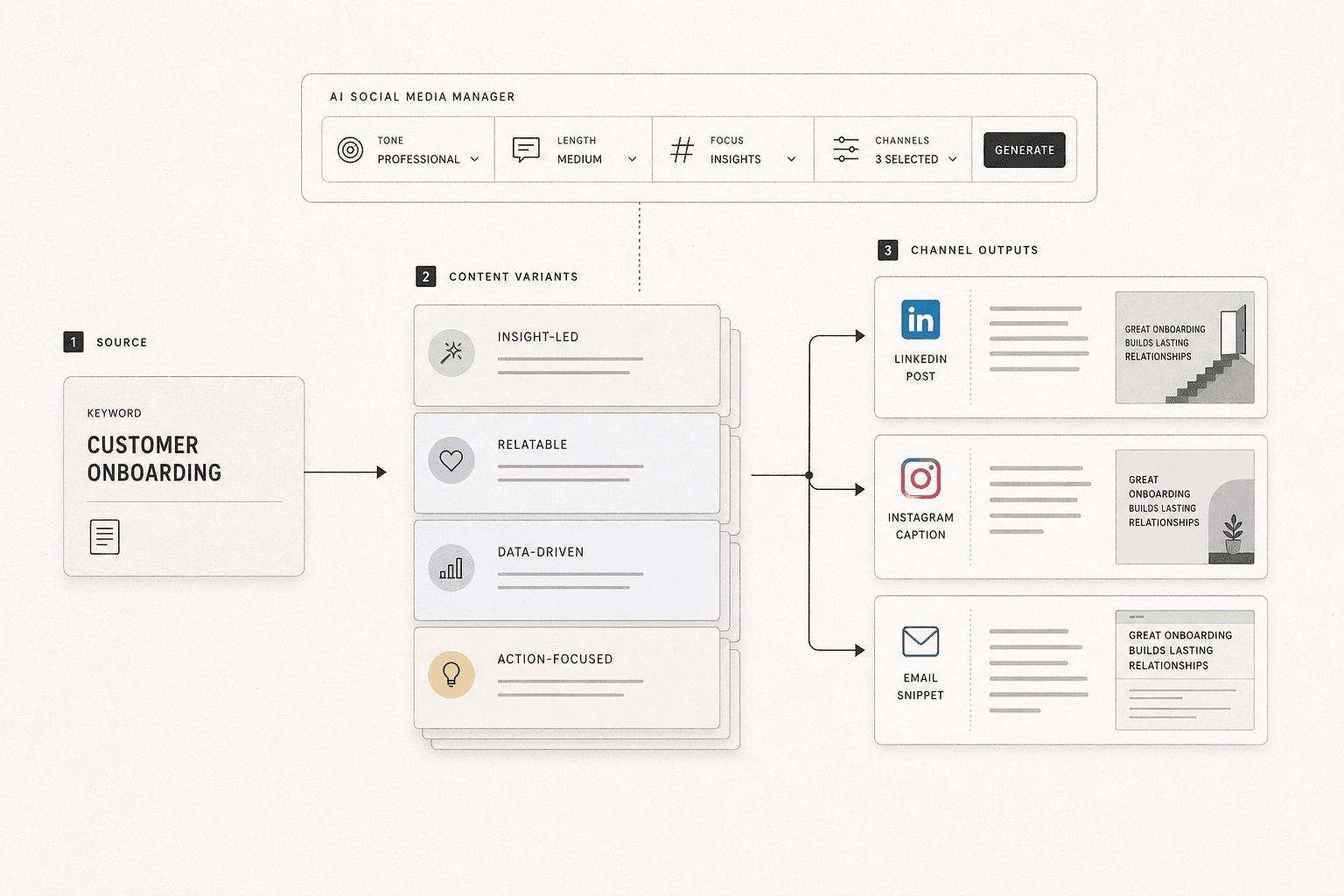
By the end of this section, you’ll know how to turn one idea into channel-ready angles.
Start with the source message. Then ask what each channel needs. Think of your keyword like a movie script. The plot stays the same, but each trailer highlights a different scene. That is why content repurposing works. You keep the message steady, but change the wrapper.
For example, if your keyword is “social media automation,” your blog angle could be “how to build a simple approval workflow.” Your LinkedIn post could focus on team bottlenecks. Your short caption could tease a result or pain point. Your promo snippet could push readers to the full guide.
This approach keeps your campaign aligned. It also makes review easier. When every asset comes from one source idea, your team avoids mixed messages and off-brand claims. Content Repurposing: One Piece, Ten Formats Guide
Use an AI Social Media Manager for First Drafts
By the end of this section, you’ll understand where AI helps and where humans still matter.
Can AI manage social media content? Yes, but only part of it. An ai social media manager can speed up ideation, outlines, first drafts, and format changes. It can suggest hooks, rewrite posts by platform, and create draft variations fast. That saves effort at the messy start. Automating blog management with AI: A step-by-step guide - Sedestral
But AI should not replace review. You still need a human to check facts, tone, timing, and brand fit. Think of AI like a fast junior assistant. It gives you raw material. You still decide what ships.
Research from Your Content Workflow in 2026: Automation That Works shows a strong workflow can create up to 777x more leverage from the same content process. That only works when review stays in the loop.
Create Reusable Prompt and Template Rules
By the end of this section, you’ll have a simple system for repeatable post templates.
How do you repurpose one piece of content for multiple channels? You set rules before drafting. Define tone, format, CTA, and length for each platform. For example, LinkedIn gets a sharper point of view and a soft CTA. Instagram gets a short caption and punchy opener. Promo snippets get one benefit and one next step.
Write these rules once. Then reuse them in every prompt. This makes content repurposing faster and cleaner. It also reduces edit rounds and keeps your post templates consistent across channels. Later, these same rules will support scheduling and cms publishing workflows.
Part 3 Connect CMS Publishing Scheduling and Approvals
Link Blog Publishing to Social Promotion
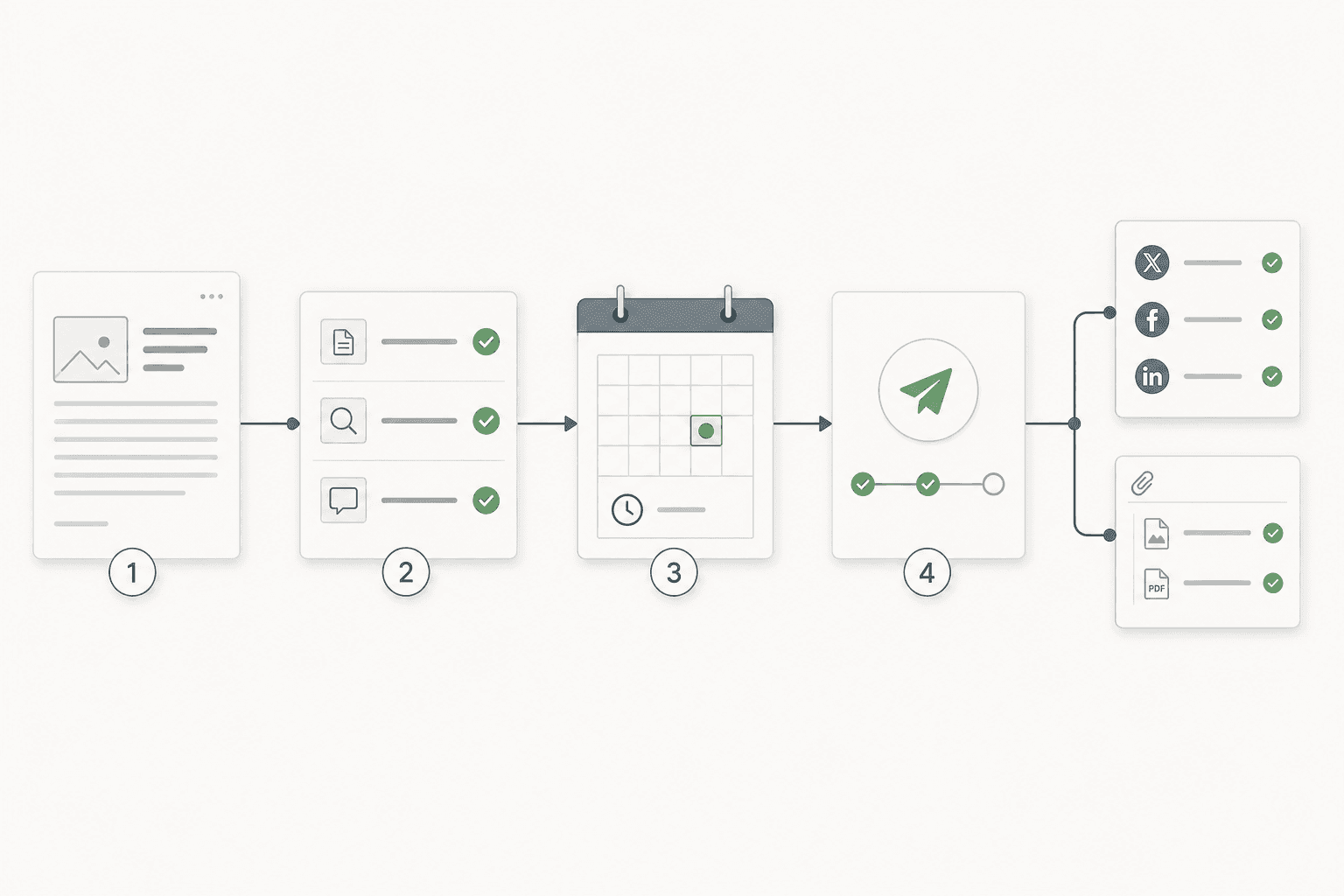
Your CMS should do more than publish a page. It should trigger a promotion checklist the moment an article reaches ready status. For example, when a blog post is approved in WordPress, your workflow can create social tasks, attach the featured image, pull the post URL, and assign channel owners. That turns cms publishing into the switch that starts distribution, not the finish line.
This matters because disconnected teams miss details. The blog team publishes. The social team scrambles. Links get pasted by hand. Images go missing. Captions drift from the source message. A connected publishing workflow fixes that by keeping every asset tied to the original article record. Wordable recommends connected systems because they reduce manual handoffs in modern content operations Your Content Workflow in 2026: Automation That Works.
Build the Approval Checkpoints
In this section, you’ll learn the best way to approve automated social posts. Use three checkpoints before anything gets scheduled. Start with brand review for tone and voice. Next, send it through compliance if your industry needs legal or policy checks. End with final edits for links, formatting, and CTA accuracy.
Think of content approvals like airport security. One scan is not enough. Each checkpoint catches a different risk before the post boards the plane. Sedestral also stresses structured review layers when automating blog management with AI Automating blog management with AI: A step-by-step guide - Sedestral.
Schedule Posts Without Losing Context
In this part, you’ll learn how to schedule posts without breaking the chain of context. Keep source links, visuals, UTM tags, captions, and owner notes attached to the same asset card from draft to publish. For example, if you update the blog headline, your social caption should update from that same source, not from an old spreadsheet.
That is how cms publishing fits into social media automation. It acts as the source of truth for every downstream post. Research from The Complete Guide to WordPress Content Automation: A to Z shows a featured automation asset at 1024x wide, a simple reminder that structured systems are built to move content cleanly across channels.
Conclusion

Your next job is to pressure-test every handoff. Check the keyword input first. Then review AI draft quality, channel formatting, links, approvals, and scheduled publish times. If one step breaks, the whole workflow gets noisy fast. Think of it like a relay race. A smooth pass matters as much as raw speed.
Do not launch this across every campaign on day one. Start with a small pilot. Pick one keyword theme, a short date range, and a few channels. Watch what happens. Track where work stalls, where posts duplicate, where assets go missing, and where outputs drift off-brand. Broken links and bad scheduling are not minor issues. They are signals that your process needs tighter rules.
Document every failure point while the test is live. That gives you a cleaner path to improve the system. You will know where to add checks, where to tighten templates, and where human review still matters most. This is how you turn a clever setup into reliable content operations.
Step back and look at what you built. You created a repeatable path from one keyword to multi-channel publishing. You connected strategy, content repurposing, approvals, cms publishing, and scheduling into one working flow. That puts you in a strong place to improve the next layer - better analytics feedback, smarter routing, stronger asset management, and deeper automation around performance insights.
Keep it simple. Prove it works. Then scale what earns trust.
If you want to learn more, Learn More and reach out.