JavaScript SEO in 2026: How Search Engines Crawl and Index Dynamic Content

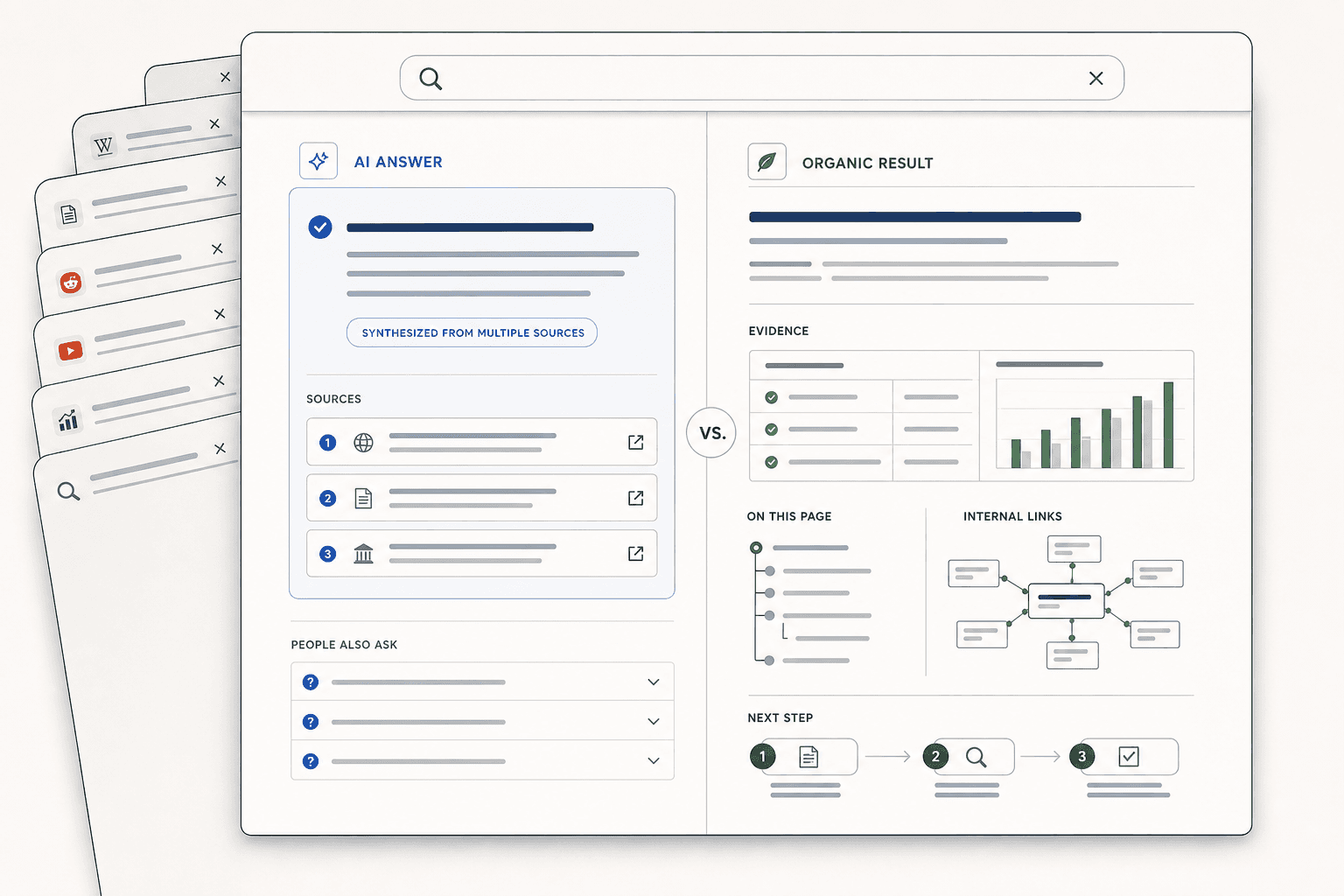
JavaScript SEO fails in a boring way. Googlebot reaches your URL, but misses the content you thought it would index. Yes, Google can index JavaScript content, but only when rendering works, critical resources load, and your app exposes crawlable signals. That is the real problem in 2026. Modern sites lean hard on client rendering, hydration, and APIs, which adds more ways discovery and indexing can break. According to Single-Page Application SEO: Complete Guide to Ranking SPAs, 100% of your routes need proper tracking and crawlable behavior on SPA builds. In this tutorial, you’ll learn how Googlebot crawls JavaScript-heavy pages, what actually gets indexed, and how to fix lazy loading, client-side routing, and dynamic meta tag issues fast. It is built for lean developers and technical SEO teams who need answers, not overhead.
Prerequisites and the Demo Project Setup
Knowledge and tools you need
By the end of this section, you should know what to inspect first. You need basic HTML, JavaScript, and routing knowledge. You also need Chrome DevTools, Google Search Console, URL Inspection, Rich Results Test, a simple site search check, and server logs if your stack exposes them. For broader context on testing an SPA for SEO, see Single-Page Application SEO: Complete Guide to Ranking SPAs.
The sample JavaScript app you will use
Build a tiny demo app with four moving parts. Start by creating a new React project:
npx create-react-app javascript-seo-demo
cd javascript-seo-demo
npm install react-router-dom
Add one server-rendered route like /, one client-rendered route like /app, lazy-loaded content below the fold, and dynamic <title> plus meta description updates. Create a src/App.js file with these routes:
import React, { lazy, Suspense } from 'react';
import { BrowserRouter, Routes, Route } from 'react-router-dom';

const LazyProduct = lazy(() => import('./LazyProduct'));

function App() {
  return (
    <BrowserRouter>
      <Routes>
        <Route path="/" element={<Home />} />
        <Route path="/app" element={<ProductPage />} />
      </Routes>
    </BrowserRouter>
  );
}
For example, your /app route can fetch product text after hydration, while the home page ships key copy in raw HTML. Add this src/ProductPage.js to demonstrate client-side rendering:
import React, { useEffect, useState } from 'react';

function ProductPage() {
  const [product, setProduct] = useState('');

  useEffect(() => {
    document.title = 'Product Page - SEO Demo';
    fetch('/api/product').then(r => r.json()).then(setProduct);
  }, []);

  return <div><h1>Product</h1><p>{product}</p></div>;
}
That mix lets you reproduce javascript indexing problems without risking a production site. Run npm start and visit http://localhost:3000 to confirm your setup works.
Versions accounts and baseline checks
Before you change code, define your baseline. Check view source, the rendered DOM, HTTP status, canonical tags, and robots directives. Verify whether each URL is linked in raw HTML. Pay special attention to robots meta tags that might block indexing. Then compare what users see with what Google can likely fetch and render.
How do you check if Google can see your JavaScript? Start with URL Inspection, then compare raw source against the rendered DOM in DevTools. If key content appears only after scripts run, validate whether Google rendered it, whether the page returned a valid status, and whether internal links expose that URL for crawl discovery. This foundation matters because every later fix maps to crawlability, renderability, or indexability.
Part 1: How JavaScript SEO Crawling and Rendering Works
1. The crawl queue and resource discovery
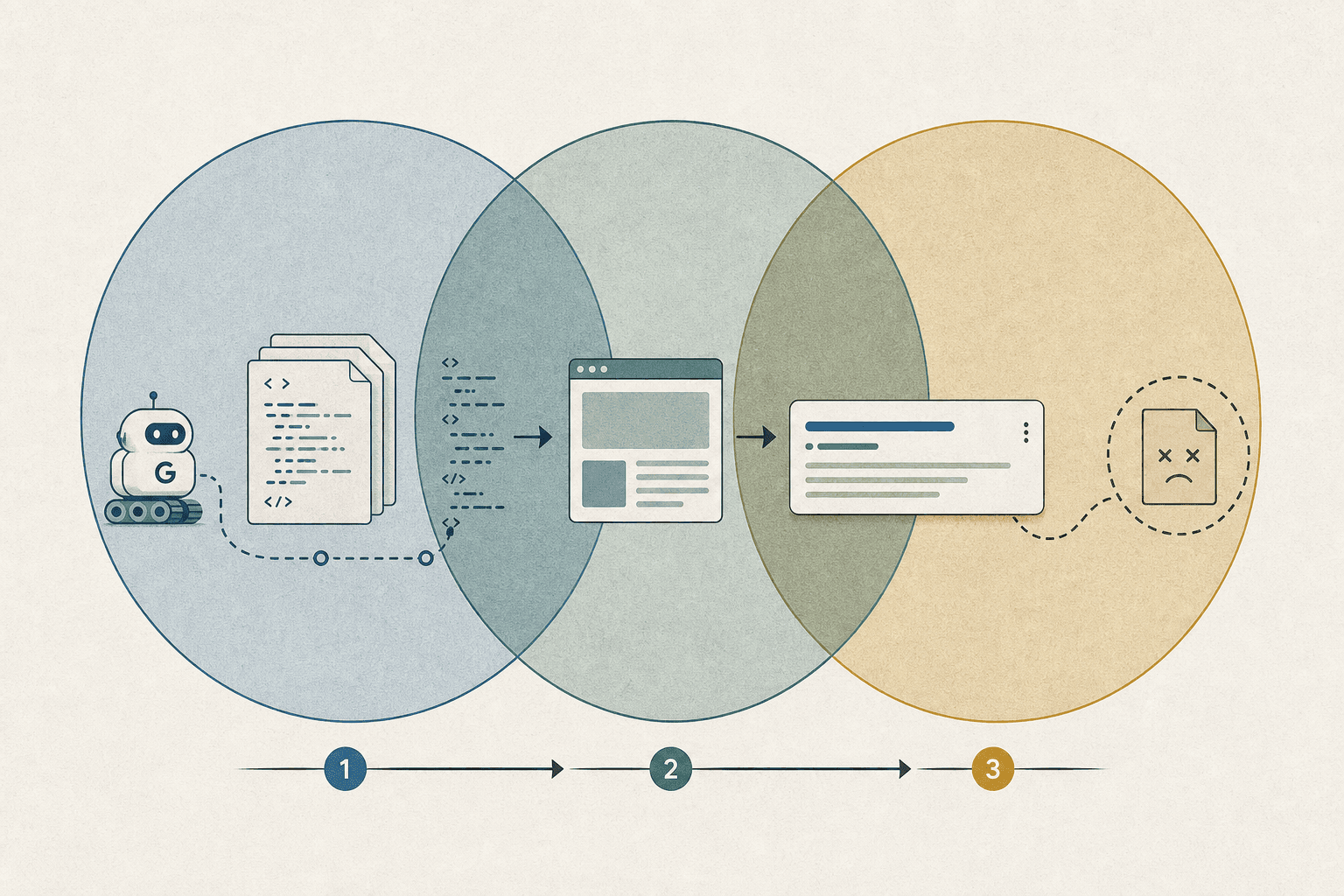
Googlebot usually starts with the URL’s initial HTML. It looks for links, canonicals, directives, and page signals it can read without running your app first. Think of this like opening a moving box and checking the label before unpacking what is inside.
If your navigation, product links, or pagination appear only after JavaScript runs, discovery gets weaker. The same goes for lazily loaded content that appears after scroll or click events. In single page application seo, that is a common failure point because key URLs may never enter the crawl queue reliably.
2. What Googlebot sees before rendering
Before rendering, Googlebot mainly sees the raw response from the server. That means empty app shells, placeholder loaders, and thin HTML can leave Google with very little to evaluate. To see what Googlebot sees before rendering, open DevTools (F12), go to the Network tab, refresh your page, and click the first document request. Click the Response tab to see the raw HTML. Now compare this with the Elements tab (rendered DOM). For example, if your product description appears in Elements but not in Response, Google's first crawl will miss it. If your page returns one root div, a script bundle, and no body copy, the first pass has almost nothing useful.
Blocked JavaScript, CSS, or API endpoints make this worse. If the browser needs those files to build the page, and Google cannot fetch them, javascript indexing becomes fragile fast. The practical rule is simple: critical content, internal links, canonicals, metadata, and status handling should not rely on client execution alone.
3. The second wave of rendering and indexing
Google can render JavaScript later, after the first crawl. That second wave exists because rendering costs more resources than fetching HTML. So Google separates quick discovery from heavier page execution, then processes rendering when capacity allows.
This is why Google can execute JavaScript, but not instantly, not perfectly, and not with human patience. Delayed API calls, race conditions, and content that appears only after user actions can miss the window. According to CyberCraft Bangladesh, even standard SEO work can stretch across 6 weeks, which shows why lean teams should reduce moving parts early.
4. Why rendered HTML still does not guarantee indexing
Rendered HTML helps, but it does not force indexing. Google still judges quality, duplication, canonical consistency, and whether the URL looks useful enough to keep. A rendered page can also fail if it sends mixed signals, uses robots meta tags poorly, or helps create soft 404 patterns.
For example, a client-rendered product page may finally show content, yet still get skipped if the canonical points elsewhere or the template looks empty at first fetch. That is why you should treat rendering as one checkpoint, not the finish line. For lean teams managing growth stacks, the strategy is simple: remove fragile steps, keep core signals stable, and make indexable content obvious from first load. If you need operational support to execute this consistently, consider roles like Digital Marketing & Operations Executive (UK) that bridge technical SEO and implementation.
Part 2 JavaScript Indexing Pitfalls in SPA SEO
Lazily loaded content that never appears
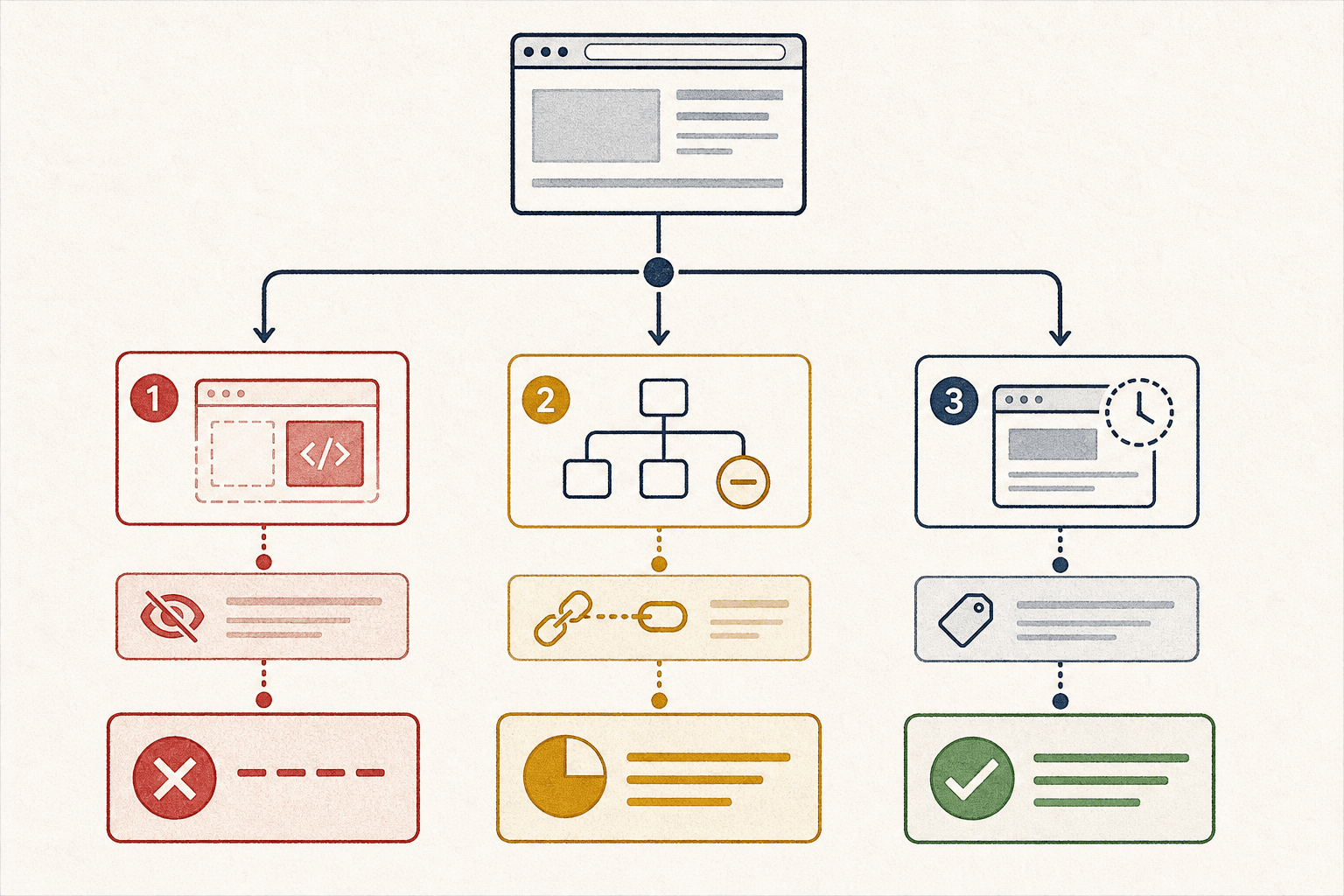
In this section, you’ll learn why lazily loaded content is a common crawl trap. You’ll also answer a key question: does lazy loading hurt SEO? Yes, it can, when important content appears only after scroll, click, or viewport triggers.
Think of Google like a visitor who enters your store, glances around, then leaves before the back room opens. If your product copy loads only after an intersection event fires, Google may never see it. The same problem happens with tabs, accordions, and “load more” buttons that hide core text.
For example, your category page may render only headings at first. Reviews, FAQs, and internal links appear after scroll. That setup weakens spa seo because the most useful content never becomes reliable HTML. In our demo app, let's fix this by moving critical content into the initial server response. Open your pages/app.js and locate the lazy-loaded product description component. Change <LazyDescription onIntersect={load} /> to <Description data={serverProps.description} />, then pass description from your server-side fetch. Now test: view source should show the description immediately. Run URL Inspection again to verify Google sees the content. Keep critical copy visible on initial load, and treat lazily loaded content as secondary enhancement, not your main page substance. For a practical overview, see Single-Page Application SEO: Complete Guide to Ranking SPAs.
Client side routing and orphaned URLs
In this section, you’ll learn how routing breaks discovery. A clean URL in the browser does not guarantee a strong indexable page. Your router may change views, while the server still returns the same shell for every path.
That creates weak route signals. For example, /features, /pricing, and /docs may all return one thin HTML response. If those routes are missing crawlable internal links, they become orphaned URLs. Hash routes make this worse because fragments are not treated like normal paths.
History API routes also fail when each route lacks distinct content or self-referencing canonicals. Google can discover those URLs from sitemaps or external links, yet still treat them as duplicates or low-value pages. This is a common reason your SPA is not indexed by Google. SPA SEO: Strategies and Best Practices covers similar route-level issues.
Dynamic meta tags and head management limits
In this section, you’ll learn why client-only head updates are risky. Many apps inject titles, descriptions, canonicals, hreflang tags, and structured data after hydration. That timing works for users. It is less dependable for crawlers.
For example, your product page may load with a generic <title> first. The real title appears after an API call finishes. Google can render JavaScript, but late head changes may be missed, ignored, or merged incorrectly. The same risk applies to social shares and structured data when they depend on delayed client state. Optimizing Single-Page Applications for SEO & AI Search explains why early, stable head output matters.
Soft 404s broken status codes and empty states
In this section, you’ll learn how JavaScript apps fake success by mistake. A missing page should return 404 or 410. Many SPAs return 200 with an error message, empty API shell, or blank loading state instead.
That confuses indexing and wastes crawl budget. Google sees a successful response, then finds little value on the page. Over time, that can create soft 404 errors across filtered pages, expired products, and broken routes. If you want to avoid soft 404 errors, align server status codes with page reality. According to Fix SEO for Single Page Applications: React & Next.js | CyberCraft Bangladesh, complex web application work can stretch to 5 months, which is why fixing status logic early saves painful cleanup later.
Part 3 Testing an SPA for SEO and Indexation
View source versus rendered HTML
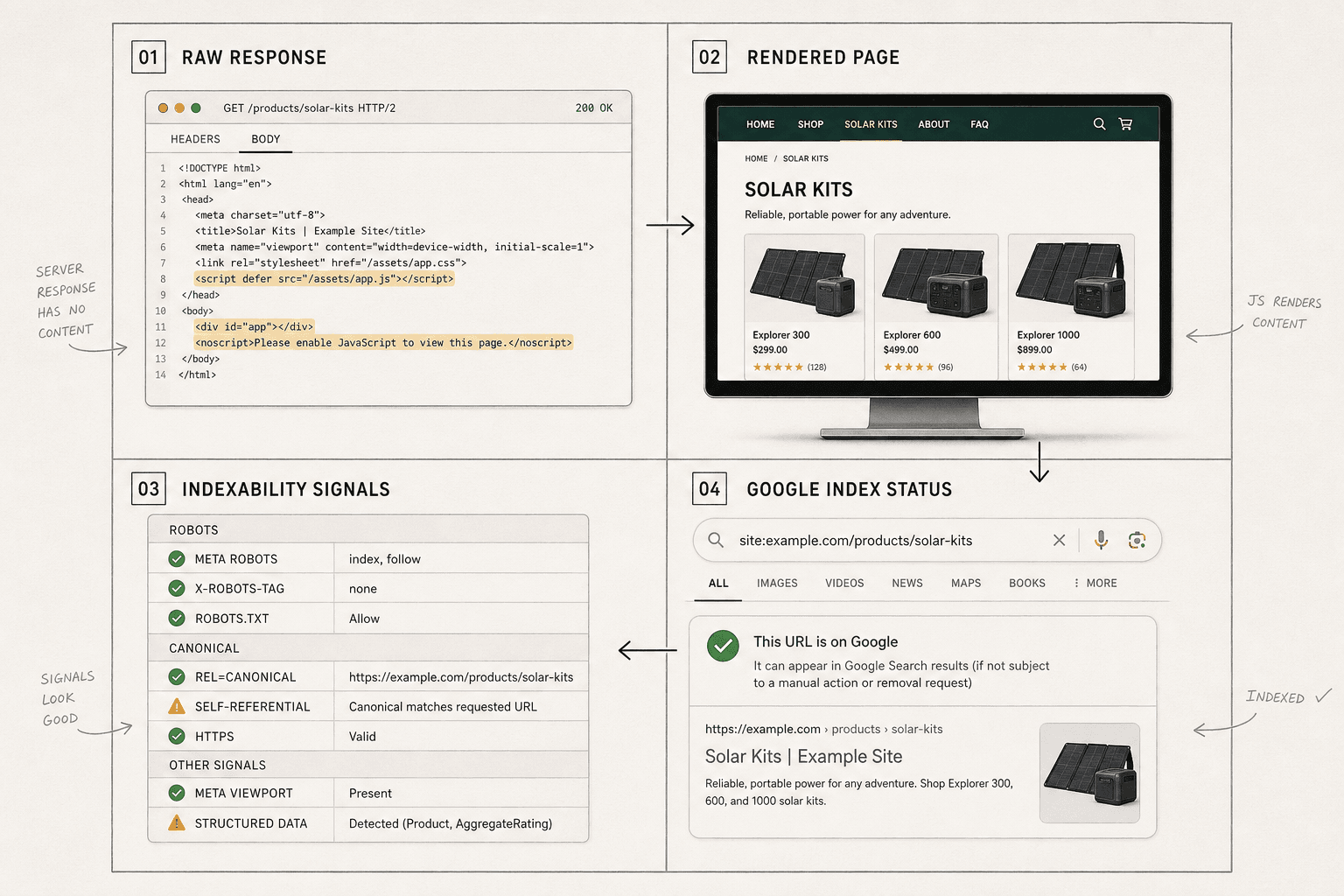
Start with the raw HTML. Use View Source, curl, or your browser network panel. You want to see what the server sends before scripts run. For example, if your product copy only appears after hydration, the raw response may contain almost nothing useful.
Next, inspect the rendered DOM in DevTools after the page settles. Think of raw HTML as the blueprint, and rendered HTML as the finished room. If the room looks great but the blueprint is empty, crawl success may not become indexing success. That gap matters in Single-Page Application SEO: Complete Guide to Ranking SPAs.
URL Inspection and live test workflow
Open Google Search Console and enter your exact route (for example, /app or /products/123). Navigate to the URL Inspection tool at the top of the dashboard. Look at the Coverage section first. If you see "Crawled - currently not indexed" with a rendered screenshot showing only a loading spinner or blank page, your JavaScript content isn't making it through to crawlers.
Check these specific fields in order: the discovered URL (should match what you entered), the last crawl result (look for "Success" status), the selected canonical (should point to the correct version), and whether indexing is allowed (should show "Yes"). Then click "Test Live URL" and wait for the test to complete.
Compare the rendered screenshot with what actual users see in their browser. A successful test shows your full content - headlines, body text, images, and navigation. A failed test shows a shell, spinner, or partial layout. If you see the failure pattern, your dynamic content seo setup needs work before Google can properly index your pages.
Pay close attention to blocked resources and missing page signals. If the screenshot shows a shell, spinner, or partial layout, your dynamic content seo setup is weak. SPA SEO: Strategies and Best Practices explains why rendered output alone does not guarantee indexation.
Logs crawl stats and internal link validation
Now validate discovery paths. Review server logs and crawl stats to confirm Googlebot requested the route and key assets. Then test internal links in raw HTML, not just after client-side routing fires.
This is also where tracking single page applications matters. For example, route changes may fire analytics events but fail to expose crawlable links. Check history API navigation, pageview triggers, and internal anchors together. Research from Optimizing Single-Page Applications for SEO & AI Search shows 80% of users prefer page speed, which makes router regressions expensive for both UX and spa seo.
How to confirm content is actually indexed
To answer “How do you test JavaScript SEO?” use this repeatable order:
- Check the raw response.
- Inspect the rendered DOM.
- Confirm robots, canonicals, and status signals.
- Verify the page appears in Google’s index.
To answer “How do I know if Google indexed my JavaScript content?” use URL Inspection first, then confirm with a site: query and keyword snippets from the rendered copy. If Google crawled the page but indexed different text, or no text, your page rendered but did not qualify for indexing.
Conclusion: Fix the Crawl Path First
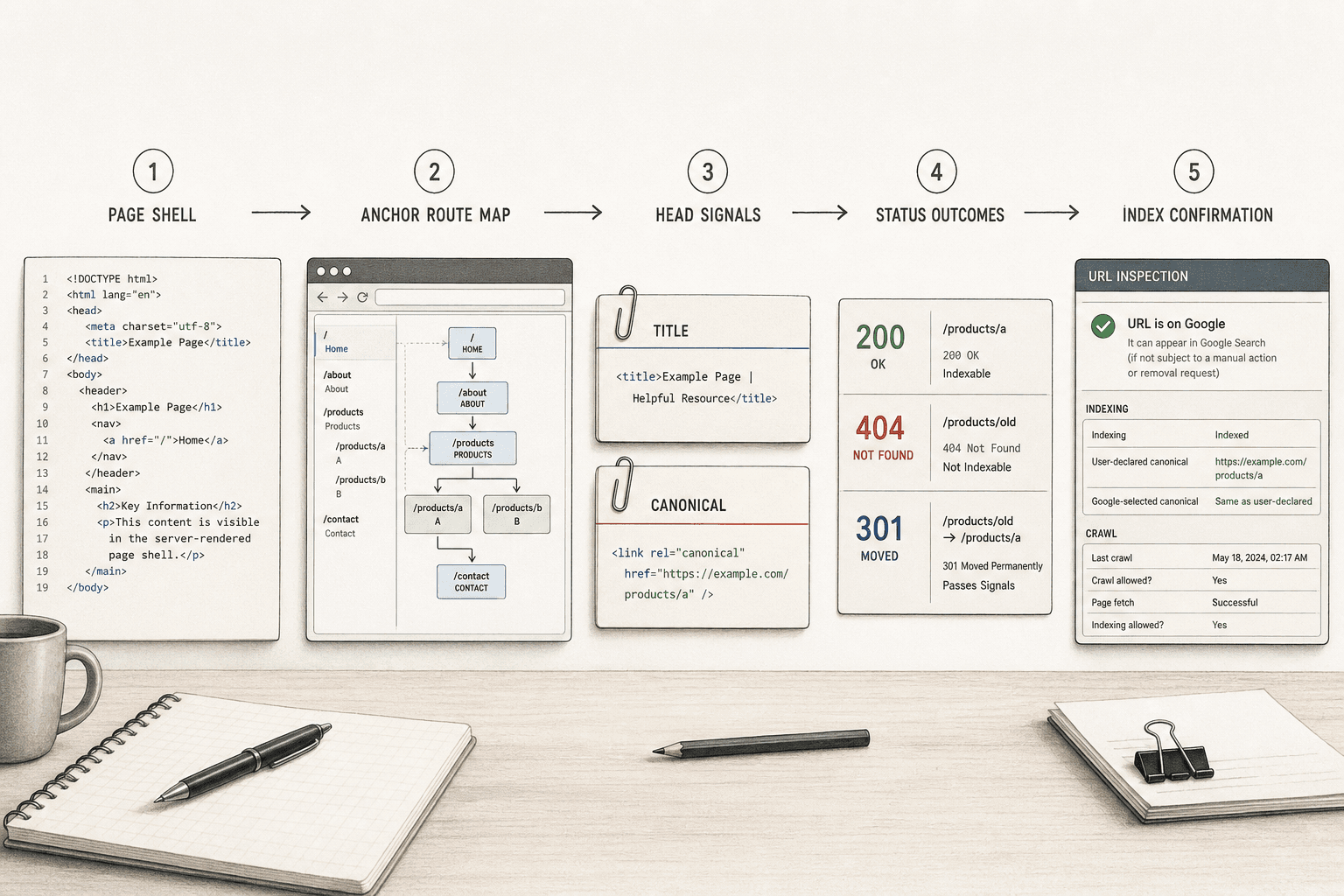
For production, keep your process boring and strict. Ship checks your team can handle this sprint: monitor blocked JavaScript and CSS assets, keep robots directives stable across templates and environments, validate structured data on the server, and test social shares and rich result output after every release. Then use a lean deployment checklist before and after launch. Run crawl tests on key templates. Save rendered HTML snapshots for important routes. Validate route responses, canonicals, and noindex rules. After release, verify indexing in Search Console, inspect a sample of high-value URLs, and confirm that Google sees the version you intended.
The bigger lesson is simple. Crawling, rendering, and indexing are separate steps. If you treat them like one black box, you will miss the real issue. If you test them one by one, JavaScript indexing becomes much easier to control. From here, you can go deeper into single page application SEO, dynamic content SEO, testing an SPA for SEO, tracking single page applications, and avoiding soft 404 errors. But get the mechanics right first. When route discovery, rendered HTML, and index signals are stable, the rest of your SPA SEO work gets easier.
Ready to audit your JavaScript site? Try It Free to test how Googlebot sees your pages and identify rendering issues before they impact your rankings.