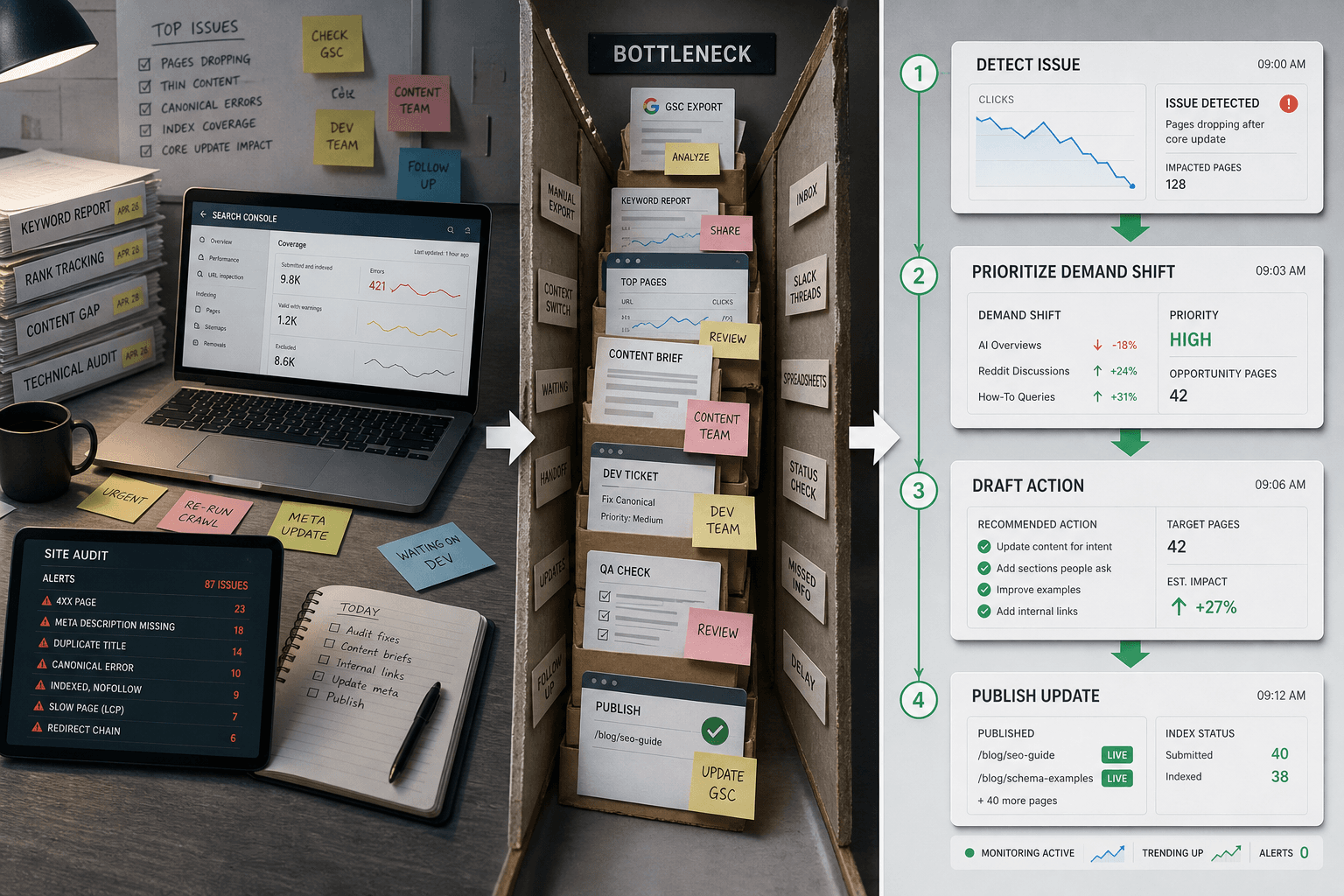
Observe → Analyze → Act: The 3-Step Agentic SEO Loop That Replaces Your Weekly Audit

Agentic seo turns SEO from scattered tasks into a working growth loop. Instead of chasing checklists, you run a repeatable system that finds gaps, creates assets, and ships updates.
That matters because most teams lose speed in handoffs. Audits sit in one tool. Briefs live in docs. Writing happens elsewhere. Publishing gets delayed. According to Agentic SEO Guide: What It Is, How It Works, and Its Future, the push toward faster, more automated execution is reshaping how teams work. Track indexation rate as your baseline metric. Aim to get at least 90% of your priority pages indexed within 30 days.
In this guide, you will run a practical three-step loop inside Mygomseo. You will see what agentic seo looks like in real work, what to check after each step, and how to keep momentum. The walkthrough stays simple, outcome-first, and built for lean teams that need results fast.
Prerequisites for Your Agentic SEO Setup
Tools and accounts you need
Gather access to four systems before you begin:
- Your website or CMS
- Google Search Console
- Your analytics platform
- Your Mygomseo workspace
For example, if your product page ranks but does not convert, you need both search data and conversion data. That lets Mygomseo act based on real signals, not hunches. At this point, you should have one shared document with every login, owner, and source link.
The team at Useractiv explains this concept clearly:
What data to gather before you start
Bring the basics into one place before launch:
- Target pages
- Core offers
- Top keywords
- Conversion goals
Use one sheet, one dashboard, or one Mygomseo brief. For example, list your demo page, pricing page, and two blog posts. Then map each page to a keyword and a goal, based on form fills, trials, or sales calls.
What success looks like before launch
Pick one metric now. Do not track ten. Track one result that matters.
You might choose more indexed pages, faster content output, or better rankings on priority terms. Agentic SEO Guide: What It Is, How It Works, and Its Future explores how automated systems can scale content indexation. Track indexation rate as your baseline metric. Aim to get at least 90% of your priority pages indexed within 30 days. Verify that your metric has a clear baseline before proceeding.
At this point, your setup should feel boring in a good way. You have one source of truth for inputs. You also have one success metric to track.
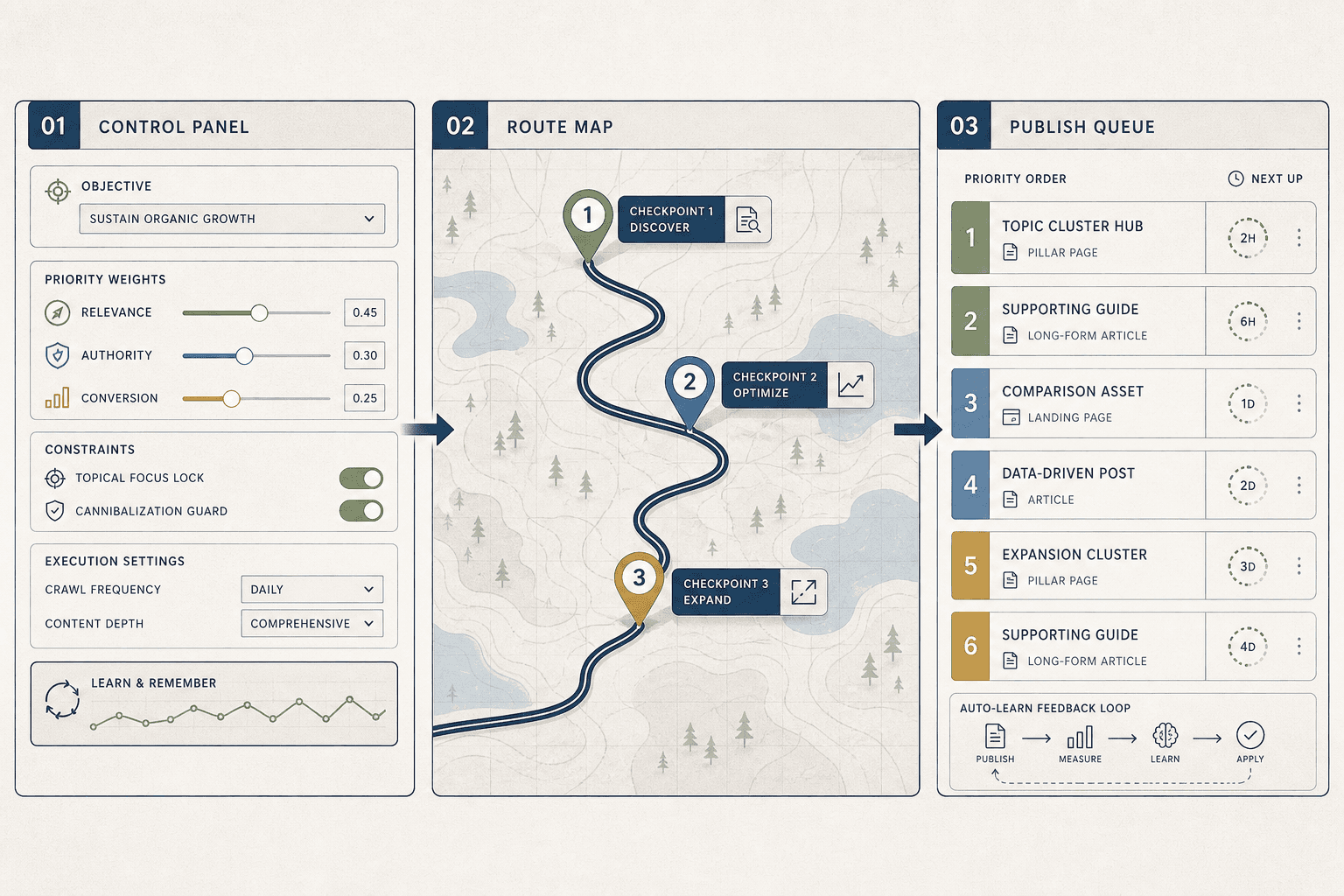
Step 1 Set Up the Agentic SEO Control Loop
Connect your site, pages, and goals
Start by adding the assets Mygomseo will monitor and act on.
- Enter your main domain in the site settings.
- Connect your page list or sitemap.
- Tag your priority pages, such as product, service, or feature pages.
- Add your target topics and content themes.
- Set one or two measurable goals, like ranking gains or organic traffic growth.
For example, you might tag your pricing page, demo page, and three feature pages as priority assets. Then you might add themes like "email automation," "crm sync," and "lead scoring." This gives Mygomseo a clean map of what matters most to your business, not just what exists on your site. Learn more about how this approach fits into the broader Agentic SEO Guide: What It Is, How It Works, and Its Future framework.
You should now see your domain, key pages, and goals inside one workspace.
Verify that each priority page has the right URL, page type, and goal before proceeding.
Give the system the right operating context
Next, configure the context that shapes decisions. An autonomous seo agent cannot work well without context. It may find issues, but it will not know which fixes matter most for your offers, funnel, or audience.
- Define your core offers in plain language.
- Add your customer segments and pain points.
- Enter brand terms, competitor terms, and excluded topics.
- Set content rules, such as tone, claims, or review needs.
- Mark which pages drive signups, demos, or revenue.
For example, a B2B SaaS team may want traffic for integration pages, not broad blog vanity terms. That changes what the system flags, briefs, and publishes. Research from What Is AI Marketing? 9 Tips For Agentic ECommerce shows teams that implement score-based recommendations saw a median 12% decrease in cost.
At this point, your setup should reflect business priorities, based on real goals and constraints.
Verify that your themes, exclusions, and conversion pages appear in the same dashboard view.
Choose the first workflow to automate
Now pick one workflow for seo automation. Do not automate everything at once. Start with one repeatable job that slows your team down each week.
- Open the workflow library in Mygomseo.
- Choose one automation-ready flow.
- Set triggers, approvals, and publishing targets.
- Review the output path before you turn it on.
For example, start with a workflow that audits priority pages, drafts updates, and queues approved changes for publishing. That is a practical first loop. You should now see connected assets, target topics, and your first workflow ready to run.
Step 2 Run an SEO Audit and Prioritize Actions

Let Mygomseo find the highest impact opportunities
ClickRun Auditfrom your main workspace. Then select the site, page group, or topic cluster you want reviewed first. Choose the filters for technical issues, content gaps, and topical coverage before you start the scan.
Next, open the opportunity view once the audit finishes. You should see grouped findings, not a raw export. For example, Mygomseo may cluster weak title tags, thin product pages, and missing supporting articles around one revenue page instead of listing them as separate chores.
This is where agentic SEO starts to differ from a normal audit. A normal audit reports everything it can find. Mygomseo looks for what is worth fixing first, then ties those findings to likely outcomes and next steps, similar to how Search Atlas explains agentic SEO.
For a visual walkthrough of the audit process, check out this tutorial from LinkBuilding HQ:
You should now see a short set of opportunity clusters. Verify that each cluster links to pages, keywords, and a clear reason to act before proceeding.
2. Turn findings into content and optimization tasks
Open the highest priority cluster first. Sort actions by expected impact, effort, or page value. This step replaces manual workflows where teams bounce between spreadsheets, docs, and tickets.
Then convert findings into tasks inside Mygomseo. For example, turn “missing comparison content” into a new article brief. Turn “weak internal links” into an on-page optimization task. Turn “outdated service page copy” into a refresh task for one specific URL.
This is also where you use ai agents well. They do not just flag a problem. They package the fix into something your team can approve and execute fast. Research from AI Agentic Workflows: Marketing Revolution 2026 shows agentic workflows can drive 30% higher lead conversion in some marketing contexts, which helps explain why prioritized action beats reactive cleanup.
You should now have a ranked action list. At this point, your team should no longer need a giant spreadsheet to decide what happens next.
3. Approve or refine what the agents recommend
Review each recommendation before launch. Check the target page, keyword, suggested action, and expected outcome. Then approve, edit, or defer each item based on your current goals.
Can AI agents decide what SEO tasks matter most? Yes, within guardrails. They are strong at pattern detection, clustering, and ranking likely wins. But you still set the rules, especially for brand voice, page priority, and business timing, which matches the human oversight approach described by Yotpo.
You should now see clear recommendations tied to pages, keywords, and next actions. Verify that every approved item has an owner, a page target, and a defined task type before moving on.
Publish, Prove, and Run the Next Cycle
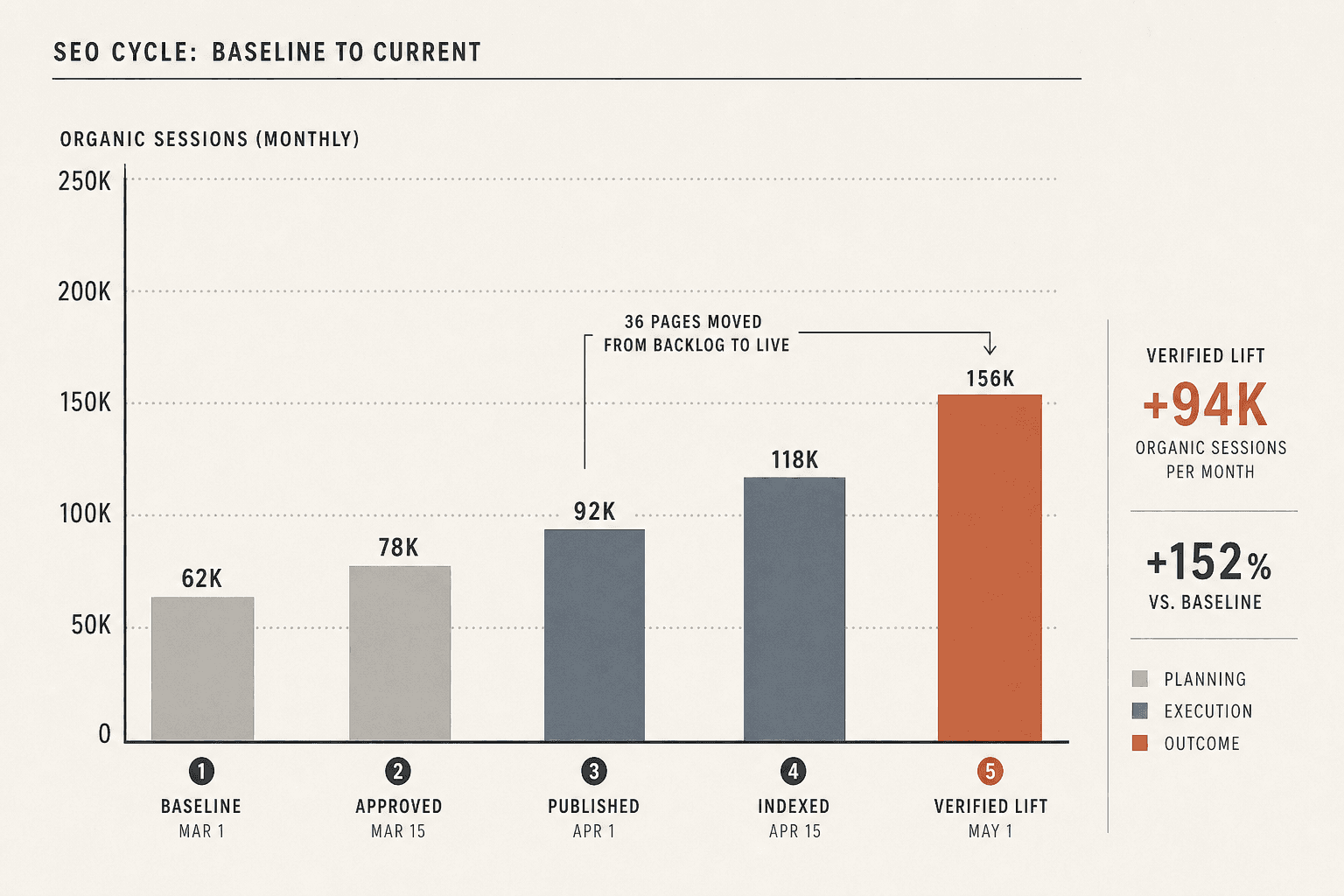
In this final step, your job is simple. Approve the work that matters, publish the improvements, and confirm that the right numbers move. Use Mygomseo to generate content briefs, draft page updates, publish approved content, and send repeatable tasks through connected workflows. If your team compares tools, this is also where Mygomseo feels more practical than Claude Code style workflows for non-technical operators. You are not stitching prompts together by hand. You are pushing approved actions through a system built to keep moving.
The payoff is speed with control. Your pages go live faster. Recommended fixes stop sitting in backlog purgatory. Your team can track what changed by page group, keyword set, or output volume, then decide what deserves the next round of effort. That is the real shift. You stop treating SEO as a weekly audit ritual and start running it like an operating loop.
Before you close the cycle, verify the outcome. Confirm that published actions appear in Mygomseo. Check the baseline-versus-current view for the pages or keyword groups you targeted. Make sure the next repeatable workflow is ready to run without rebuilding the process from scratch. At this point, you should see execution history, live outputs, and a clean handoff into the next cycle.
The key takeaway is not that agentic seo does the work for you. It is that it keeps the work connected. Audit, prioritization, briefing, drafting, publishing, and measurement all live in one motion. Your next step is clear: pick one page group, run one cycle, verify movement, and repeat what works.
This is where lean teams win. They do not wait for a perfect quarterly plan. They publish, verify, and scale the moves that produce lift.
Want a low-friction place to start? Try It Free to export and share projects, and design simple connections.