SEO Checker Guide: How to Audit Your Site and Fix Issues Fast (2026)
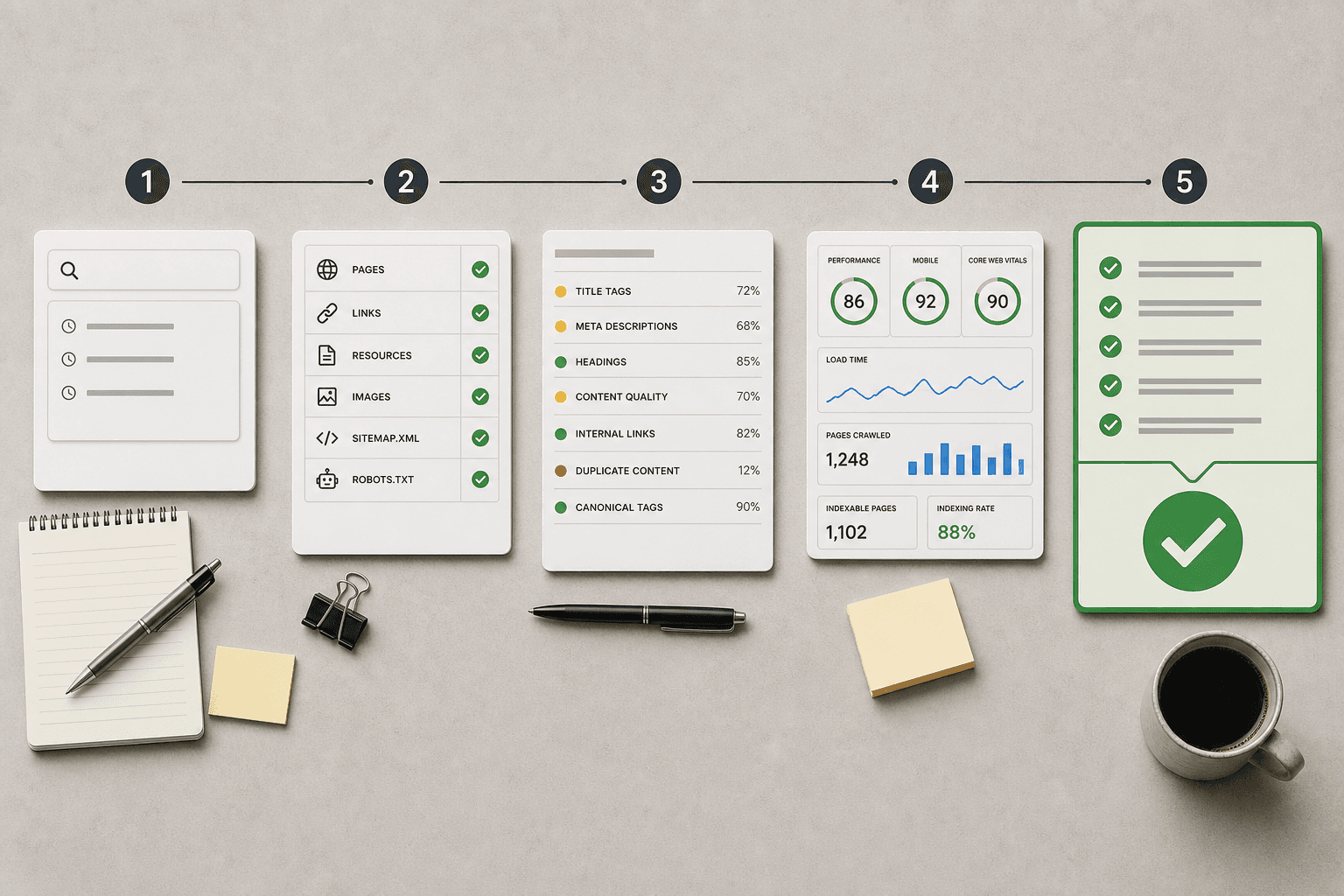
Your seo checker should find ranking blockers, not dump another report on your desk. An seo checker is any tool or process that scans your site for issues that hurt search performance, then flags what needs attention. That matters because most teams still bounce between a seo checker free tool, spreadsheets, and manual follow-up. The result is slow fixes, messy priorities, and pages that stay stuck.
This guide shows you a better way. You will learn a practical checker process you can run step by step. Then you will see how AI can automate the same workflow and cut the busywork. By the end, you will have a repeatable system to spot issues, rank fixes, verify results, and move faster.
Prerequisites for Your SEO Checker Workflow
Step 0 Gather the tools and access you need
Start with the smallest useful stack. Use one seo checker, Google Search Console, Google Analytics, and access to your CMS or developer queue. A free option works here. If you need a quick starting point, use an seo checker free tool or a free seo test online to spot obvious issues fast.
For example, treat this like packing a repair kit before fixing a leak. You need one scanner, two data sources, and one path to ship changes. Add your logins, key URLs, and owners to one document. You should now have every tool open and ready.
Step 0 Define what success looks like
Write down what this workflow must prove. Focus on pages you want to grow, not your whole site. List your priority URLs, target queries, and the action owner for each fix. If you manage handoffs often, Checker and EOR gives related process context.
At this point, your success criteria should be clear. Verify that each page has a goal, a keyword theme, and a person assigned.
Step 0 Capture your baseline before any fixes
Record three starting metrics before touching anything. Pull indexed pages from search console. Note top landing page clicks from Analytics. Then log average position for your priority keywords.
Use a simple table or shared doc. You should now see one document with tool logins, target pages, and starting metrics. Verify that you can compare this snapshot against results later.
Step 1 Run a Manual SEO Website Checker

Check your core pages with a free seo test online
Open your preferred tool and run a free seo test online for six URLs. Include your homepage first. Then add the five pages with the most business value. For example, check your pricing page, top service page, best blog post, demo page, and highest-converting landing page.
Follow this order:
- Enter one URL at a time.
- Export or copy the page report.
- Label each page by purpose, such as traffic, lead gen, or sales.
- Ignore sitewide alerts for now unless they block indexing.
You should now have six page reports, not one giant list. Verify that each report matches a real priority page before proceeding.
For a visual walkthrough of this process, check out this tutorial from Keywords Everywhere:
Review the on page signals that affect rankings first
Check the signals that change visibility fastest. Start with title tags, meta descriptions, H1s, indexability, internal links, page speed warnings, and mobile usability. These are the core inputs most tools surface first, and they often explain why a page stalls.
Work through each page in this sequence:
- Check the title tag for clarity and missing terms.
- Review the meta description for relevance and truncation.
- Confirm one clear H1 appears on the page.
- Verify the page is indexable and not blocked.
- Check whether internal links point to the page.
- Flag slow load elements and mobile layout issues.
You should now see which alerts affect on page seo and which ones are just noise. Verify that every flagged issue maps to a visible page element or a clear technical problem.
If you want a related example of structured checking, see Checker and EOR.
Turn the report into a short priority list
Now reduce the tool output to a working list. Do not chase every warning. A seo checker free tool can generate dozens of alerts, but most do not deserve action this week.
Score each issue by page importance and likely impact:
- Mark high for pages tied to revenue or strong traffic.
- Mark medium for supporting pages with ranking potential.
- Mark low for minor fixes on low-value pages.
- Assign an owner and due date to each item.
For example, a missing title tag on a pricing page is high. A short meta description on an old blog post is low. Use the same logic if your seo website checker reports weak internal links or mobile warnings.
At this point, your list should contain five to ten fixes that matter now. Verify that each row includes page URL, issue type, priority, owner, and due date. If your list feels bloated, cut anything that belongs in a full website audit. If you manage many similar checks, Save time with bulk workflows for similar connections shows the next step in streamlining repeat work.
Step 2 Automate the SEO Checker with AI

1. Connect your site, goals, and sources in Mygomseo
Start by giving Mygomseo the inputs your team already uses. Connect your site, Google Search Console data, priority URLs, and content goals. Add simple direction, such as “protect demo pages” or “grow non-brand blog traffic.”
Next, define what matters most. Group pages by business value, funnel stage, or topic cluster. For example, you might tag pricing, product, and comparison pages as high priority, while old blog posts stay lower priority.
Then add the sources the agent should monitor. Include ranking signals, indexing changes, internal link gaps, and content targets. If your team uses a brief or planning doc, map that too so the agent can connect technical seo findings to real publishing goals.
You should now see one workspace tied to your site and priorities. Verify that your top pages, core goals, and connected data sources appear before you proceed.
2. Let the AI agent check, prioritize, and assign work
Turn the checker process into a running system. Once connected, Mygomseo scans for repeated issues, ranking shifts, and indexing changes. It does not just list alerts. It groups duplicates and highlights patterns that deserve action.
For example, five pages may lose impressions for the same reason. A manual tool often shows five separate warnings. An ai seo agent can cluster them into one issue, explain the likely cause, and suggest the next fix.
Use this step to set owners and rules. Route content updates to marketing. Route template bugs to development. Route internal linking gaps to whoever manages publishing. This keeps your team out of spreadsheets and inside one queue.
At this point, your dashboard should show active issues, priority levels, owners, and status. Verify that duplicate problems appear grouped, not scattered across separate exports.
3. Approve actions instead of rebuilding reports every week
Move past detection and into execution. Manual tools usually stop after analysis. You export findings, rewrite notes, and rebuild the same report next week. Mygomseo keeps the workflow alive after the check ends.
Approve the actions the agent recommends. Turn a thin page into a content refresh task. Turn orphan page findings into internal linking work. Turn ranking drops into a publish update or rewrite request.
For example, if a comparison page slips in search, the agent can flag the drop, connect it to stale headings, and queue an update. If several support pages lose internal links, it can package one linking task instead of ten separate reminders. That is the real gap between a free seo test online and an operating system for search execution.
You should now have a live queue instead of static reports. Verify that each recommended action has an owner, a status, and a clear reason for priority.
This answers the big question: can AI automate an SEO checker? Yes - if the system understands your site, goals, and workflows. The win is not faster scanning alone. The win is that the checker loop keeps running without you rebuilding it.
For small teams, that is better than an seo checker free tool. You get one place to monitor, decide, and act. If you want a related view on structured checking, see Checker and EOR. If repeated tasks slow your team down, review how to Save time with bulk workflows for similar connections.
Manual tools help you inspect pages. Mygomseo helps you run the whole system. That is the difference.
Conclusion
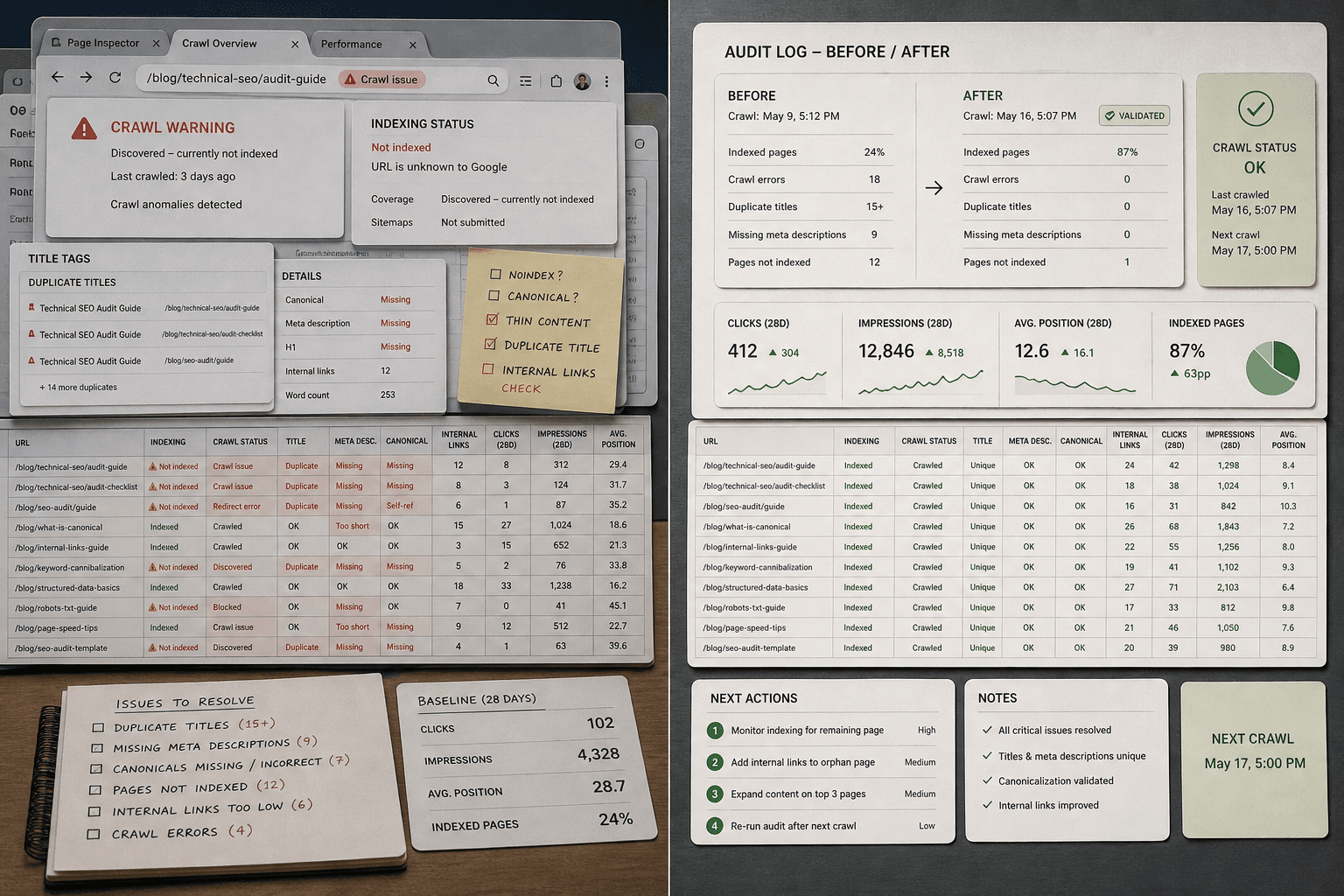
Keep the review tight. Check whether Google actually crawled the page. Confirm the fix matched the real issue. Make sure internal links still point authority to the page you want to rank. If performance stays flat, do not assume the checker was wrong. Look for the usual failures: pages blocked from indexing, duplicate titles still live, slow deployments, or updates pushed to the wrong URL. Small misses create fake wins and false alarms.
Your goal here is simple. Separate validated improvements from unresolved issues. Build a short before-and-after log for each important page. Note what changed, when it shipped, what moved, and what needs another pass. At this point, you should see clear wins, clear misses, and a next action for each unresolved item. That checkpoint matters because it turns SEO from opinion into operating rhythm.
This is also where manual tools hit their ceiling. They can flag issues. They cannot keep watch, compare outcomes, and queue the next move without your team stitching everything together by hand. That is the gap Mygomseo closes. Instead of rerunning reports and chasing spreadsheets, you let the system monitor changes, surface weak pages, and keep the work queue moving. You spend less time checking dashboards and more time shipping fixes that matter.
The takeaway is not “run more scans.” It is “build a repeatable loop.” Run the checker weekly on your highest-value pages. Run it monthly across the full site set. Recheck every meaningful fix after publish. Keep the log short, factual, and tied to business pages, not vanity noise. When you do that, you stop collecting SEO alerts and start building SEO momentum.
Keep going. The teams that win with search are not the ones with the most reports. They are the ones that verify, adjust, and repeat faster than everyone else.
Want a cleaner way to keep that loop running? Try It Free.