Single Page Application SEO: The Complete 2026 Guide

Single page application seo breaks when Google sees JavaScript before content. That is why single page application seo matters if you want your site crawled, rendered, and ranked right.
Many SPAs lose traffic because bots hit rendering delays and miss core page signals. According to SEO for Single Page Applications: Dirty Secret Senior Devs Never Share | CyberCraft Bangladesh, the right fixes can drive a 200% lift.
So how do you optimize a single page application for SEO? You fix crawl paths, rendering, metadata, and indexation checks in the right order. In this guide, you will learn the exact setup, fast fixes, and clear checks your team can ship now. Keep reading, and you will see what actually works today.
Prerequisites for javascript seo success
Tools and accounts you need
Gather five essentials first. Confirm Google Search Console, Google Analytics, your CMS or codebase, framework docs, and a crawler that renders JavaScript. For example, use Screaming Frog or a similar tool to inspect rendered HTML and catch metadata and structured data issues. You should now have one working list of tools, logins, and owners.
Research from SEO for Single Page Applications: Dirty Secret Senior Devs Never Share | CyberCraft Bangladesh shows a 400% gain tied to stronger Core Web Vitals. That makes baseline tracking worth doing before any javascript seo changes.
For a visual walkthrough of this process, refer to the official documentation from Google Search Central or Vercel, which provide comprehensive guides on implementing SEO for single-page applications.
What access your team should have
Confirm who can edit what. Your SEO lead needs Search Console and Analytics access. Your developer needs route, title, meta tag, and server setting access. If your CMS controls templates, your content team also needs publish rights. At this point, your checklist should show owners beside each permission.
What you should know before you start
List your top SPA URLs first. Record index coverage, impressions, clicks, and rendered page titles. Then note framework-specific seo challenges, such as javascript rendering delays or route handling limits. Verify that your team can change titles, meta tags, routes, and server settings before proceeding.
If you cannot edit those areas, you need developer help. If you can edit content only, fix what you control and escalate code changes fast. You should now see your target pages, current baselines, and clear next owners.
Step 1 Audit spa seo rendering and indexing
1. Check how search engines see your content
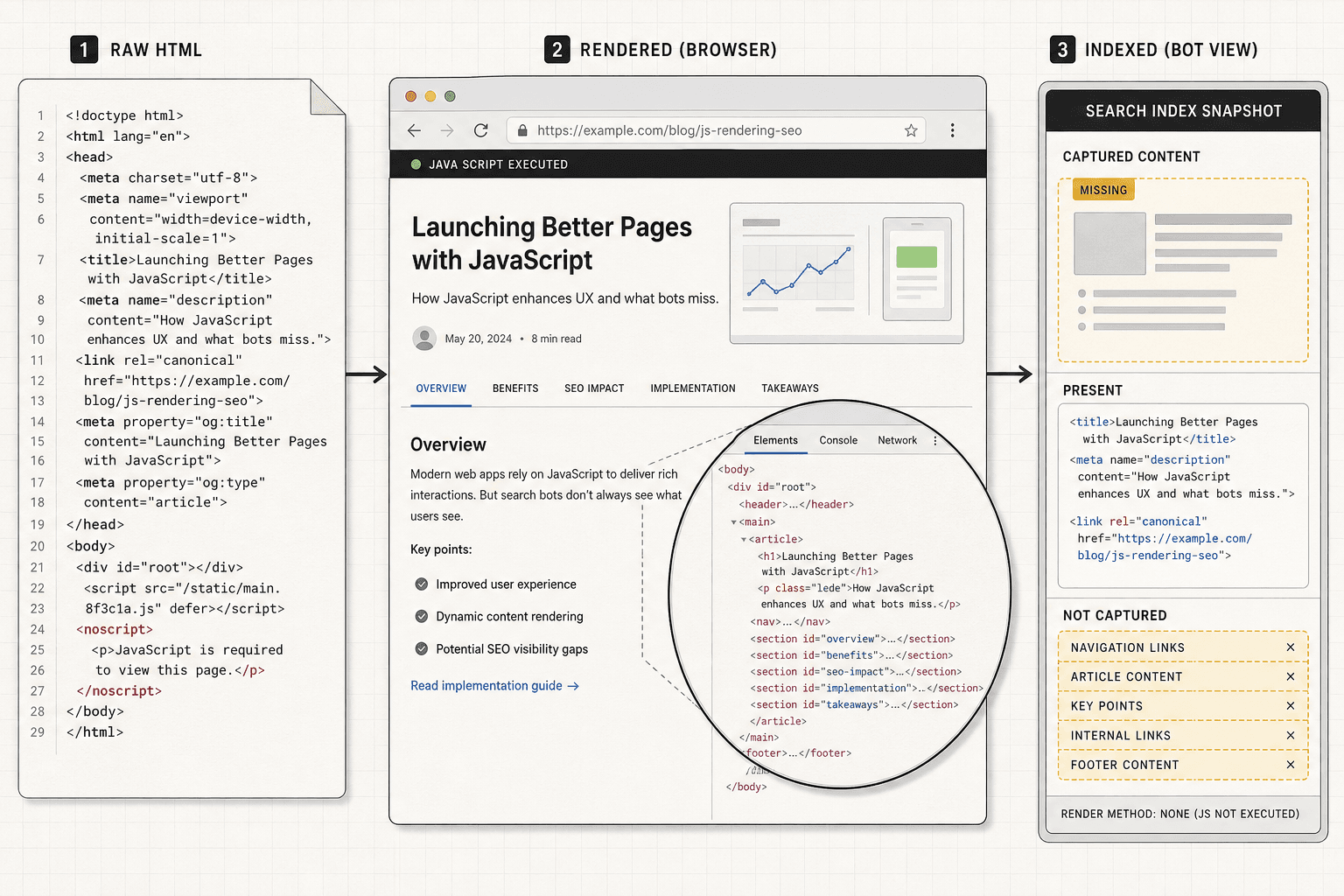
Start with your highest-value URLs. Pick your home page, one category page, and two detail pages. Then inspect each URL in Google Search Console with URL Inspection. Review the indexed status, last crawl date, canonical URL, and whether Google saw the page as crawled and indexed.
Next, compare page source with the rendered page. Open the page in your browser. ClickView Sourceand look for the main heading, body copy, internal links, title tag, meta description, and canonical tag. Then open DevTools (press F12 in Chrome) and inspect the rendered DOM under the Elements tab. If the source is mostly empty but the DOM fills later, your content depends on client-side rendering.
For example, your product page may look complete to users. But the raw HTML may show only an empty <div id="app"></div>. That is one of the most common framework-specific seo challenges. If Google delays rendering, your page signals can arrive too late. SPA SEO: Strategies and Best Practices and Optimizing Single-Page Applications for SEO & AI Search both stress this gap.
For a quick refresher on how SPA routing works, this video helps:
You should now know which pages expose key content in raw HTML. Verify that your title, canonicals, and primary content appear before rendering.
2. Find javascript rendering delays
Test load behavior on each key route. Disable JavaScript once, then reload the page. If the page loses all main content, bots face a higher rendering burden. Then throttle your connection in DevTools and reload again. Watch when headings, links, and metadata appear.
Focus on delayed hydration. If the shell loads first and content appears seconds later, indexation can slip. Rendering delays directly impact SEO by delaying content discovery, link discovery, and page signal processing. That can weaken single page application seo even when the page looks fine to users. Single Page Application SEO: How to Make SPAs Crawlable in 2026 explains why delayed rendering often blocks discovery.
Research from SEO for Single Page Applications: Dirty Secret Senior Devs Never Share | CyberCraft Bangladesh shows teams can see an 800% lift from stronger SEO controls. The exact number matters less here than the lesson: rendering issues compound fast.
You should now see which URLs load critical content too late. Verify that headings, links, and metadata appear without long waits.
3. Review crawl paths routes and internal links
Click through your main navigation and route changes. Confirm each route updates the URL, title, canonical, and page content. Then inspect internal links in the HTML. Make sure links use real href values, not only click handlers. A crawler can follow <a href="/pricing">, but not a div with an onClick.
Next, test deep pages with weak link paths. For example, if a blog post is reachable only after filters, tabs, or search actions, crawlers may never find it. Review route patterns for orphan pages, broken canonicals, and duplicate states. If helpful, document these findings in your crawl audit spreadsheet alongside related resources like Google's JavaScript SEO guide or Search Console documentation to track navigation issues clearly.
You should now have a short list of blocked or weak URLs. At this point, you should see which pages fail because of client-side rendering, weak linking, or delayed hydration before rendering completes.
Step 2 Fix metadata and structured data issues
Add server side or pre rendered page signals
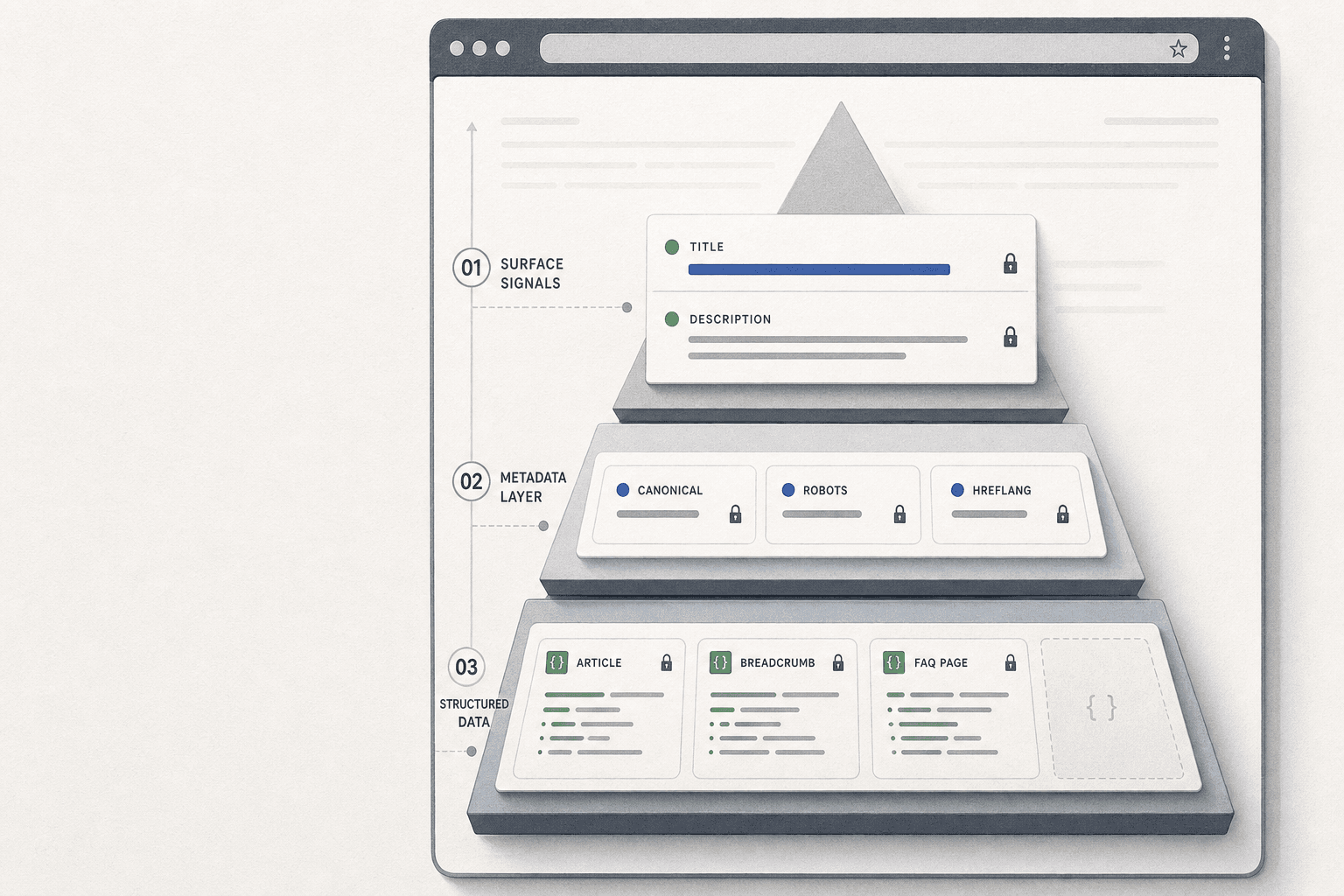
Start by deciding which routes need HTML before JavaScript runs. Product pages, service pages, blog posts, and location pages usually need this first. For example, if /pricing loads its title after hydration, Google may miss it during early processing.
- Implement SSR if the page changes often.
- Implement SSG if the page changes on a schedule.
- Implement prerendering for marketing routes with light interactivity.
- Use dynamic rendering only if other options are blocked.
If you use Next.js, configure route-level rendering in the app or pages router. If you use React with Vite or a custom setup, add a prerender layer for priority URLs. Keep the raw HTML useful, even before scripts finish.
<head>
  <title>Pricing for Structural Design Teams</title>
  <meta name="description" content="Compare plans for connection design, code checks, and team workflows.">
  <link rel="canonical" href="https://example.com/pricing">
</head>
You do not always need server side rendering for SEO. You need reliable HTML signals on important routes. That can come from SSR, SSG, or prerendering, depending on your stack and publishing flow. Inspa seo, the best method is the one your team can ship and maintain.
You should now have a rendering method assigned to each priority template. Verify that the initial HTML includes the title, meta description, and canonical before proceeding.
Fix titles descriptions canonicals and robots tags
Next, generate unique metadata per route. Do not reuse one default title across the app. Do not let every route point to the homepage canonical. These are common metadata and structured data issues in javascript seo.
- Map each route template to metadata fields.
- Pull title and description values from your CMS or route data.
- Create one self-referencing canonical for each indexable page.
- Set robots directives based on page purpose.
For example, a blog article should output its own title and canonical. A filtered search page may need noindex,follow. A duplicate campaign page may need a canonical to the main URL instead of indexing both versions.
<title>Steel Connection Design Guide</title>
<meta name="description" content="Learn connection design steps, checks, and software workflows for engineers.">
<link rel="canonical" href="https://example.com/blog/steel-connection-design-guide">
<meta name="robots" content="index,follow">
If you need to fix metadata in a JavaScript app, move metadata generation closer to the server or build step. Then bind route data to head tags for every URL. Tools like Next.js Metadata API, React Helmet with prerendering, or framework middleware can handle this cleanly. For related template planning, review Structural Software Engineer.
You should now see route-specific metadata on every important page. Verify that each title, description, canonical, and robots tag matches the page intent.
Validate structured data across dynamic routes
Finally, test schema output on your highest-value templates. Start with product, article, FAQ, breadcrumb, and organization markup if those apply. Then confirm the schema stays valid across dynamic routes, not just one sample URL.
- Render schema in the HTML or inject it early.
- Use JSON-LD for cleaner maintenance.
- Populate fields from the same route data as the page content.
- Test several URLs from each template.
<script type="application/ld+json">
{
  "@context": "https://schema.org",
  "@type": "Article",
  "headline": "Steel Connection Design Guide"
}
</script>
For example, one article route may pass Rich Results Test, while another fails because the headline or URL variable is empty. That is how javascript seo problems hide. According to SEO for Single Page Applications: Dirty Secret Senior Devs Never Share | CyberCraft Bangladesh, better technical coverage can drive gains of 150%.
You should now have stable schema across important templates. At this point, you should see metadata appear consistently in rendered HTML and rich result tests without route-level errors.
Step 3 Verify single page application seo and scale
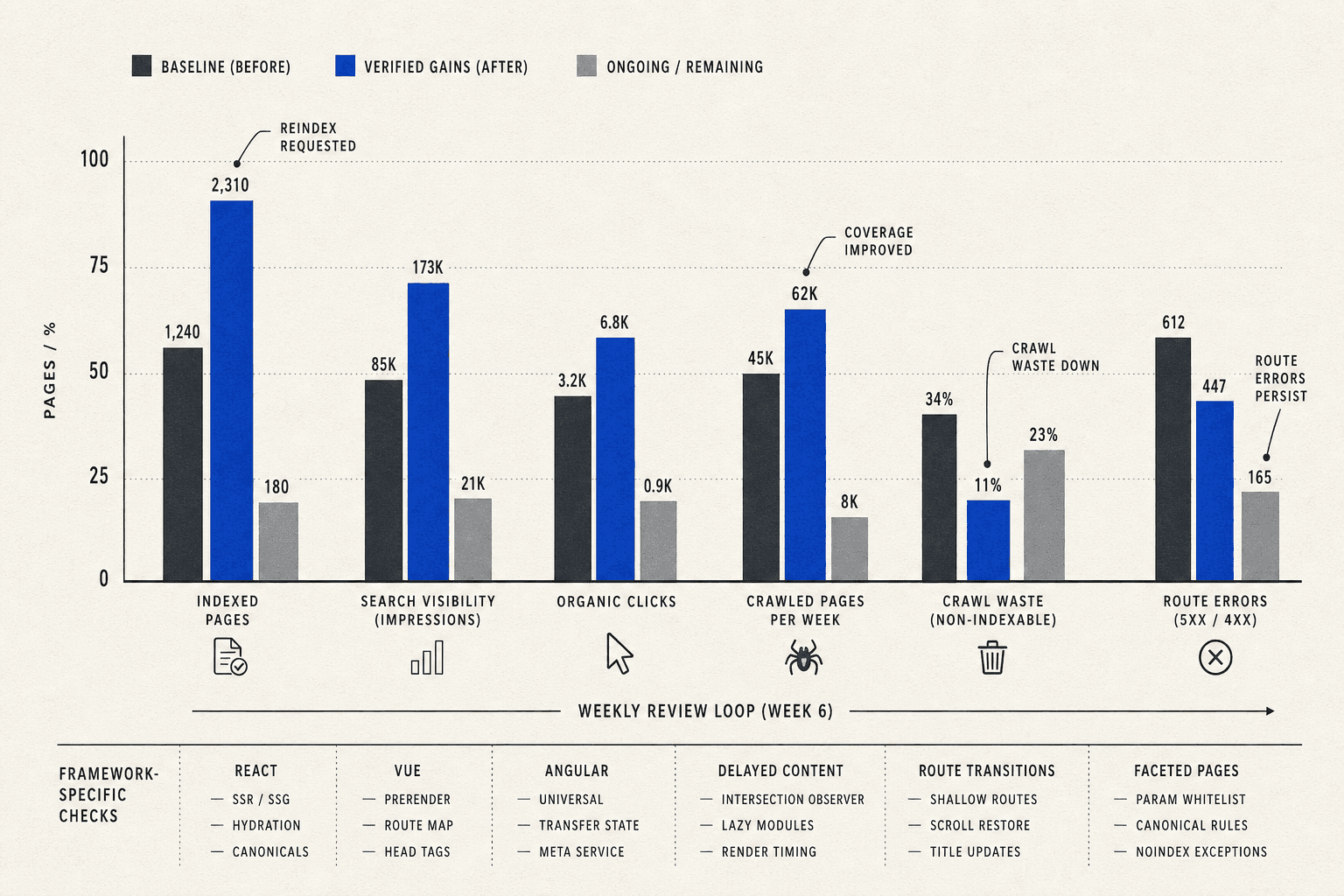
Start by resubmitting your priority URLs in Google Search Console. Then monitor index coverage, impressions, and clicks for the pages you fixed. Compare crawl activity before and after release. Review whether Google now reaches more routes, requests fewer broken URLs, and spends more time on pages that matter. If you use React, Vue, Angular, or another JavaScript framework, test edge cases again. Check delayed content, route transitions, faceted pages, and any page that depends on client-side state. If one fix keeps showing up across templates, document it. Turn that fix into a launch checklist for every new route.
Your goal here is simple. Separate confirmed gains from unresolved engineering work. Some changes will improve crawl access fast. Others will clean up page signals but still need more template work, internal linking, or rendering support. When you track those outcomes side by side, you can prioritize with confidence. You stop debating opinions. You start shipping based on evidence.
Use a short review loop each week:
- Resubmit updated URLs and request reindexing for high-value pages.
- Compare valid indexed pages against your earlier baseline.
- Review coverage reports for fewer excluded or duplicate URLs.
- Check impressions and clicks for route-level movement.
- Compare crawl stats for better bot access and fewer wasted requests.
- Retest framework-specific SEO challenges on templates and edge routes.
- Record recurring fixes for future launches and related blogs.
You should now know which updates moved visibility forward. You should also know which issues still need engineering time. That clarity matters. It helps you defend SEO work, estimate effort, and scale smarter across larger sections of your site.
At this point, your reports should look cleaner. You should see more valid indexed pages, fewer route-level errors, and a more stable process for launching new SPA content. Verify that your team can repeat the same checks on every new template before proceeding to broader rollout. That is how spa seo becomes operational, not reactive.
The big takeaway is this: single page application seo is not a one-time patch. It is a repeatable process for handling javascript seo, metadata and structured data issues, javascript rendering delays, and framework-specific seo challenges before they cost you visibility. Keep your checks tight, document what breaks, and carry those lessons into every release.
The payoff grows over time. Each verified launch makes the next one faster, cleaner, and easier to scale.
Want to automate your SPA SEO audits and monitoring? Try It Free to track rendering, indexation, and performance at scale.