Single Page Application SEO: The Complete 2026 Guide to Getting JavaScript Sites Indexed
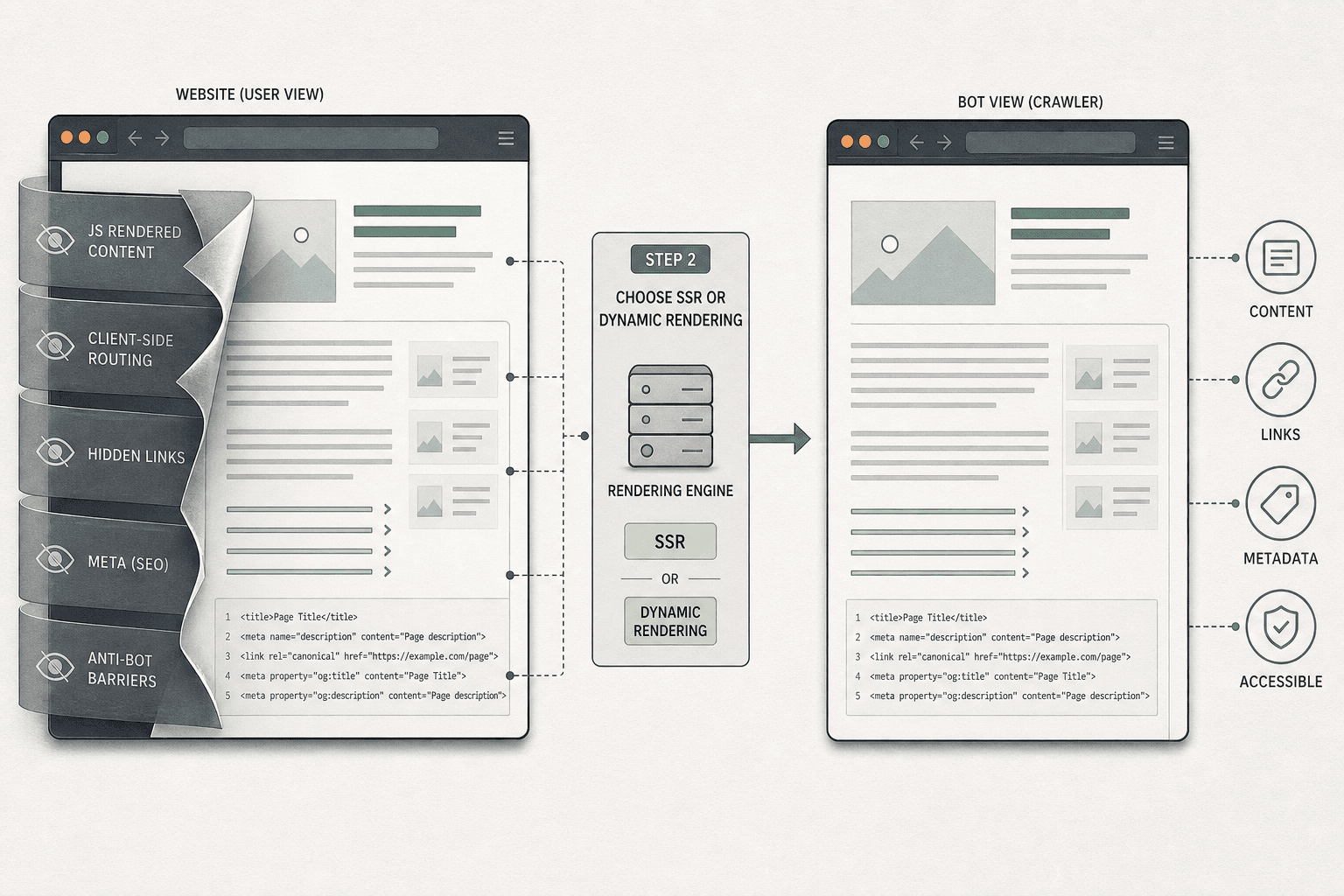
Single page application seo breaks the moment Google only sees a thin JavaScript shell. Your SPA can look flawless to users while hiding core content, links, and metadata from crawlers.
That gap matters more in 2026 because rendering is better, but not magic. According to Single Page Application SEO: How to Make SPAs Crawlable in 2026, if disabling JavaScript leaves a blank page, you already know you have a crawlability problem.
So, are single page applications bad for SEO? No. Bad implementation is. This guide shows you how to choose the right rendering path, fix crawlability issues, improve performance, and audit your setup step by step. You will finish with clear checkpoints, so you can confirm Google can crawl, index, and rank your SPA correctly.
Step 1 Prerequisites for Single Page Application SEO
What you need before you touch code
Start by gathering the stack you need forsingle page application seo. You need Google Search Console, Google Analytics, Chrome DevTools, Lighthouse, server log access, URL Inspection, and a crawler that renders JavaScript, such as Screaming Frog. Think of this like checking a store before opening. If the shelves are full but the front door is locked, search engines still cannot enter. For a visual explanation of SPA basics, check this Laracasts video:
Configure each tool before auditing.
- Connect Search Console and confirm domain ownership.
- Open URL Inspection for live rendering checks.
- Verify Google Analytics events and conversions.
- Enable server logs or ask DevOps for access.
- Run Chrome DevTools and Lighthouse on key routes.
You should now have visibility into crawling, indexing, traffic, and rendering.
How to map your SPA routes and SEO goals
List every route your app can load. Include product pages, feature pages, blog posts, pricing, docs, and frequently asked questions. Then label each route by template, intent, conversion value, and rendering type. Mark whether it uses client-side rendering, server-side rendering, or pre-rendering.
Next, check indexability. Confirm each route returns a clean URL, unique title, unique meta description, canonical tag, and indexable status. Use rendered HTML, not just source code. This matters for understanding javascript crawling and indexing. It also helps when getting spa analytics tracking right across route changes.
You should now have a route map tied to business goals.
Verification checkpoint before implementation
Review your sheet before touching templates or routers. At this point, your audit should show which routes have unique content, which depend on JavaScript, and which pages drive leads. Also note what are core web vitals risks, plus any issues with optimizing largest contentful paint (lcp).
Verify these points before proceeding:
- Each important route has one SEO purpose.
- Each route has a known rendering method.
- Each priority page can load as rendered HTML.
At this point, yoursingle page application seoaudit is ready.
Step 2 Fix Crawlability With SSR and Dynamic Rendering
How to decide between client side rendering, SSR, prerendering, and dynamic rendering
Start by sorting routes by business value. Put product, service, category, location, and blog pages first. These pages need stable HTML on first load.
Use server-side rendering for those pages when possible. SSR usually gives bots the fastest path to content. Yes, SSR is often better for SEO because crawlers receive meaningful HTML before JavaScript finishes. Single Page Application SEO: How to Make SPAs Crawlable in 2026
Keep client-side rendering for logged-in areas, dashboards, and tools. Those pages rarely need search traffic. Do not spend crawl budget on private app states.
Use prerendering for pages that change rarely. For example, pricing, about, or feature pages can ship as ready-made HTML. That cuts risk without rebuilding your whole stack. Optimizing Single-Page Applications for SEO & AI Search
Reserve dynamic rendering for edge cases and legacy stacks. Dynamic rendering in SEO means you serve one rendered version to bots and another app version to users. It can help when a full SSR migration is not realistic, but treat it as a bridge, not the end state. A Comprehensive JavaScript SEO Guide
Think of rendering like storefront glass. If users see products only after pressing a button, bots may walk past. For example, a React app that ships an empty <div id="root"></div> to Google creates a weak first impression for javascript seo. Fix SEO for Single Page Applications: React & Next.js | CyberCraft Bangladesh
You should now have a route list with a rendering choice for each page type. Verify that every SEO page can return useful HTML without waiting for user actions.
The crawlability issues that break SPA SEO most often
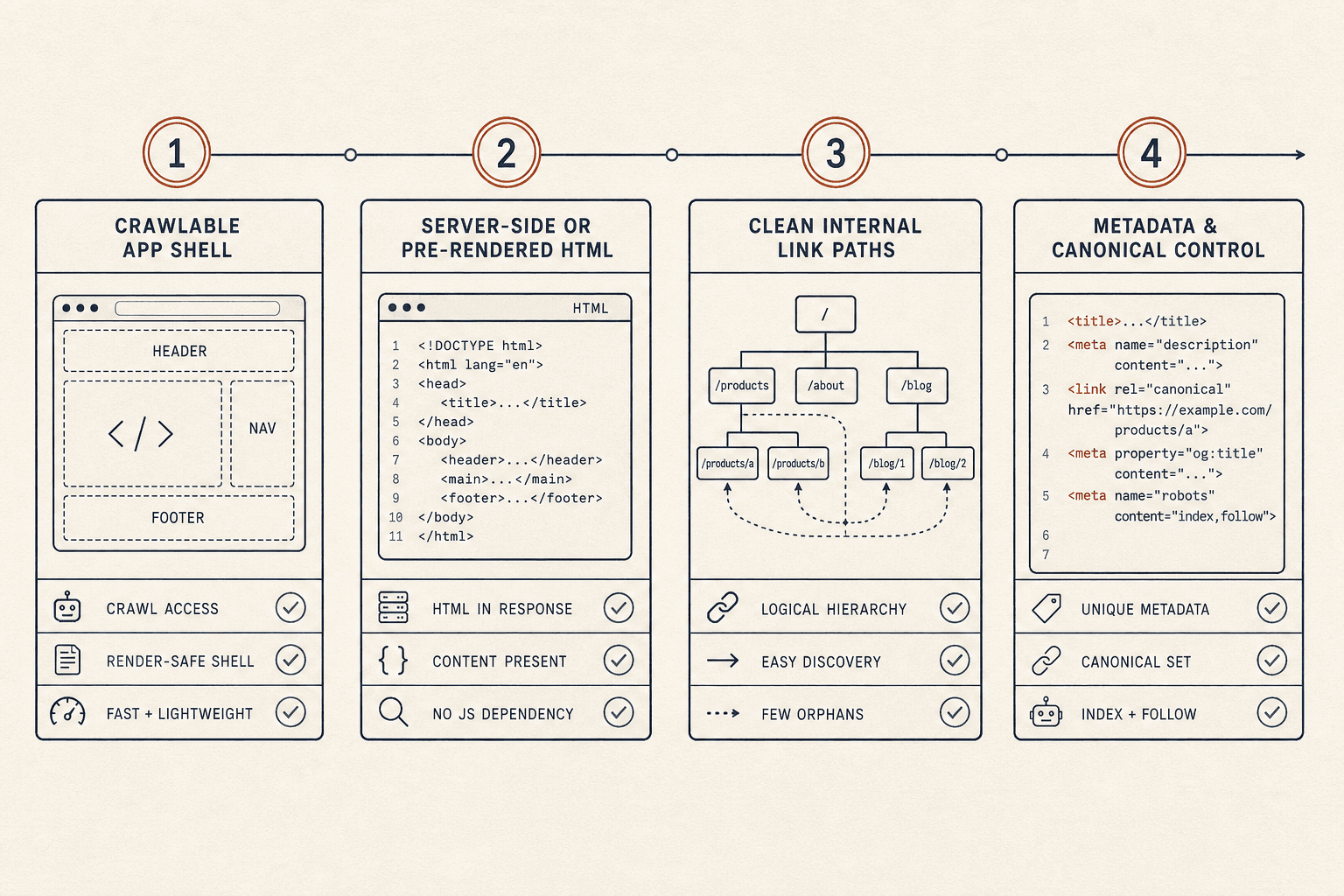
Open page source for your top routes first. If you only see a shell, fix that before anything else. Empty source HTML is still one of the biggest spa seo blockers. JavaScript SEO: The Complete Guide to Making JS Sites Crawlable in 2026
Replace hash-based routing next. URLs like /#/services create weak signals and messy indexing. Use clean history routes such as /services instead. Single Page Application SEO: How to Make SPAs Crawlable in 2026
Fix metadata that changes too late. Your title tag, meta description, canonical tag, and robots directives must match each route on load. If every route shares one default title, crawlers will struggle to separate pages. Optimizing Single-Page Applications for SEO & AI Search
Check delayed hydration and soft 404 states. If the app shows content after several seconds, bots may miss key text. If thin error views return 200 OK, Google may treat them as soft 404 pages. A Comprehensive JavaScript SEO Guide
Inspect your links carefully. If navigation only works through onClick handlers on div elements, crawlers may not follow it. Use real <a href=""> links for important paths, including related resources such as BIM links when they support user journeys.
You should now see the main blockers tied to understanding javascript crawling and indexing. Verify that route URLs, HTML, metadata, and link elements all work without manual interaction.
How to implement indexable routes, metadata, and internal links
Configure indexable routes with unique URLs first. In React, use real route paths and render page content on the server when possible.
<Route path="/services/steel-connection-design" element={<ServicePage />} />Next, render unique metadata for each route. In Next.js, set it in the page layer, not after hydration.
export const metadata = {
  title: "Steel Connection Design Services",
  description: "Review steel connection design services and project scope.",
  alternates: { canonical: "https://example.com/services/steel-connection-design" }
}
In Vue, do the same with route-level meta handling. Make sure the server returns the finished head tags on first response. At this point, your important pages should each have one title, one canonical, and one clear topic.
Add internal links with crawlable anchors next. Use descriptive anchor text and real href values.
<a href="/services/steel-connection-design">Steel connection design services</a>Avoid buttons for page-to-page navigation. Also review fixing cumulative layout shift (cls) and general spa performance optimization tips while you work. Stable layouts help bots and users read the same page state. Fix SEO for Single Page Applications: React & Next.js | CyberCraft Bangladesh
You should now have stable routes, visible metadata, and crawlable links. Verify that your rendered HTML includes the main copy, anchors, and canonical tags before moving on.
Verification checkpoint for crawling and indexing
Run URL Inspection on a priority page. Compare the tested live page with the raw source. You should see rendered HTML, route-specific title tags, and visible internal links. Optimizing Single-Page Applications for SEO & AI Search
Crawl the site with JavaScript rendering enabled. Confirm that key pages return 200, canonicals self-reference, and no route falls into a soft 404 pattern. Over time, Search Console should show more valid indexed pages for your single page application seo setup.
If you see gaps, check hydration timing and route responses again. For example, bots may fetch HTML before client scripts finish. At this point, your React or Vue SPA should be crawlable because bots can access content, metadata, and links without guessing.
Step 3 Improve Core Web Vitals and JavaScript SEO Performance
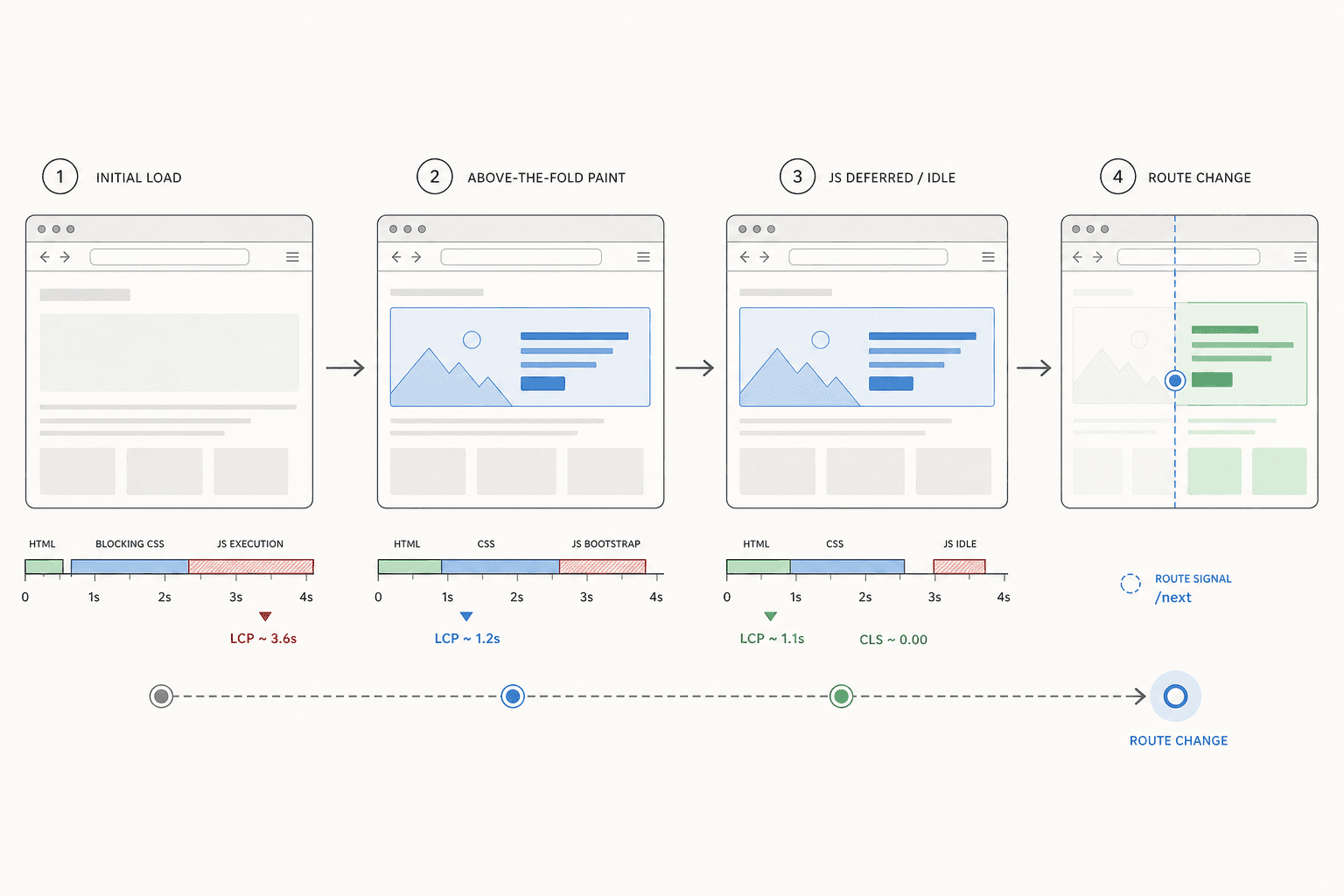
What are core web vitals for SPA teams
Core Web Vitals measure loading speed, visual stability, and page responsiveness. For SPA teams, they matter because slow rendering can delay content visibility for users and crawlers alike. Single Page Application SEO: How to Make SPAs Crawlable in 2026 and Optimizing Single-Page Applications for SEO & AI Search both stress that JavaScript-heavy pages need tighter performance control.
Answer the first question directly: yes, Core Web Vitals matter for SPA SEO. They affect user experience first, but they also support stronger crawling and cleaner rendering. Think of your app like a storefront. If the lights turn on late, visitors leave before they browse.
Optimizing largest contentful paint LCP
Start optimizing largest contentful paint lcp by moving key content into the first render path. Put the main headline, hero copy, and primary image above the fold. Avoid waiting for a late API call before showing them.
Then reduce JavaScript bundle size and delay non-critical work.
- Split route bundles aggressively.
- Lazy load modals, chat widgets, and admin modules.
- Prefetch only likely next-route assets.
- Trim unused libraries and duplicate packages.
You should now see the main content paint earlier.
Next, improve delivery speed. Use faster server response times, compress images, preload the hero image, inline critical CSS, and control font loading with font-display: swap. If your SPA waits on chained API requests, flatten that waterfall. Fetch independent data in parallel.
@font-face {
  font-family: "Inter";
  src: url("/fonts/inter.woff2") format("woff2");
  font-display: swap;
}
Verify that your largest visible element appears fast on a cold load.
Fixing cumulative layout shift CLS
Start fixing cumulative layout shift cls by reserving space before assets load. Set width and height for images, video, embeds, banners, and consent bars. Give skeleton states a fixed box size so late components do not push content downward.
<img src="/hero.jpg" width="1200" height="630" alt="Product dashboard">You should now see fewer jumps during load and route transitions.
For a visual walkthrough of this process, check out this tutorial from Umar Tazkeer :
General SPA performance optimization tips
Configure caching for static assets. Defer third-party scripts. Hydrate only interactive islands when possible. For example, keep a pricing block server-ready, but delay a carousel below it. Research from JavaScript SEO: The Complete Guide to Making JS Sites Crawlable in 2026 shows dramatic performance swings can happen when JavaScript is not controlled.
At this point, your SPA should load faster and feel more stable.
Getting SPA analytics tracking right
Your analytics tracking is often inaccurate because route changes do not trigger full page loads. Fire pageview events on every client-side route change. Update page title, URL, and referrer fields consistently. Also exclude duplicate events during hydration and consent replays.
You should now record cleaner session data across route changes. Verify that Lighthouse scores improve, route-level analytics look cleaner, and more URLs pass Core Web Vitals in Search Console before proceeding.
Conclusion
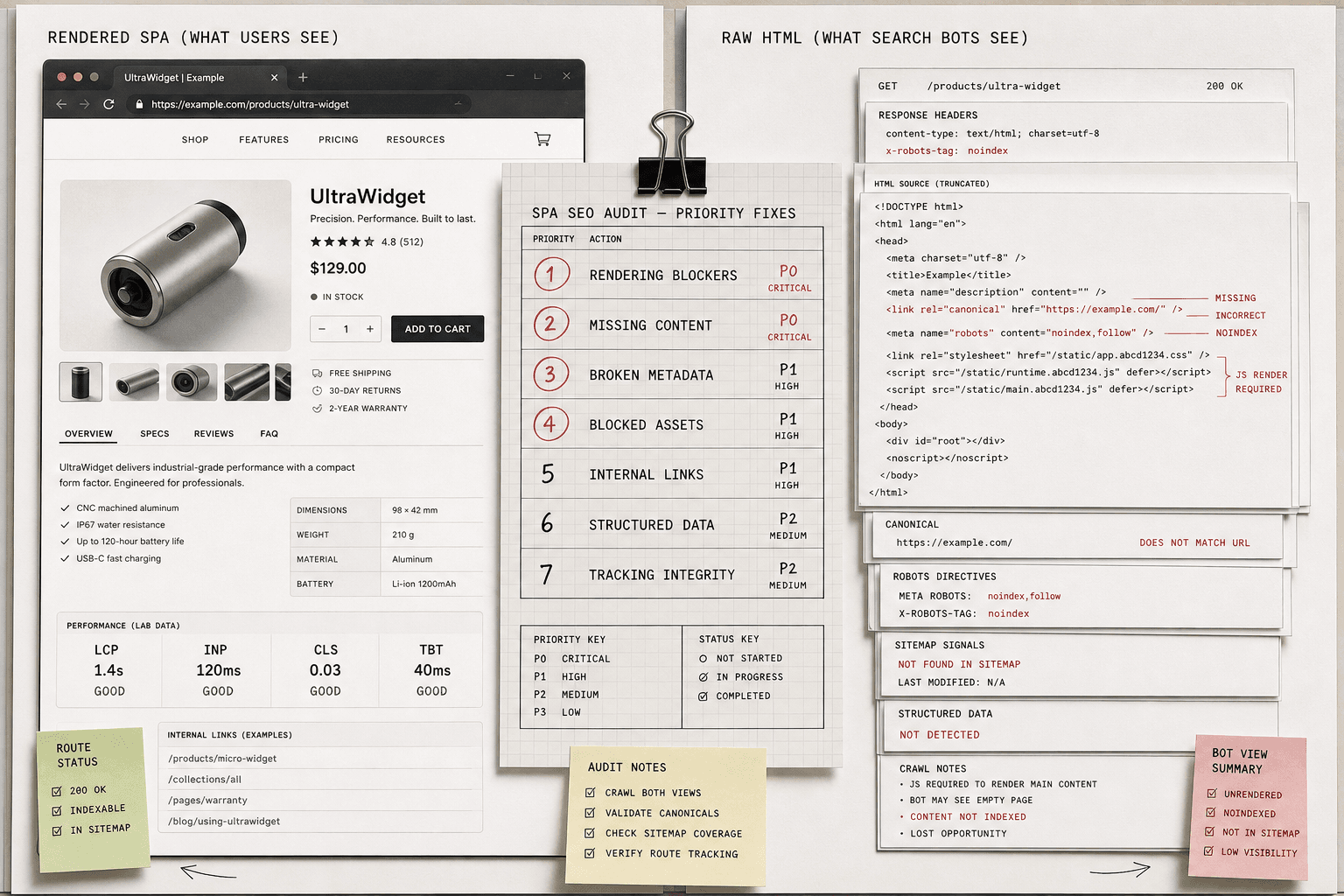
The last step pulls everything together. You are no longer checking one report at a time. You are comparing three realities at once: what users see, what bots fetch, and what Google decides to index. That shift changes how you work. Instead of chasing random symptoms, you can inspect indexability, rendered content, canonicals, robots directives, sitemap coverage, response codes, route-level tags, internal links, schema, performance signals, and route change tracking as one connected system.
That is where most teams get stuck. A route looks fine in the browser, but the rendered HTML is thin. A page gets crawled, but parameter states create duplicates. Content exists, but only after a click, modal open, or app state change. Tracking fires on the first load, then breaks on client-side navigation. Hydration mismatches create noise that hides the real issue. When you audit your SPA this way, those problems stop looking random. They become visible, testable, and fixable.
Your goal now is simple: leave every audit with a ranked action list. Put rendering blockers, missing content, broken metadata, blocked assets, and bad internal linking first. Put speed gains, structured data cleanup, and tracking refinements next. That order keeps your team focused on what can unlock discovery and indexing fastest. It also stops you from polishing Lighthouse scores while critical pages still fail to qualify for search.
At this point, your next move should be operational, not theoretical. Recheck your most important URLs in Search Console. Confirm that the rendered output matches the business value of the page. Validate that canonical rules point to the right version. Make sure route transitions keep analytics clean. Then assign the next sprint based on actual risk and upside, not whoever shouts loudest in Slack.
Single page application seo in 2026 is no longer about asking whether Google can handle JavaScript. It is about making your app easy to crawl, easy to understand, and easy to trust at scale. If you keep your rendering stable, your routes discoverable, and your audits disciplined, your SPA can compete just fine.
Want a simple way to keep building from here? Try It Free to export and share projects, and design simple connections.