What Your Content Analyzer Should Catch Before You Hit Publish
On page SEO decides what happens next: early traction or instant invisibility. Most teams treat it like a final polish, then wonder why strong posts stall after launch. That delay costs rankings. Relevance, structure, internal links, and metadata often get checked too late. According to Instagram, the gap can be as high as 10x. Data from Instagram also points to a 73X difference in outcomes when the right factors align. This list breaks down the pre publish checks that matter most. Each one compares what to review, why it matters, and what to fix first. The goal is simple: stronger content optimization, cleaner launches, and better post launch search performance.
1. Match On Page SEO to Search Intent
On page SEO is the work done inside a page to help it rank and satisfy readers. That includes headings, examples, internal links, copy, and CTA placement. Search intent matters because rankings often follow fit, not effort. If a query wants education, a sales page will feel off fast.
What to review before publishing
First, check what the searcher likely wants. If the query signals learning, the draft should teach first. It should not drift into product-heavy copy by paragraph two. For example, a post about audit steps should explain the process, not pitch software features.
Next, run a quick SERP analysis. Open the top results and compare angle, depth, and format. Are they checklists, guides, or templates? If most pages answer basic questions before selling, that is the expected shape. This step sharpens content relevance and prevents avoidable misses.
A final review should scan headings and supporting examples. Each section should move the reader toward the answer promised by the keyword. Helpful links also matter here. A term like Heading Tags (H1-H6) can support clarity without interrupting the flow.
Why intent alignment matters most
Intent alignment is the fastest trust signal on the page. Readers decide within seconds whether the content fits the task. If the page feels like a brochure, they bounce. If it feels useful, they keep scrolling.
That is why search intent sits at the center of on page SEO. It tells the writer what to explain, how deeply to explain it, and when to introduce a CTA. For example, a reader comparing methods may accept a soft CTA near the end. That same CTA near the top can feel premature.
How to fix a mismatch fast
Start with the headings. If they sound promotional, rewrite them to answer questions. Then swap feature blocks for examples, steps, or proof. A practical section often beats a polished pitch.
Next, move sales copy lower on the page. Let the article satisfy the searcher before it sells. Check whether the Meta Description matches the real page angle too. When title, intro, and body align, the page feels consistent and useful.
2. Tighten Content Optimization and Page Structure
What to review before publishing
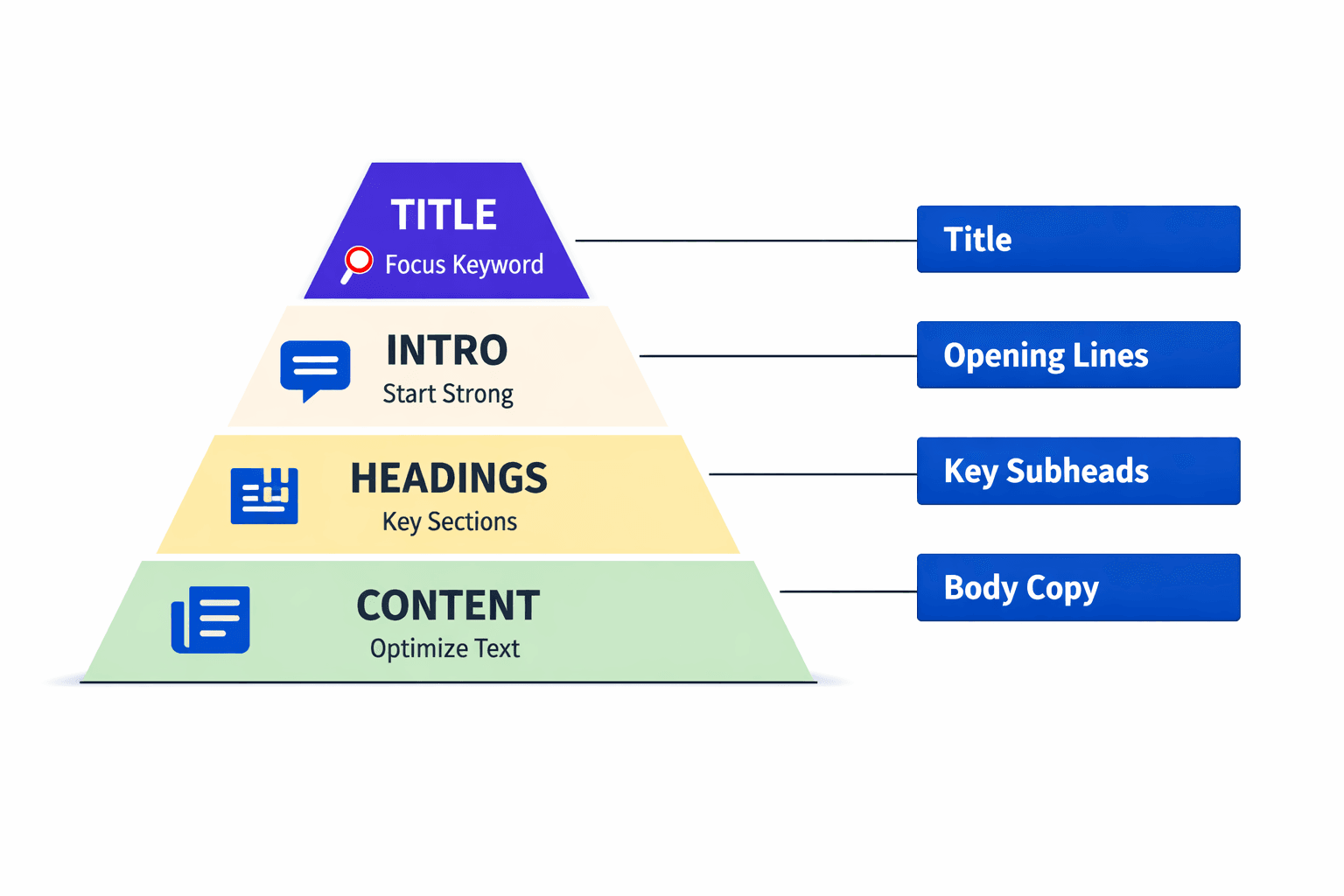
Start with the page frame. One H1 should define the topic clearly. H2s should break the main ideas apart. H3s should support those sections without creating clutter. That simple heading structure helps readers scan fast and helps search engines read the page with less guesswork.
Next, review content optimization line by line. Cut repeated claims, vague transitions, and weak openers. For example, a section that takes four sentences to reach the answer should be reduced to two. If the draft buries the main point, the page feels harder to trust.
Keyword placement also needs a final pass. The term should fit where it adds context, not where it interrupts flow. A strong draft uses the phrase in visible spots, then relies on related language to support the topic. For heading guidance, this is where Heading Tags (H1-H6) becomes useful.
Why structure improves readability and rankings
Clear structure makes the page easier to consume. Short sections reduce friction. Direct subheads tell readers what comes next. Early answers show the page respects limited attention. That same clarity supports stronger on page SEO because the topic stays obvious from top to bottom.
For example, a founder scanning a blog post should find the core answer within seconds. If the first useful point appears halfway down, the page loses momentum. Research from Instagram shows a 2X effect tied to stronger presentation, which highlights how format can shape response.
How to tighten weak sections
Start by asking one question: what is this section trying to answer? If that answer is unclear, rewrite the heading. Then trim any sentence that does not support it. According to Instagram, focused structure can improve results by 7x, which makes weak sections expensive to ignore.
A practical fix is to front-load value. Put the answer first. Add one example next. Then support it with a short explanation. This pattern keeps sections tight and easy to scan.
Finally, check that supporting elements match the page goal. Internal links should feel relevant, not random. Metadata should stay aligned too, especially the Meta Description. That is how teams optimize content for on page SEO without stuffing or overbuilding.
3. Strengthen Internal Links and Content Pathways
What to review before publishing
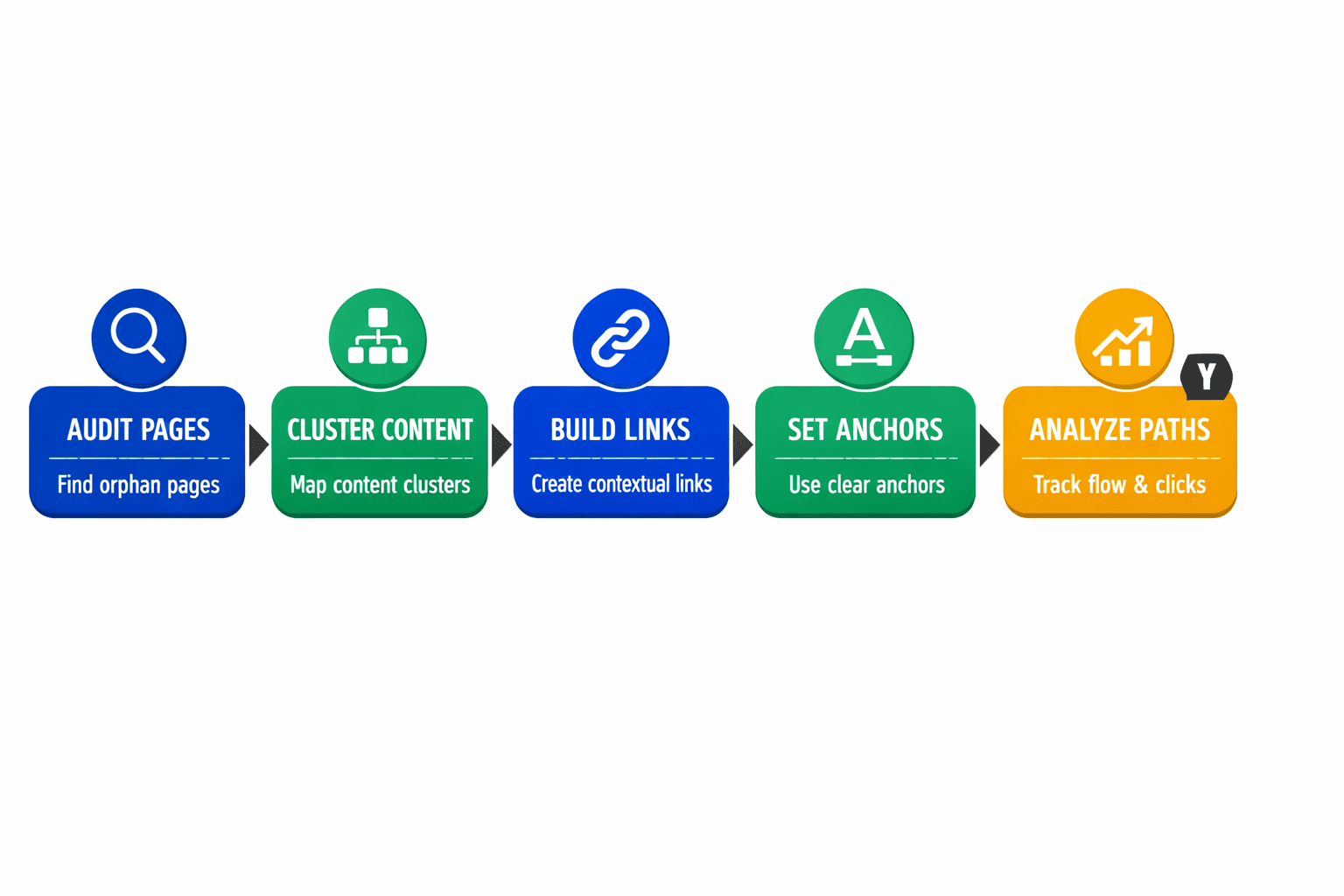
Review every link before the page goes live. Each destination should feel like the next logical step. For example, a section about headings can point to Heading Tags (H1-H6), not a random glossary page.
Anchor text should be clear and specific. “Compare heading structures” works better than “click here.” Good anchor text tells readers what comes next and helps search engines map the topic cluster.
A simple rule keeps decisions clean. Every link should improve understanding, support conversion, or reinforce topical authority. If it does none of those jobs, it likely does not belong.
Why internal links increase page value
Internal links help a page share context across the site. They connect related ideas, surface useful pages, and make deeper content easier to find. That makes the page more useful for readers and stronger for site structure.
Research from Instagram shows 3X. The source lacks context, but the takeaway is still practical. Better pathways usually create more chances for readers to continue.
The opposite is also telling. Data indicates 0x (Instagram). A link that sends readers sideways adds no value. Loose connections waste attention and weaken on page SEO.
How to build a better path
Start with the reader’s next question. Then link to the page that answers it best. For example, a section on snippets can lead to Meta Description if that topic expands the point.
How many internal links should a page have? There is no fixed number. A short post may need three to five. A long guide may need more. The better rule is relevance first, then coverage.
Build paths like signs in a store. Each sign should move visitors closer to the right aisle. If a link does not deepen learning, support action, or strengthen the topic cluster, cut it.
4. Fix Titles Meta Descriptions and SERP Snippets
1. What to review before publishing
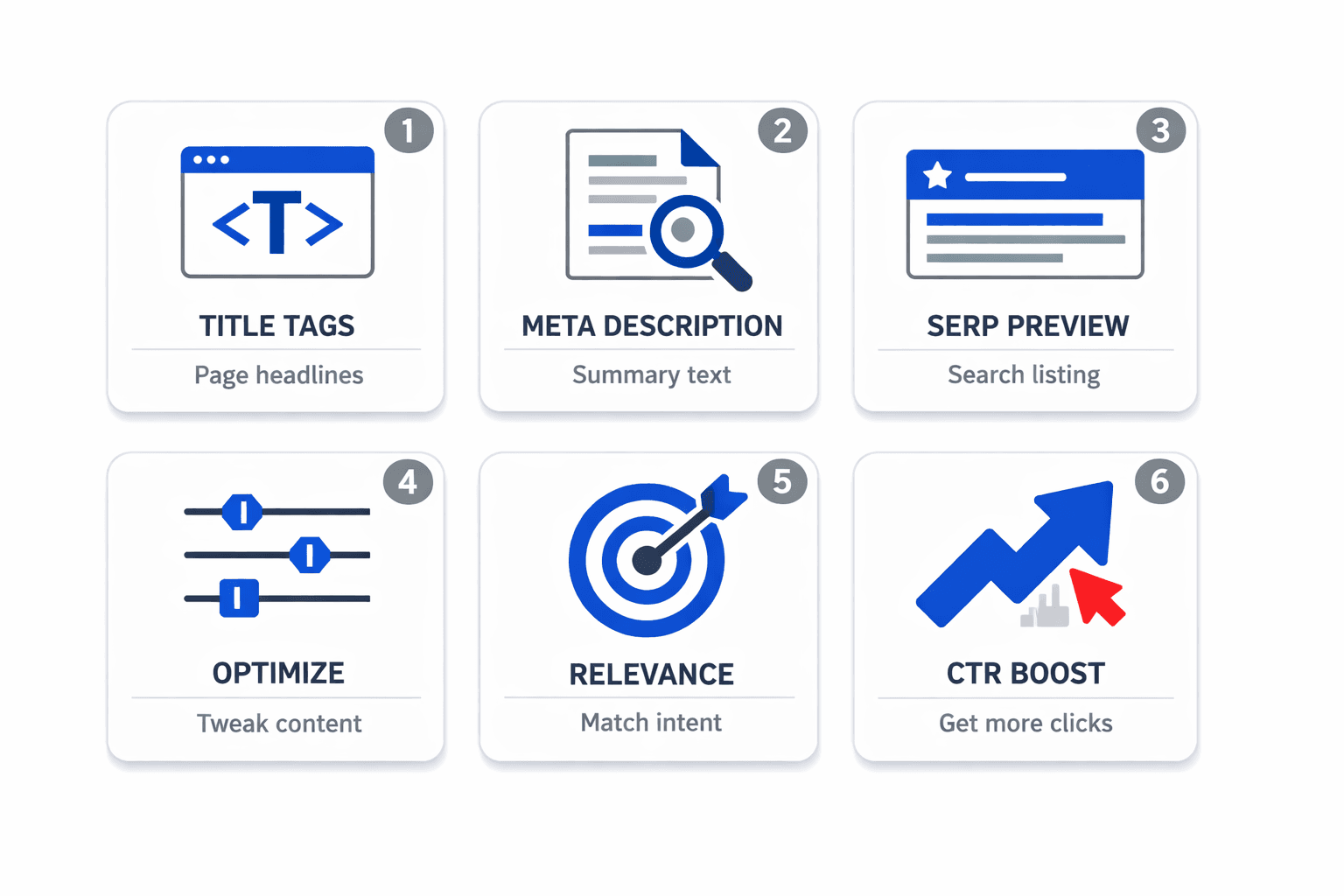
Review the SEO title like a headline on a store shelf. It must say what the page is, who it helps, and why it is worth attention. For example, “On-Page SEO Checklist for SaaS Teams” is clearer than “SEO Tips for Growth.”
Next, compare the title tag and description side by side. They should sound like one message, not two separate drafts. If the title promises a checklist, the SERP snippet should preview that checklist, not drift into broad claims. This is also the right moment to confirm alignment with the Meta Description glossary and the page topic.
2. Why metadata affects clicks
Metadata does not just fill a field. It shapes the first impression in search. A clear title and clean description help searchers judge relevance fast. That matters because the click often goes to the result that feels most specific.
Does meta description matter for on page SEO? Yes - indirectly but clearly. It may not act like a direct ranking boost, but it affects click behavior and expectation setting. Research from Instagram shows 6X, which makes snippet quality hard to ignore.
For example, a title that promises “templates” but a description that talks about “strategy” creates friction. The click feels risky. A matched snippet feels safer and more useful.
3. How to validate with a meta description checker
A meta description checker helps catch weak copy before launch. It checks length, truncation risk, and readability. It also shows whether the SERP snippet scans well on desktop and mobile.
Use it like a final packaging test. Read the preview out loud. If it sounds bloated, flat, or confusing, revise it. According to Instagram, 50X. That makes preview validation a practical last step, especially before adding extras like Structured Data (Schema.org).
Run the Final On Page SEO Pre Publish Check
That last review should stay practical. Scan for broken links first. A single dead link weakens trust fast. Then check for duplicate headings, missing image alt text, weak CTAs, and obvious formatting gaps. These issues look small in isolation. Together, they can blunt performance, reduce clarity, and create friction right after launch. Good on page SEO is often the result of catching preventable errors before the page goes live.
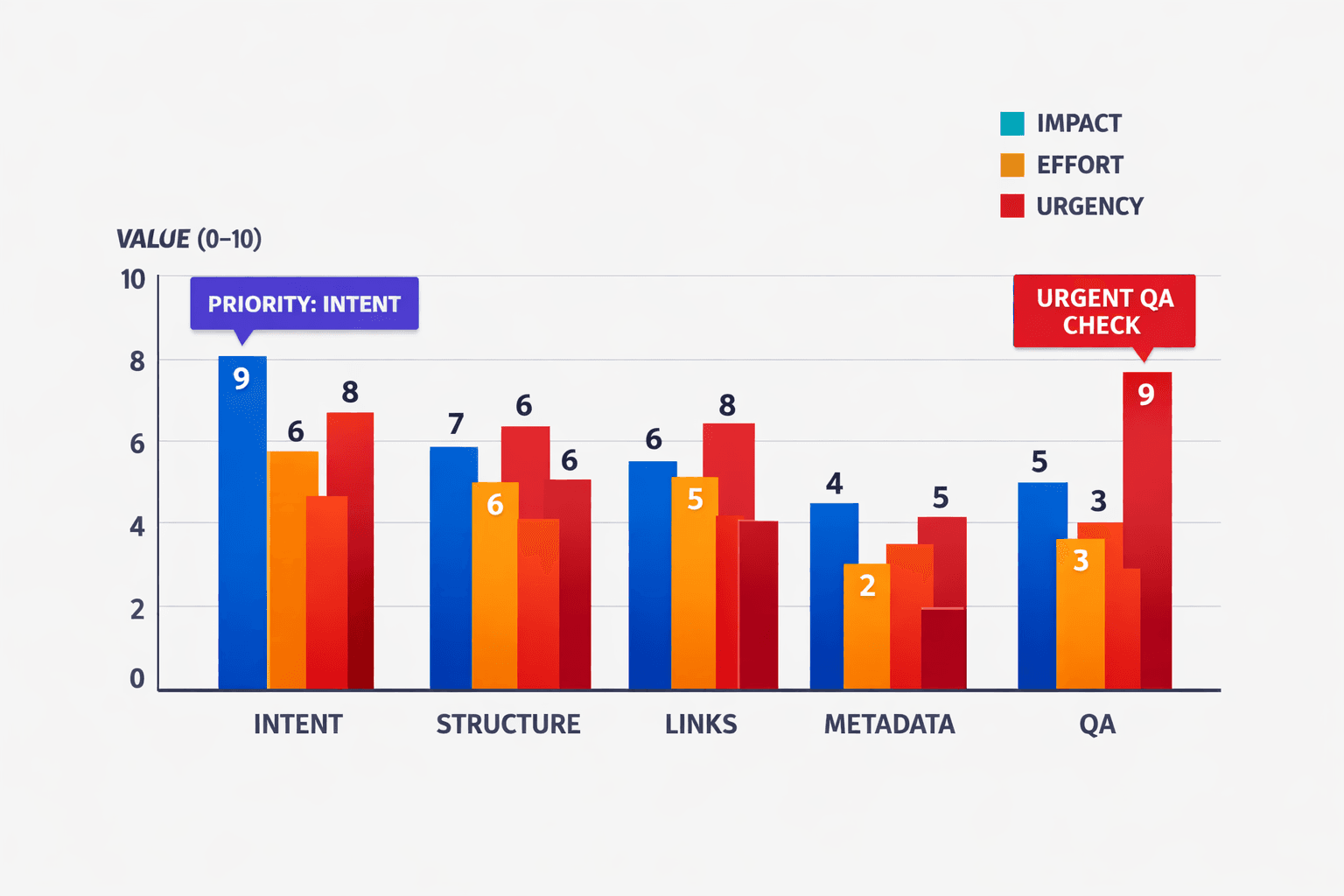
A fast scorecard helps teams decide what moves first. Rate each of the five checks by impact, effort, and urgency. Search intent usually gets the highest impact score because it shapes whether the page can earn traffic at all. Content optimization and page structure often rank next because they affect readability, crawlability, and answer quality. Internal links deserve a strong urgency score when the post supports product discovery or topic clusters. Metadata fixes are usually low effort, which makes them quick wins. Final QA issues may look minor, but they often carry high urgency because they prevent avoidable mistakes from reaching real visitors.
The clearest verdict is simple. If the goal is traffic, intent alignment matters most. It gives the page a real chance to rank for the right query. If the goal is engagement, structure and content flow usually do the heaviest lifting. They help readers stay oriented, keep scrolling, and take the next step. If the goal is avoiding post launch losses, the final QA check is the safety net. It catches broken paths, sloppy presentation, and missed accessibility basics before they cost clicks or trust.
The best teams do not treat publishing as the finish line. They treat it as a quality gate. Run the final check, score the fixes, and ship the version that is most ready to perform. Want to learn more? Learn More to explore how Mygomseo can help.