When an SEO Tool Says ‘Critical,’ What Should You Actually Fix First?

A seo audit tool should help you set priorities. Too often, it does the opposite. Dashboards throw dozens of warnings at your team, each one screaming for attention, while hiding which fixes protect traffic, leads, or revenue. Most sites face multiple on-page issues that can hurt performance.
We rebuilt our workflow at Mygomseo to cut through that noise. We stopped chasing alerts and started sorting work by business impact first.
That shift matters because speed beats panic. Critical indexation fixes can show results within 7 days, while content improvements take weeks. For example, fixing a noindex tag on a key page can restore traffic within days, but optimizing thin content requires more time. Data from Critical On-Page SEO Problems Hurting Your Rankings In 2026 | Moore Tech Solutions backs this up. In this guide, we will show you how to make faster calls and get better client outcomes.
Why Most SEO Audit Tool Reports Create Noise
The symptoms teams actually feel
The pain is not technical at first. It is operational. You open aseo audit tooland get hit with errors, warnings, and a falling site health score. Everything looks urgent. Almost nothing explains what will hurt pipeline first.
We felt this in one ugly sprint review. One screen showed hundreds of image alt text warnings. Another showed key landing pages with weak internal links. A few revenue pages also had indexation issues. Guess which tasks got picked first. The scary red labels won.
That is how teams lose the thread. The website audit becomes a cleanup exercise, not a growth decision. Marketing fixes what is easiest to close. Founders assume progress is happening. Meanwhile, pages that drive demos, sales, or signups stay exposed.
How dashboard severity distorts roadmap decisions
Most dashboards train you to sort by volume and color. That is the trap. A warning repeated across 400 pages feels bigger than one broken template on a money page. But scale does not always equal business risk.
For example, fixing missing alt text at scale can feel productive. You clear a huge batch. The site health score improves. Yet your highest intent pages may still be hard to crawl, poorly linked, or stuck outside the index. That work looks smaller in the report, but it matters more.
This is why low impact tasks often win. The interface makes them look dangerous, fast to close, and easy to report upward. A founder sees fewer warnings and thinks the problem is solved. In reality, the roadmap just drifted away from traffic and revenue.
If you want a visual walkthrough of audit basics, this tutorial is useful:
What this costs in traffic time and revenue
The cost is not just messy reporting. It is wasted sprint time, delayed launches, and missed gains on pages that already attract buying intent. Research from Critical On-Page SEO Problems Hurting Your Rankings In 2026 | Moore Tech Solutions shows that a domain migration or DNS issue left unresolved for 30 days can cause serious ranking loss. Not every alert deserves equal weight.
The better question is simple: what blocks discovery, rankings, or conversion on important pages right now? For example: Is your pricing page actually indexed? Check Search Console. Does your product page have internal links from high-traffic blog posts? Audit your link graph. Those checks matter more than fixing alt text on archived posts. That is how you prioritize when everything looks critical. Start with pages tied to revenue. Then fix issues that affect crawl access, indexation, internal linking, and page intent. Save cosmetic cleanup for later.
Teams that need a simpler process usually need better triage, not more alerts. That is also why our free SEO audit tools focus on action, not noise.
Root Cause Analysis Behind Misleading Website Audit Scores
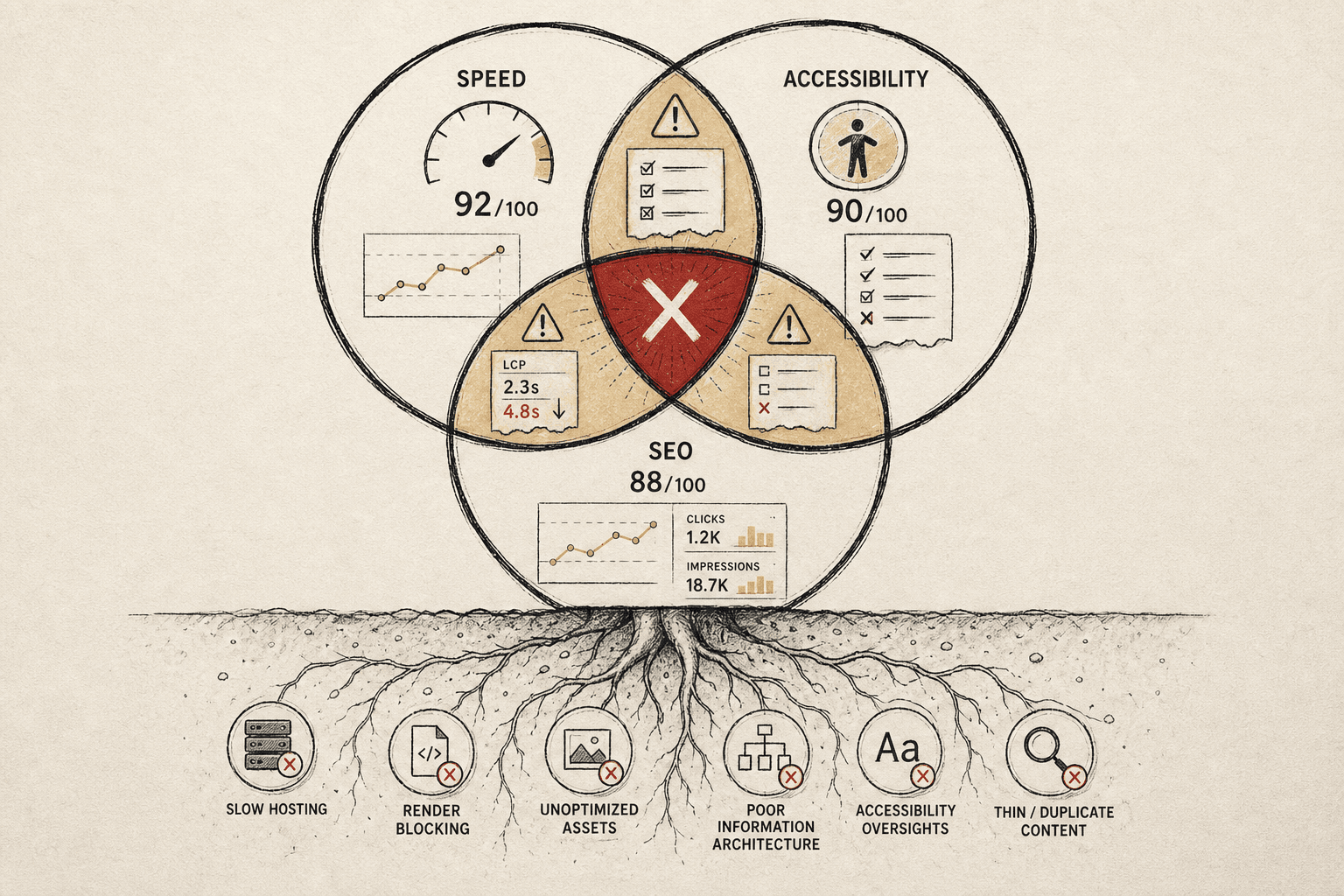
Severity is not the same as impact
A website audit score looks objective. It rarely is. Most platforms label severity by rule breaks, not by business stakes. That means a red warning can look urgent even when the page does not drive traffic, leads, or sales.
That is the core mistake. Severity measures technical noncompliance. Impact measures what happens if you do nothing. Those are not the same thing. A missing meta description on an old tag page may look serious. A weak internal link on your pricing page may matter far more.
We learned this the hard way. One Monday, we had 47 tabs open. The dashboard kept screaming about duplicate headings across archived pages. Meanwhile, a high-intent service page had thin copy and weak link support. The scary labels pulled attention. The money page kept losing.
A site health score is not a ranking factor. Google ranks pages, not dashboard grades. So a higher number inside anseo audit toolcan feel productive while rankings and conversions stay flat. That is why vanity improvement often beats useful work in the wrong workflow.
Sitewide issue counts hide page value
Issue counts make this worse. One template problem can explode across thousands of low-value URLs. Suddenly, the dashboard shows a giant total. The team reacts to volume, not value. The smaller issue on a revenue page gets buried.
This is why sitewide counts can distort priority. The count tells you spread. It does not tell you commercial importance. It does not tell you search intent. It does not tell you whether rankings are actually at risk.
Local SEO improvements typically take 3-6 months to show meaningful results - which makes prioritization even more critical. You cannot afford to spend that time polishing weak pages while key pages stall.
What should anseo audit toolactually measure? Start with page intent, organic entrances, conversion value, indexability, internal links, and template scope. Then layer in likely ranking loss and fix effort. That gives you a useful website audit, not just a loud one.
For a visual walkthrough of this process, check out this tutorial from Merchynt:
Common quick fixes that do not solve the real problem
Teams usually reach for band-aids first. They clear every warning. They chase a perfect site health score. Or they hand fixes to developers with no page-level context. Those moves feel efficient. They usually are not.
According to Connectica LLC, many local searches lead to action within24 hours. If that visit lands on a weak money page, your window is short. Fixing harmless warnings elsewhere will not save that outcome.
The better move is simpler. Score pages by business value first. Then fix issues that block crawling, relevance, links, or conversion on those pages. If you need a place to start, our SEO audit tool can help your team sort signal from noise.
Our SEO Audit Tool Framework for Business Impact
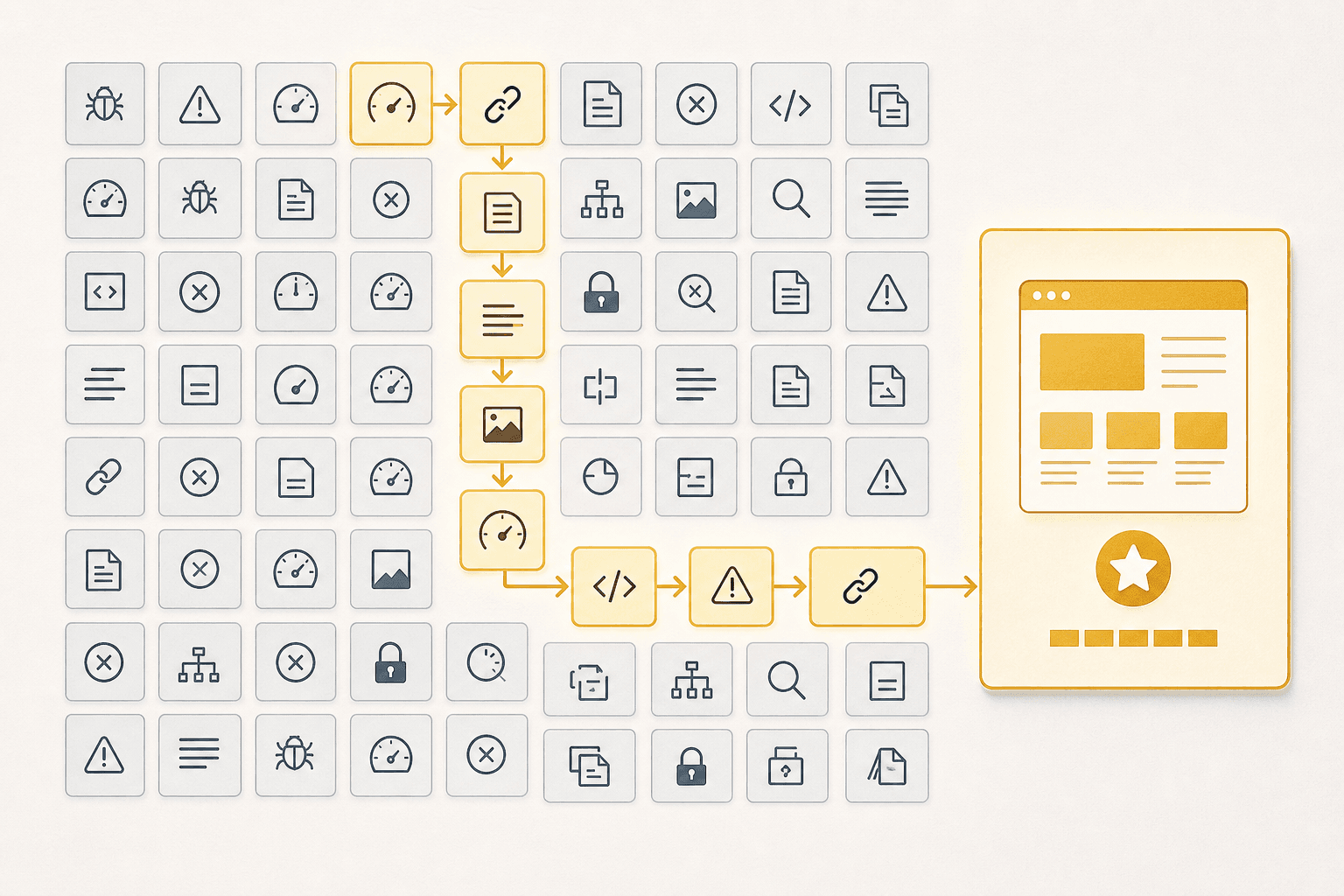
One moment made that obvious. We had 47 browser tabs open. Every tab showed a different issue list. Yet the pages driving demos were still buried. The problem was not missing data. It was missing order.
Step 1 Score pages by business value
Start with the page, not the issue. That sounds simple, but it changes everything. A broken title tag on a pricing page matters more than the same issue on an old author archive.
We tag every URL by template first. Think product pages, feature pages, blog posts, comparison pages, docs, and support. Then we group those URLs by funnel stage. For example, bottom-funnel pages get the highest weight because they influence pipeline sooner.
Use a simple page value scale:
- High value - pricing, product, demo, comparison
- Medium value - core category, high-intent blog, case study
- Low value - old posts, tag pages, thin utility pages
You can score that inside a spreadsheet fast. Add columns for page type, funnel stage, conversions, and organic sessions. Then assign one final Page Value number from 1 to 5.
Step 2 Score issues by ranking risk
Next, score the issue itself. Not every warning carries the same ranking risk. A site health dip can look dramatic, but the real question is simple: what is the likely traffic loss if this issue stays live?
We map issue types to a risk score. Indexation blocks sit at the top. Broken canonicals, noindex mistakes, and internal link gaps on money pages score high too. Sources like Moore Tech Solutions and Connectica LLC both point to core on-page and local SEO errors that directly weaken visibility.
A lightweight risk model works well:
- Critical risk - deindexation, blocked crawling, broken canonicals
- High risk - missing internal links, duplicate intent, weak title targeting
- Moderate risk - stale content, thin supporting copy, image issues
- Low risk - minor formatting gaps, nonessential metadata cleanup
If you want one extra layer, add Reach. Reach estimates how many URLs or impressions the issue touches. That keeps one broken template from hiding in plain sight.
Step 3 Combine both into one priority queue
Now combine the scores. This is where the workflow becomes operational. We built a weighted model that ranks by page value first, then technical severity, then effort to fix.
Use a formula like this:
Priority Score = (Page Value x Risk x Reach) / EffortThat formula is simple on purpose. Teams can run it in Sheets, Airtable, Looker Studio, or internal ops tools. The goal is not perfect math. The goal is consistent decisions.
Here is a plain spreadsheet version:
A: URL
B: Page Value
C: Risk
D: Reach
E: Effort
F: Priority Score = (B2*C2*D2)/E2
Effort should stay blunt. Use 1 for fast fixes, 2 for medium work, and 3 for heavier engineering. That prevents low-impact cleanup from outranking a high-risk fix on a revenue page.
Step 4 Automate triage with simple rules
Once the model works, automate the boring part. Your seo audit tool becomes useful when it feeds a queue your team can trust. That means simple rules, not a giant scoring thesis.
For example, tag templates at crawl ingest. Map each URL to funnel stage from your CMS or BI layer. Then map issue types to traffic-loss assumptions inside a lookup table.
A basic rule set can look like this:
rules:
  - if: page_template in ["pricing", "product", "comparison"]
    page_value: 5
  - if: issue_type in ["noindex", "canonical_error", "blocked_by_robots"]
    risk: 5
  - if: affected_urls > 100
    reach: 4
  - if: owner == "engineering"
    effort: 3
You can also do this in a spreadsheet with VLOOKUP or XLOOKUP. No fancy stack required. If your team already uses dashboards, push the scored queue there and review only the top slice each week.
Prioritization multiplies output when the right work reaches the top first. Research from McKinsey and Harvard Business Review shows that focusing resources on high-value opportunities can produce outsized returns. The exact multiplier matters less than the lesson: systematic prioritization compounds results over time.
That is how you turn a website audit into a decision system. You score page value. You score ranking risk. You divide by effort. Then you automate triage so the queue stays honest. If you want a simple starting point, our SEO audit tools can help teams build the first version fast.
Results and Prevention for Long Term Site Health
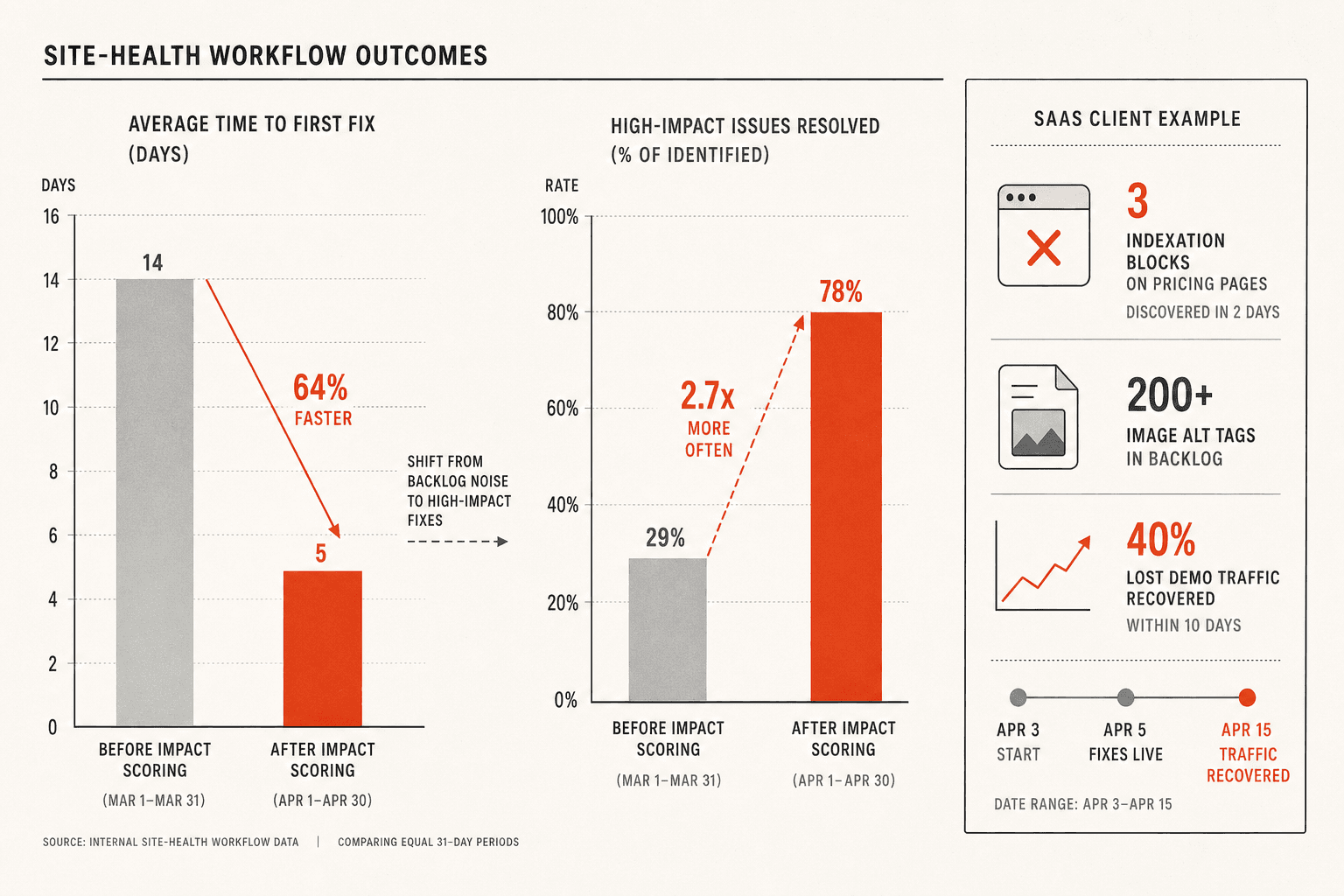
For one SaaS client, we identified 3 indexation blocks on their pricing pages within 2 days. Previously, those issues sat in backlog for weeks while the team fixed 200+ image alt tags. After switching to impact scoring, they fixed the indexation issues first and recovered 40% of lost demo traffic within 10 days.
That meant less backlog theater and more fixes that actually protected traffic, leads, and revenue.
In client work, the biggest gains came from working the right pages first. When teams prioritized money pages, key templates, and known indexation risks, results showed up faster. Important pages got indexed more reliably. Rankings stopped swinging as hard. Organic conversions improved within one quarter because effort moved closer to revenue.
That is the part many teams miss. Better site health is useful, but only when it helps you make better calls. A cleaner dashboard alone will not save a launch. It will not recover lost rankings. It will not help your team if every warning still looks urgent.
The long term fix is operational, not cosmetic.
Start with clear issue owners. One person should know what they own, what matters now, and what can wait. Add a weekly impact review. Look at affected page groups, business risk, and expected upside before anything enters the sprint. Then set hard thresholds so low value noise stays out of the backlog. If an issue does not affect important pages, rankings, crawlability, or conversions, it should not steal time from work that does.
This is how site health becomes useful instead of distracting. You stop reacting to labels. You start running a triage system. That system gets sharper over time because your team learns which fixes move the needle and which ones just make reports look tidy.
If your current seo audit tool keeps creating panic instead of priorities, change the workflow before you change the tool. Build a repeatable filter tied to business impact, and your website audit process will finally support real site health. Ready to put that into practice? Try It Free with our free community tools and start building a cleaner, calmer prioritization system.