Single Page Application SEO: The Complete Guide for 2026
Can search engines crawl a single page application? Yes - but single page application seo breaks fast when JavaScript hides key content. Modern SPAs ship client-side rendering, dynamic routes, and delayed metadata that crawlers often miss. That creates thin index coverage, weak snippets, and lost traffic. According to Single-Page Application SEO: Complete Guide to Ranking SPAs, 100% of SPA routes need clean tracking and crawlable states to avoid blind spots. You will learn how to audit rendering, fix routing and metadata, verify what Googlebot sees, and monitor changes before rankings drop. The steps are practical, framework-specific, and built for React, Vue, and Angular teams that need results without hiring a full SEO department.
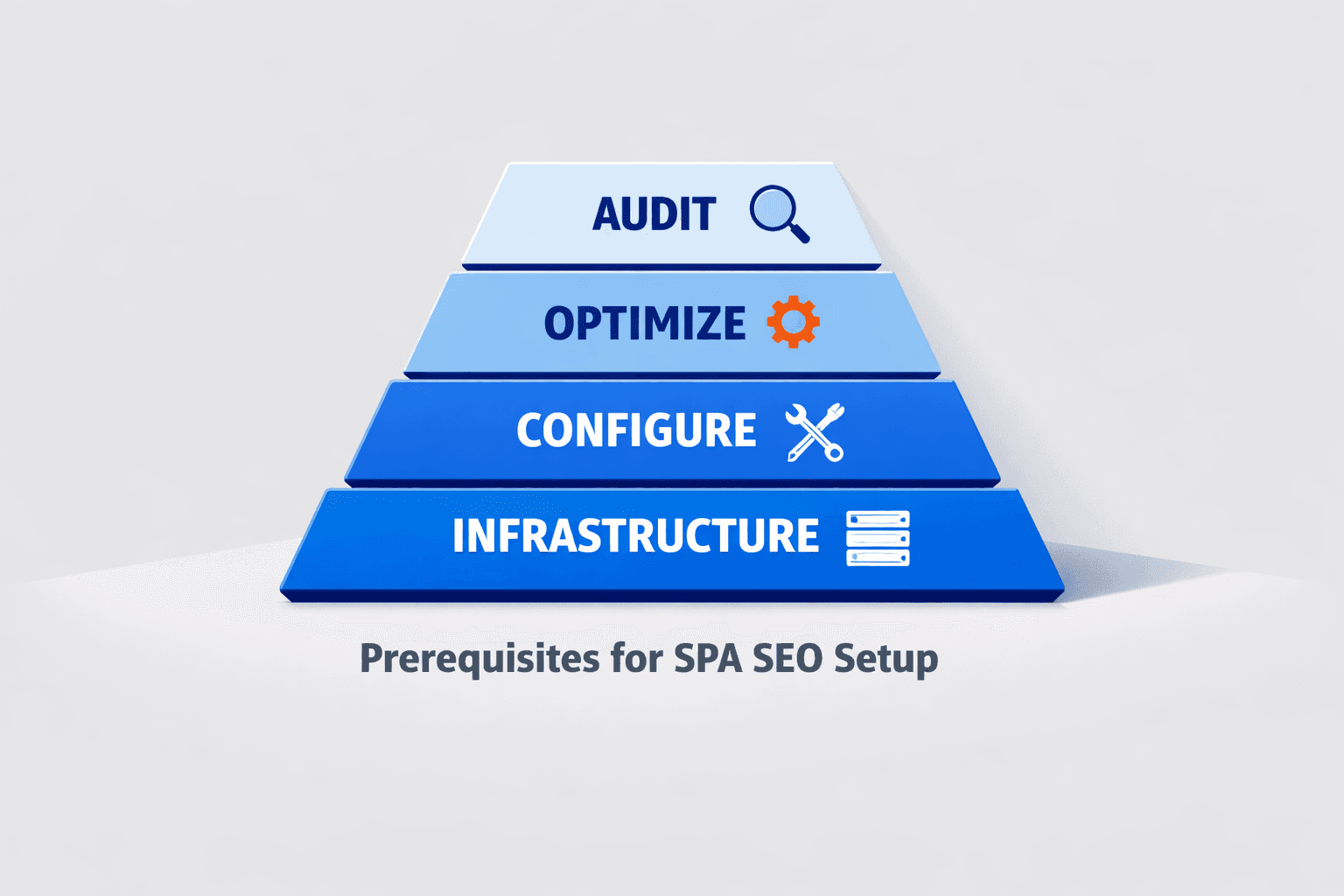
Prerequisites for SPA SEO Setup
What tools you need before you start
Gather five core tools first. Use Google Search Console, GA4, a crawler with JavaScript rendering, browser DevTools, and server logs if you can access them. For example, your crawler should show what the search engine sees after rendering, not just raw HTML. Stackmatix recommends rendering-aware crawling for SPA audits, because client-side routes and metadata often need post-render checks (Single-Page Application SEO: Complete Guide to Ranking SPAs).
If you need extra browser help, keep Chrome Extensions for SEO That Transform On-Page Optimization nearby for quick checks.
The team at Laracasts explains the SPA model clearly:
What access you should confirm
Confirm access before any audit starts. Open your React, Vue, or Angular codebase, deployment pipeline, robots.txt, sitemap, and meta tag system. Verify who controls route-level titles, canonicals, and descriptions. You should now know where every page signal gets set.
Do you need server-side rendering for SEO? No, not always. You need renderable, crawlable, and indexable output first. Nuxt SEO notes that pre-rendering and hybrid options can work well for single page applications: when route content stays visible and stable for crawlers (SEO for Single Page Applications: The Complete 2026 Guide · Nuxt SEO).
What success metrics you will track
Define your baseline before changes. Track indexed URLs, render parity, crawl depth, core web metrics, and impressions by route in Search Console. At this point, your spreadsheet or dashboard should support before-and-after comparison. Verify that each route has a starting benchmark before proceeding.
Step 1 Audit Single Page Application SEO Rendering
1. Check raw HTML versus rendered HTML
Start with one high-value route, such as /pricing or /features.
- Open the page in Chrome.
- Run
view-source:on that URL. - Check the raw HTML for the title tag, meta description, canonical, body copy, and internal links.
- Open Google Search Console URL Inspection for the same URL.
- ClickTest Live URLand review the rendered HTML.
- Compare what appears in the browser with what appears after rendering.
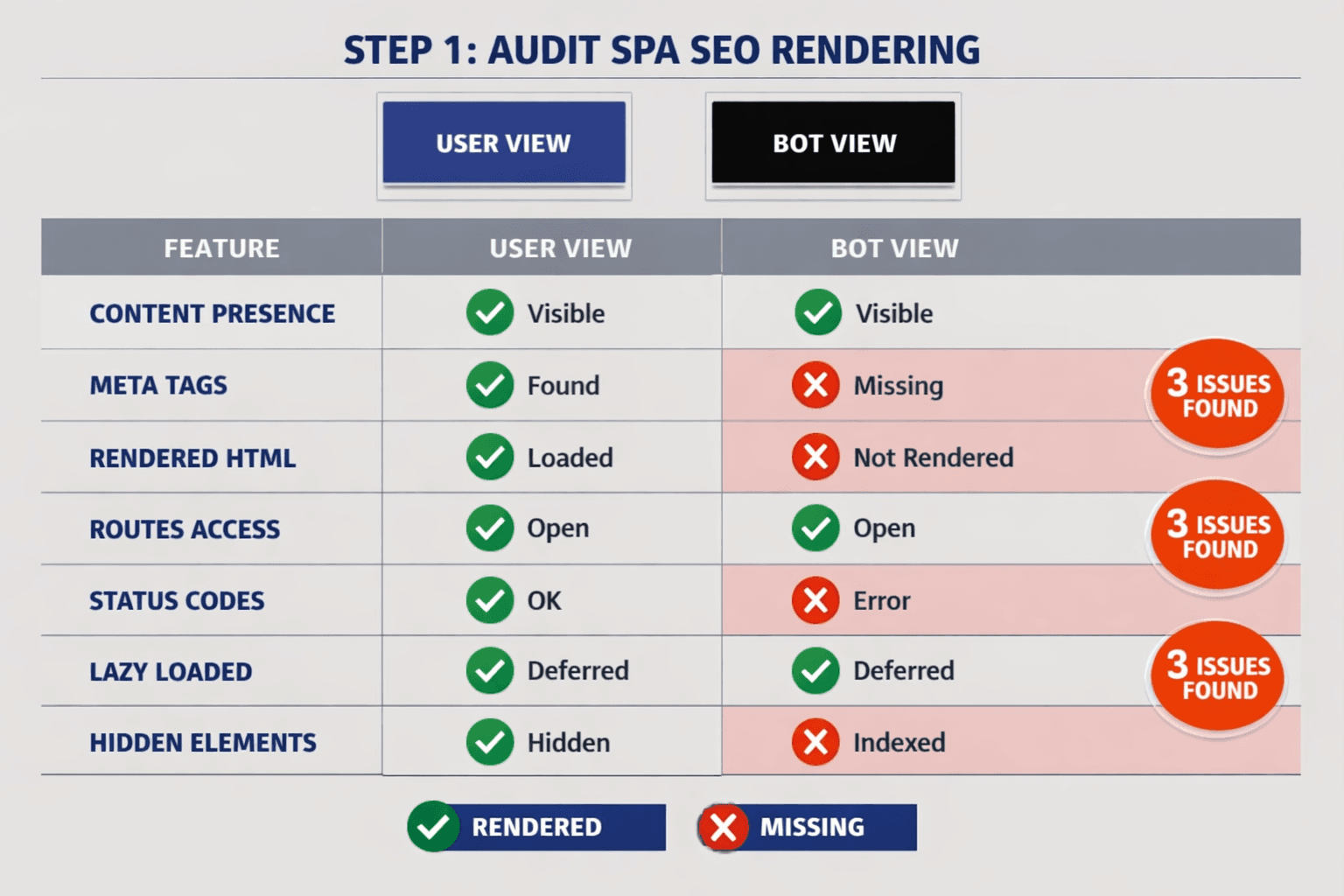
You should now see whether key content loads in the initial response or only after JavaScript runs. Verify that every page exposes the same core signals in both versions.
For example, your React route may show a full pricing table to users. Yet the raw HTML may contain only <div id="root"></div>. That gap is a red flag for spa seo because bots must execute extra scripts before they see the page.
2. Test crawlability of routes and internal links
Use a JavaScript-enabled crawler next.
- Configure the crawler to render JavaScript.
- Crawl your key folders, templates, and route patterns.
- Export status codes, canonicals, titles, meta descriptions, and discovered links.
- Check whether each route has a unique URL.
- Confirm that each route returns a valid status code.
- Confirm that internal links use real anchor elements and href values.
- Test that bots can reach routes without clicks, filters, or form submissions.
At this point, your page applications: routes should behave like normal URLs, not hidden app states. Verify that every page is linked internally and reachable through crawl paths.
Some SPA routes are not indexed because they depend on user interaction. For example, a Vue filter panel may update the view, but never create a crawlable URL. An Angular tab may load content only after a click, leaving bots with nothing stable to index. Nuxt SEO notes that weak route discovery often blocks indexing in single-page setups (Nuxt SEO).
3. Find dynamic content that bots may miss
Now inspect delayed content blocks.
- Check accordions, tabs, modals, lazy sections, and API-fed modules.
- Disable JavaScript briefly and reload the page.
- Compare headings, product text, FAQs, and links.
- Mark any missing content that appears only after hydration.
- Update the issue list by impact and template type.
You should now have a prioritized issue list covering missing rendered content, weak internal linking, broken status handling, and orphan routes. Verify that you can name which URLs render well for bots and which depend too heavily on client-side execution.
If you want ongoing checks, use an automated workflow like AI SEO Audit Tools Drive Technical SEO Results for Modern Teams. Mygomseo can monitor render parity, route discovery, and metadata drift while you sleep.
Step 2 Fix Crawlability and Dynamic Metadata in React Vue Angular
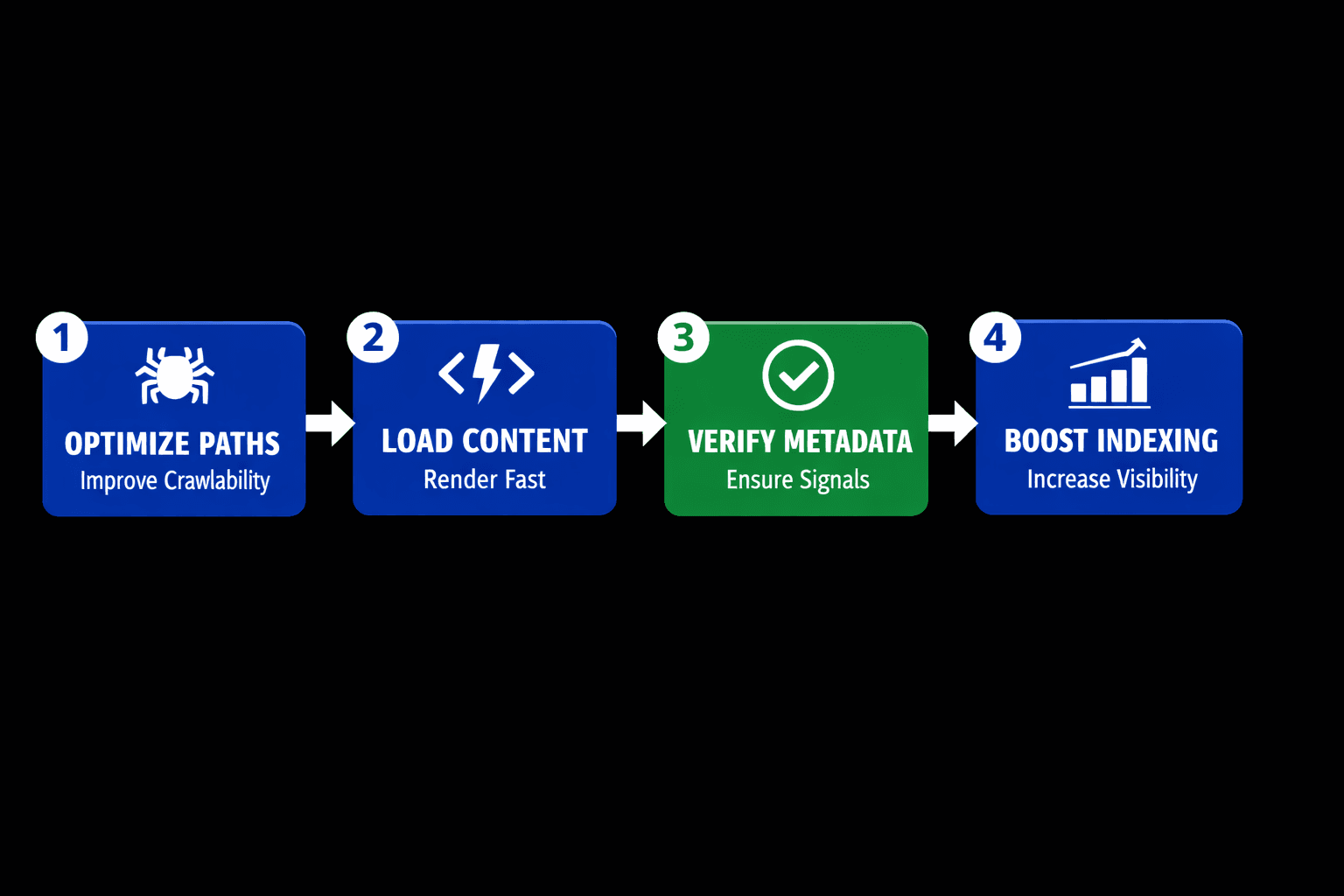
React implementation tips
Prefer server rendering, static generation, or pre-rendering for revenue pages. SSR is usually better for SPA SEO because HTML arrives with content and metadata already in place. For example, a product page should ship its title, canonical, and schema in the first response, not after a long hydration delay. Single-Page Application SEO: Complete Guide to Ranking SPAs
Configure route-level head updates with a reliable library. In React, that often means framework support in Next.js or careful head management in a custom app. Use route data to update the title, description, canonical, and JSON-LD on every page load. If you still use client rendering, shorten delays and avoid loading critical tags after user interaction.
import { Helmet } from "react-helmet-async";

export function ProductPage({ product }) {
  return (
    <>
      <Helmet>
        <title>{product.seoTitle}</title>
        <meta name="description" content={product.metaDescription} />
        <link rel="canonical" href={product.canonicalUrl} />
        <script type="application/ld+json">
          {JSON.stringify(product.schema)}
        </script>
      </Helmet>
      <h1>{product.name}</h1>
    </>
  );
}
You should now see unique tags per React route. Verify that each target URL shows the same metadata in rendered HTML and browser DevTools.
Vue implementation tips
Use Nuxt for SSR or static generation on important landing pages. If full SSR is not possible, pre-render your top pages first. This gives crawlers indexable HTML for pages that drive leads and signups. SEO for Single Page Applications: The Complete 2026 Guide · Nuxt SEO
Configure head tags with route-aware composables and update the values from page content. For example, a pricing route should expose a unique title and canonical before heavy client scripts finish. You can use useHead() in Nuxt to update the head cleanly.
<script setup>
const route = useRoute()
useHead({
  title: 'Pricing - Acme',
  meta: [{ name: 'description', content: 'Compare plans and features.' }],
  link: [{ rel: 'canonical', href: `https://example.com${route.path}` }]
})
</script>
You should now see stable Vue metadata on each page. Verify that important routes resolve as clean paths, not hash fragments.
Angular implementation tips
Use Angular Universal on pages you want indexed. That is the safest path for single page application search engine optimization in Angular apps. Server rendering puts headings, copy, and metadata into the initial HTML. SEO Single Page Application: The 2026 Ultimate Guide
Configure Title and Meta services inside route components or resolvers. Update the tags before the page becomes interactive. For structured data, inject JSON-LD on the server when possible. If you build docs or feature pages, render those routes first and keep content visible without extra clicks.
import { Title, Meta } from '@angular/platform-browser';

constructor(private title: Title, private meta: Meta) {}

ngOnInit() {
  this.title.setTitle('Features - Acme');
  this.meta.updateTag({ name: 'description', content: 'Explore core features.' });
}
You should now see Angular pages return indexable HTML on key routes. Verify that important URLs render useful copy in the first response.
Common fixes for titles canonicals schema and sitemaps
Replace click handlers with real anchor tags for internal navigation. Bots follow <a href="/features"> links more reliably than button events. Use history routing, not hash routing, for indexable pages. Hash URLs split the route from the server and weaken crawl signals. Single-Page Application SEO: Complete Guide to Ranking SPAs
Generate XML sitemaps from actual routes, not guesses. Return the right 200, 301, 404, and noindex signals for each URL state. Research from SEO Guide 2026: From Zero to Page One (Step-by-Step) shows gains can reach 1200% when technical foundations improve at scale. For ongoing checks, use The 4 Technical SEO Checks Every Developer Should Automate or AI SEO Audit Tools Drive Technical SEO Results for Modern Teams.
At this point, your high-value pages should expose route-level content, links, and metadata to bots. Verify that every target page has a unique title, canonical, structured data block, and crawlable route path before proceeding.
Conclusion: Turn Fixes Into a Repeatable SEO System
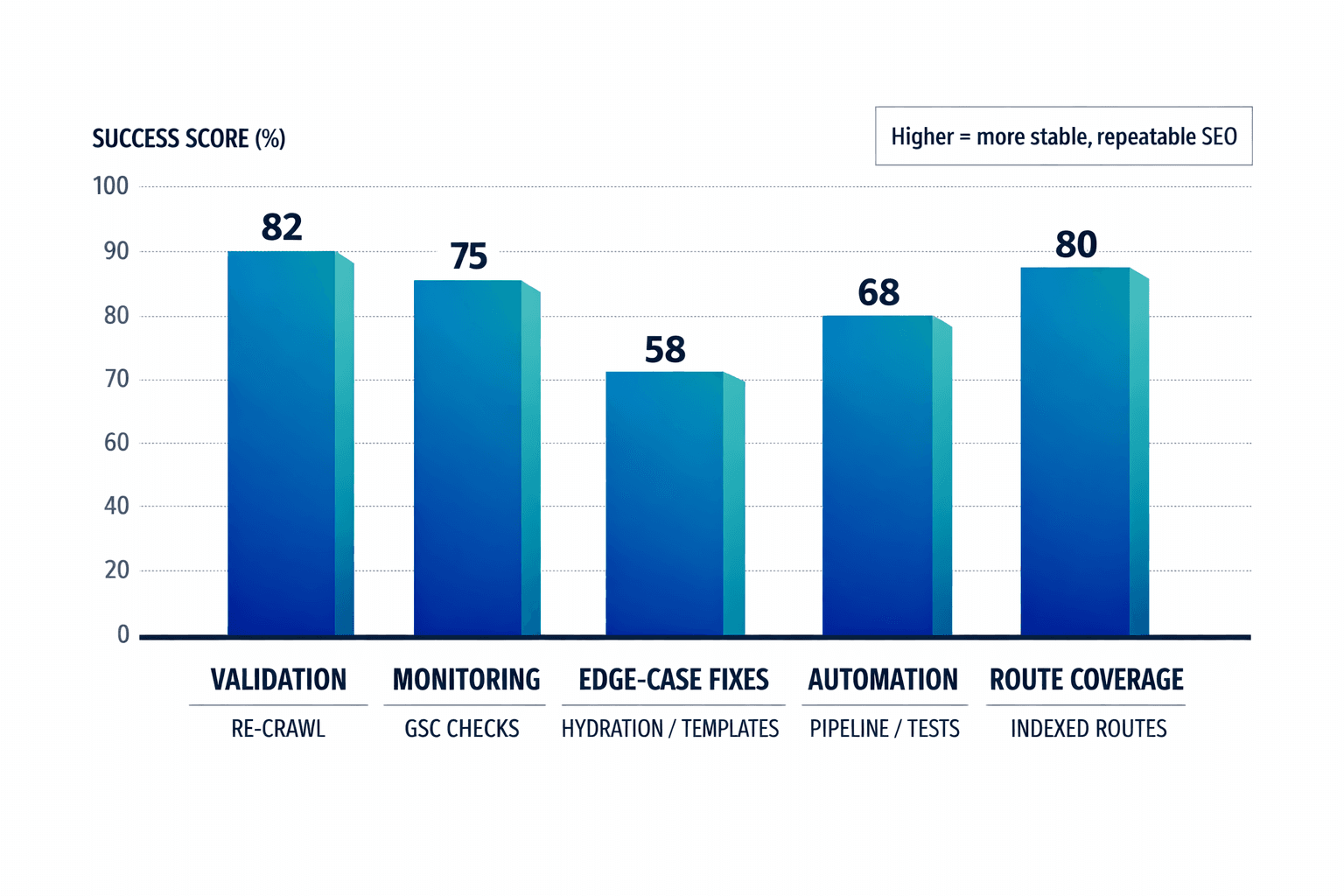
Start by validating your changes in production. Re-crawl the site with JavaScript rendering enabled. Inspect a set of priority URLs in Google Search Console. Compare rendered HTML against the live route output one more time. Check that indexed URLs grow in the right sections, impressions rise on target routes, and route coverage matches the pages you expect search engines to reach. This step closes the loop. It shows whether your fixes work outside staging and under real crawl conditions.
Move fast on the issues that still appear. Watch for app shell pages that look thin and trigger soft 404 signals. Check for route templates that reuse the same title or description. Review hydration errors that replace stable HTML with broken client output. Test lazy-loaded blocks to confirm bots can access the content without scrolling or extra interaction. Verify that JavaScript files are not blocked by robots rules or deployment settings. Confirm that canonicals point to the correct route, not a generic shell or outdated path. These are the edge cases that keep spa seo unstable even after a solid implementation.
At this stage, manual checks are not enough. Your routes change. Your components ship updates. Your metadata can drift without warning. That is where Mygomseo fits. It works as the autonomous layer for single page application search engine optimization. It monitors rendered output, crawl signals, route-level metadata, and dynamic content changes across your SPA. When something breaks, it flags the issue before rankings slip, pages fall out of the index, or traffic drops. You stop relying on periodic audits alone. You build an always-on system that checks your site while your team focuses on growth.
The real win is operational. You no longer treat SPA SEO as a cleanup project. You treat it as an ongoing workflow with clear checks, alerts, and verification points. Re-crawl after releases. Review sample URLs. Compare bot-visible HTML. Track indexed page trends and impressions by route. Then let automation watch for the failures that humans miss. That is how you keep React, Vue, and Angular sites searchable as they evolve.
At this point, your process should be repeatable. Your verification steps should be clear. Your monitoring should run in the background while you sleep. That is the shift that makes single page application seo sustainable.
Keep the process tight, keep the checks measurable, and keep monitoring live as your app grows.
Want to learn more? Learn More to explore how Mygomseo can help.