Technical SEO Audit Checklist: 40+ Factors That Actually Matter
Technical seo audit is the fastest way to find what holds your rankings back. If your pages stall, hidden crawl, index, speed, and content issues often cause the drop. According to Technical SEO Checklist: 40+ Points to Audit Your Site | Backlynk, 61% of websites fail Core Web Vitals checks. That means many sites lose traffic through problems they do not track often enough. In this guide, you will review 40 plus SEO factors with a simple checklist you can follow step by step. You will spot what fails, confirm what passes, and sort fixes by impact. By the end, you will have a prioritized action plan and a cleaner site ready to re scan.
Step 1 Prepare Your Technical SEO Audit
Prerequisites and access you need
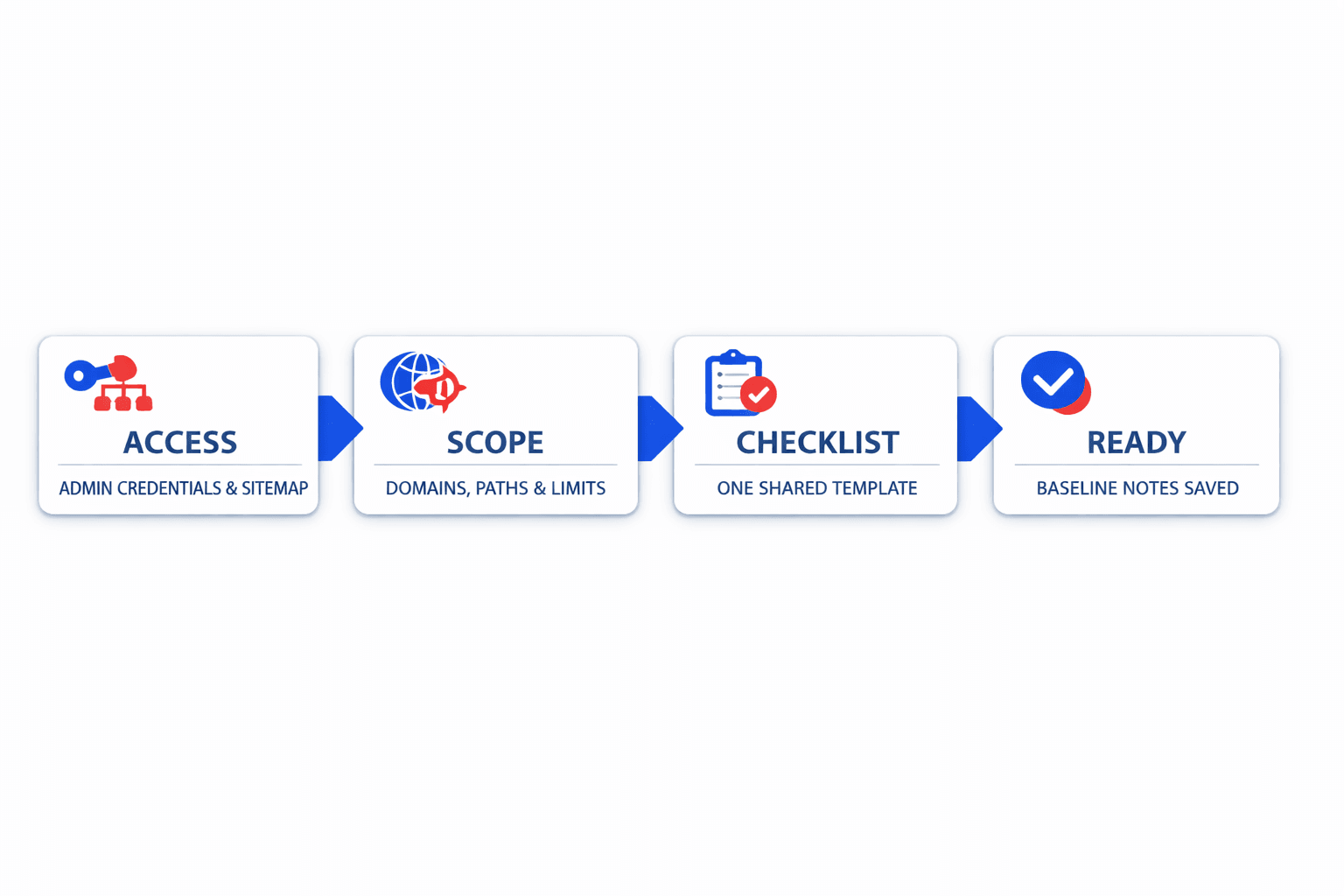
Collect the accounts and files that control your site. Get Google Search Console, Google Analytics, CMS access, sitemap URLs, robots.txt, and hosting or CDN details. For example, if your dev team uses Cloudflare, confirm who can view redirects, caching, and firewall rules.
Create one shared document for all access details. Add the preferred domain version, such as https://www.example.com, plus login owners and permission levels. You should now have one source of truth for URLs, traffic, conversions, and technical constraints.
Baseline metrics and crawl scope
Define what you will measure before opening any audit tools. Record indexed pages, organic sessions, top converting pages, and key template types. Then set your crawl scope, such as the full domain, a subfolder, or only priority templates.
Confirm your crawl limit before you start. Include live pages, excluded sections, staging rules, and sitemap lists. Broken links plague most sites - Backlynk found 404 errors on 52% of websites they audited. Add broken-page checks early in your starter audit checklist.
For a visual walkthrough of this process, check out this tutorial from Google Search Central:
Audit tools and project setup
Pick your audit tools before the first crawl. Use Google Search Console, Google Analytics, Screaming Frog, and a few marketing audit tools your team already trusts. If you want a related setup guide, read Why Your Technical SEO Audit Should Start With HTTPS (Not Content).
Run a technical seo audit monthly for active sites. Run it after migrations, redesigns, or major template releases. At this point, you should see a confirmed domain version, crawl limit, sitemap list, and a starter seo checklist.
Step 2 Run a Technical SEO Audit Checklist
Crawlability and indexation checks
Start with crawl controls first. Review your robots.txt, meta robots tags, and x-robots-tag directives. Check whether important pages are blocked by Disallow, marked noindex, or missing from your XML sitemap. For example, a pricing page may be linked in navigation but blocked from crawlers. At this stage, you'll have identified which URLs search engines can request and which ones they should ignore.
Next, inspect status codes and redirects. Export all URLs from your crawler, then filter for 3xx, 4xx, and 5xx responses. Flag redirect chains, loops, soft 404s, and pages that return 200 with thin error content. Verify that indexable pages resolve in one hop. At this point, your seo audit checklist should show where crawl waste starts.
Then compare indexable URLs against sitemap URLs and canonical targets. Check pagination, hreflang pairs, duplicate parameter URLs, and alternate versions with trailing slashes or mixed case. Research from Technical SEO Checklist: 40+ Points to Audit Your Site | Backlynk shows 74% of websites have image alt text issues, which often appears alongside weak technical hygiene. You should now see which pages are indexable, which pages are excluded, and where duplicate signals appear.
Site architecture and internal linking
Map your click depth next. Export all internal URLs and sort them by depth from the homepage. Flag key pages that sit more than three clicks away. For example, a high-converting feature page buried at depth five may stay under-crawled. You should now see whether your structure helps discovery or hides important pages.
Review orphan pages after that. Compare crawl data with analytics, sitemap files, and CMS exports. Any URL with no internal links but live traffic needs attention. Then inspect anchor text and broken links. Use descriptive anchors, not repeated “learn more” links, and replace links that point to redirects or 404s. This part of your seo checklist helps search engines understand page relationships.
If you run a SaaS site, check templates closely. Product, feature, docs, and integration pages often create duplicate paths or weak link clusters. Use this part of your saas seo checklist to confirm each money page gets direct internal links from navigation, hubs, or related content. For deeper examples, review Why Your XML Sitemap Might Be Hiding Your Best Content.
Metadata canonicals and structured data
Audit metadata one field at a time. Export title tags, meta descriptions, canonicals, image alt attributes, and schema types. Flag missing, duplicate, too-long, or conflicting entries. A canonical that points to another variant can cancel the page you want indexed. You should now see where page-level signals conflict.
Check structured data after metadata. Validate schema markup for articles, products, FAQs, breadcrumbs, and organization details. Make sure markup matches visible page content. Then review canonical logic, paginated series, and hreflang return tags together. For more on this issue, read Why Your Canonical Tags Are Backfiring (And How to Audit Them Fast).
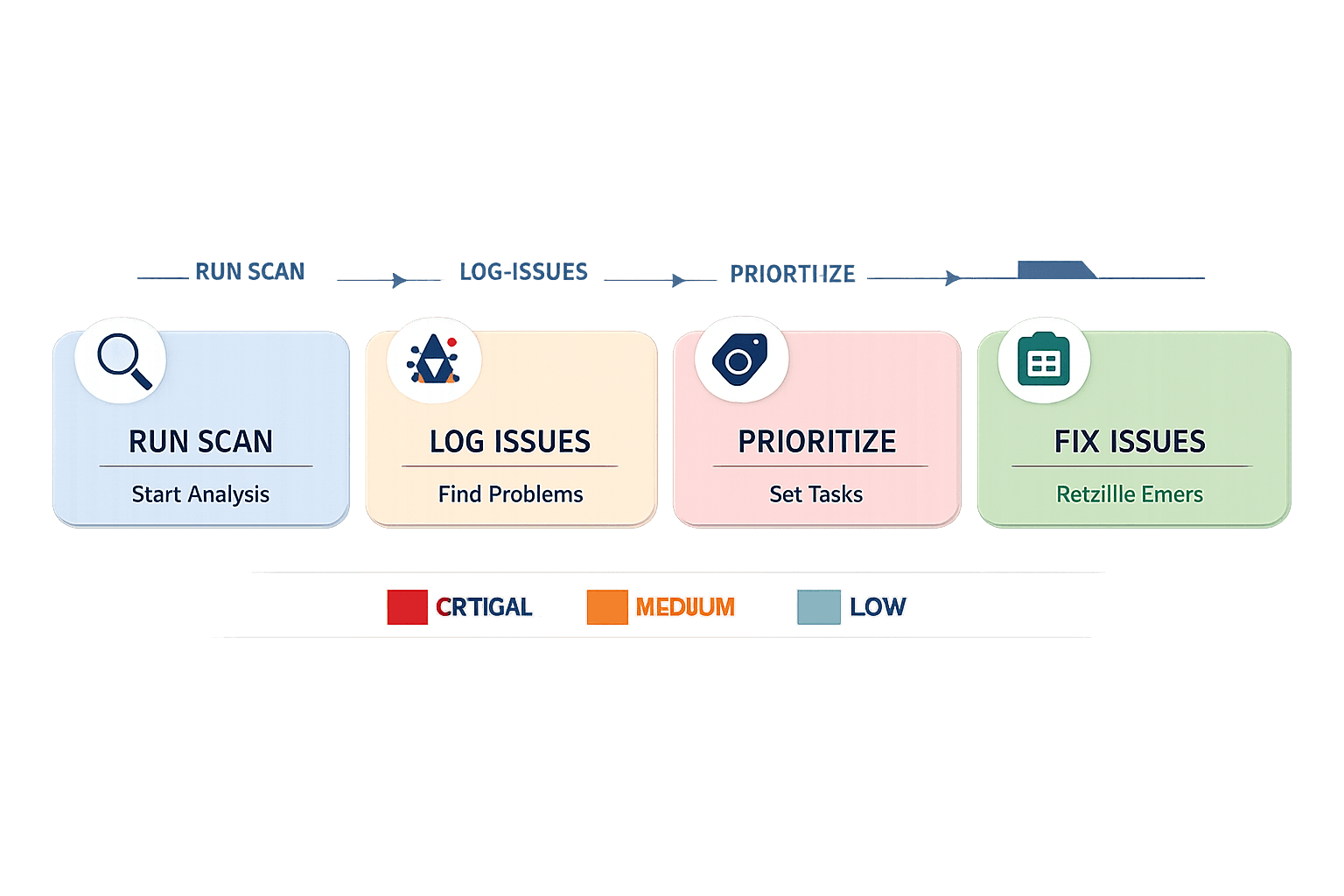
Finish by labeling every issue by impact. Put blocked money pages, wrong canonicals, broken redirects, and noindex mistakes in critical. Place orphan pages, deep pages, and weak anchors in medium. Put missing alt text or short meta gaps in low. Verify that your technical seo audit now shows clear blockers, clean priorities, and the exact fixes to assign next.
Step 3 Review Content SEO Factors and Page Quality
Thin Duplicate and Outdated Content
Start by exporting your key URLs by template. Split them into blog, product, category, and landing pages. Then flag pages with very low copy, repeated intros, outdated examples, or no unique value. For example, a SaaS SEO blog may have six posts targeting the same topic with slight wording changes.
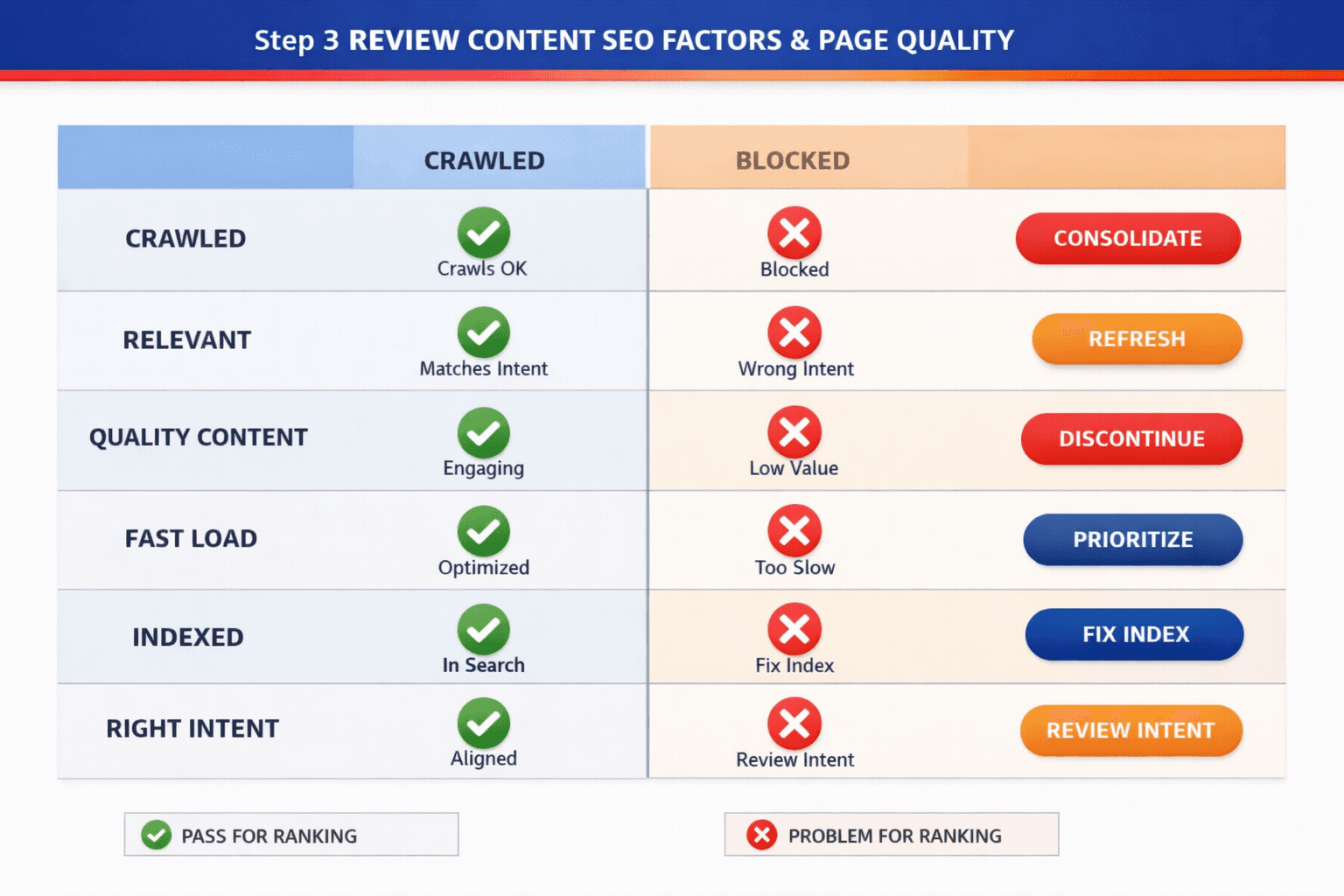
Review each page against your audit checklist. Ask four clear questions. Does this page answer a distinct query? Does it contain original copy? Is the information current? Does it support a business goal? According to Technical SEO Checklist: 40+ Points to Audit Your Site \| Backlynk, only 39% of websites pass key technical checks, which makes cleanup a practical part of any review.
You should now have a shortlist of pages to merge, refresh, redirect, or leave alone. Verify that every flagged URL has a clear action next to it before proceeding.
Search Intent Headings and Topical Coverage
Check whether each important page matches the search intent behind its target keyword. Read the title tag, H1, H2s, and opening paragraph together. If they promise one thing but deliver another, mark the page for revision. For example, a landing page targeting "marketing audit tools" should not read like a general blog post.
Next, scan heading structure for gaps. Flag weak H2s, missing target terms, vague subheads, and sections that skip core questions. Empty category pages and faceted navigation pages often fail here. They create thin indexes with little context and mixed intent. If you need a related example, see Which SEO Factors Actually Matter for AI Search Rankings?.
You should now see which pages need expanded coverage or stronger topic alignment. Verify that each priority URL has one primary intent, one main topic, and useful supporting sections.
Templates Images and Conversion Elements
Review template-level issues next. Check product grids, blog templates, and landing page layouts for repeated copy blocks, missing image alt text, weak file names, and oversized images. Then inspect conversion paths. A page with traffic but no demo button, form, pricing link, or next step wastes intent.
Look closely at category and faceted pages. If filters create near-duplicate URLs with thin content, mark them for consolidation or control. Also flag pages where titles are relevant but the body copy is generic. If canonicals complicate template duplication, read Why Your Canonical Tags Are Backfiring.
At this point, yourtechnical seo auditshould show which URLs deserve optimization versus removal. Verify that blog, product, and landing page templates each have a clear conversion path and measurable page purpose.
Step 4 Verify Performance Security and Mobile SEO
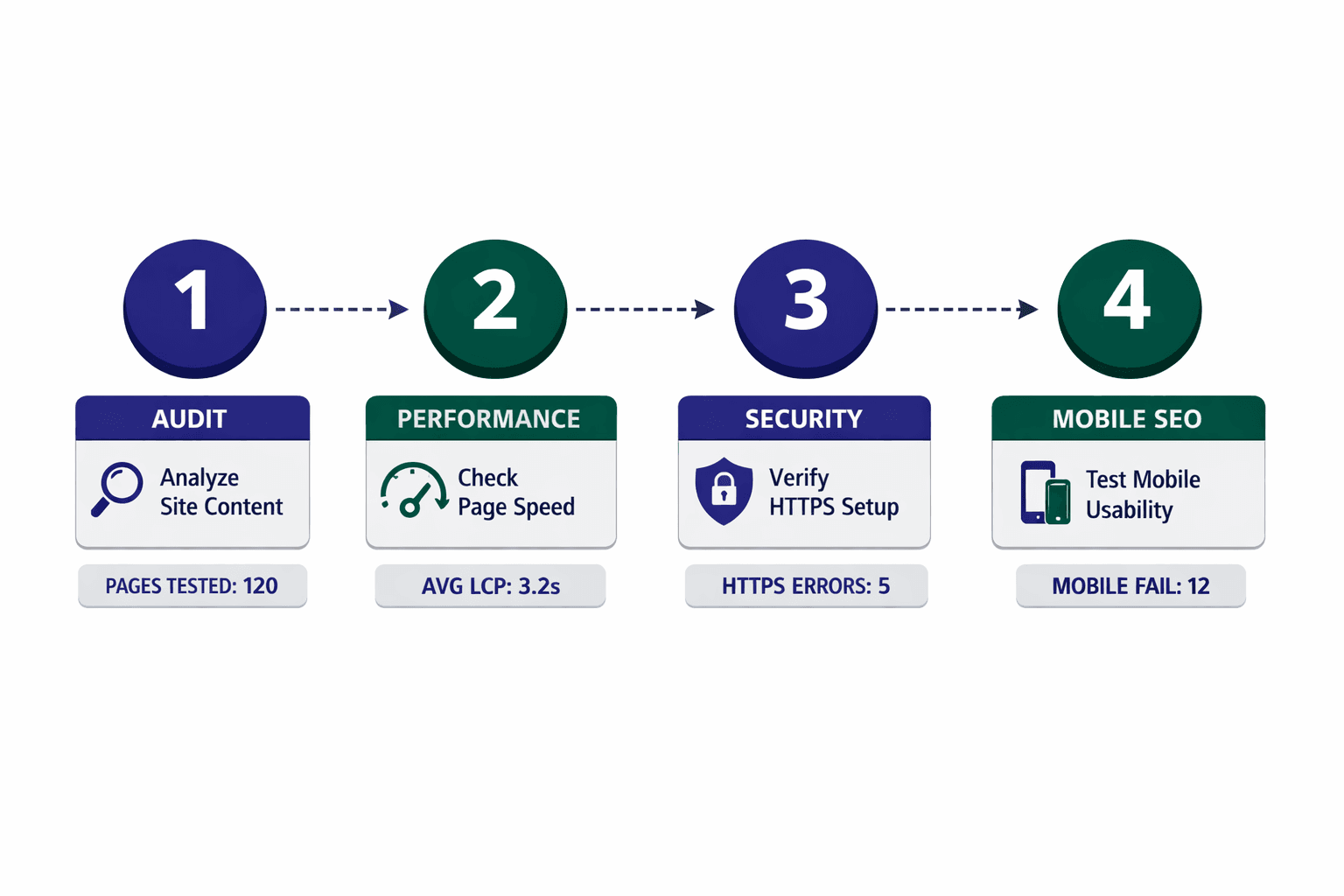
Core Web Vitals and page speed
Run Lighthouse, PageSpeed Insights, and your audit tools on key templates. Test the home page, product page, blog post, and lead page. Check LCP, INP, and CLS on both mobile and desktop. You should now see which template loads slowly, shifts layout, or delays interaction.
Review what causes the delay. Flag render blocking CSS, large JavaScript bundles, uncompressed images, weak caching rules, and third-party scripts. For example, a SaaS SEO landing page may pass on desktop but fail on mobile because a chat widget blocks rendering. Verify that each issue maps to a file, script, or template before proceeding.
Use a simple fix log like this:
Template: /pricing/
Issue: Large hero image
Metric hit: LCP
Device: Mobile
Fix: Convert PNG to WebP, preload hero image, resize to display dimensions
Owner: Dev
Research from Technical SEO Checklist: 40+ Points to Audit Your Site | Backlynk shows 38.5% in this area, which makes performance a common failure point. By now, your technical seo audit should show whether speed problems come from assets, scripts, or server behavior.
HTTPS security headers and trust signals
Check that every version of the site resolves to one HTTPS hostname. Test HTTP to HTTPS redirects, canonical targets, asset URLs, and internal links. Then scan for mixed content, insecure scripts, broken certificate chains, and cookie issues. You should now see whether trust breaks on specific pages or environments.
Review response headers on core templates. Look for HSTS, content security policy, X-Content-Type-Options, and secure cookie flags. For example, a checkout page may load over HTTPS but still call an insecure image or script. Verify that your CDN, cookies, and edge rules behave the same across cached and uncached visits. For more detail, review Why Your Technical SEO Audit Should Start With HTTPS (Not Content).
Mobile usability and international edge cases
Test templates on real mobile widths. Check viewport settings, tap targets, font sizes, sticky bars, and intrusive overlays. Then review country folders, hreflang pairs, and CDN behavior by region. You should now see whether mobile or regional issues block a clean experience.
For example, a button may work in the US but break on German pages because translated text overflows. A regional banner can also push content down and trigger CLS. At this point, you should see a short list of speed and security fixes tied to specific templates, devices, or countries.
Turn Audit Findings Into Ongoing SEO Wins
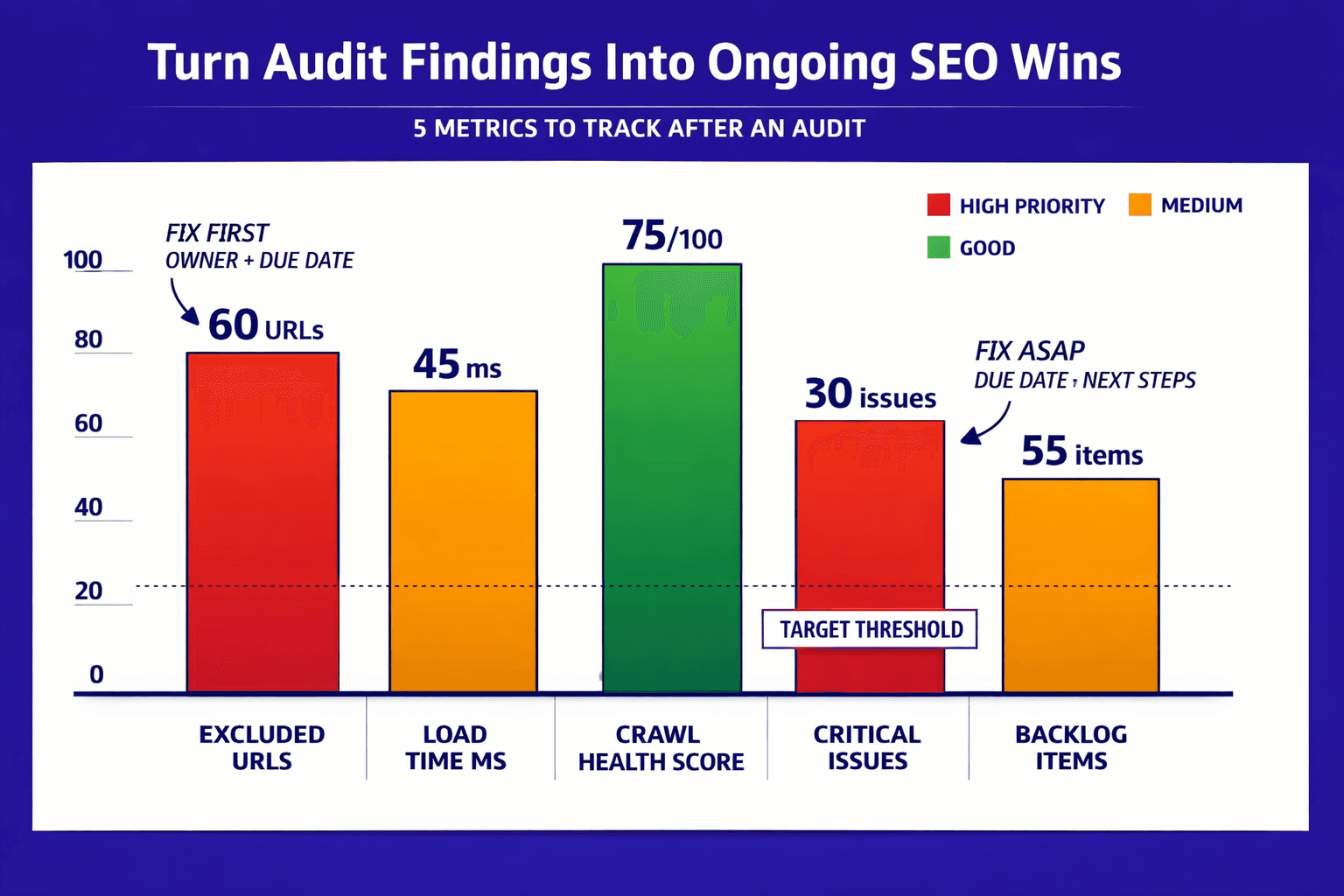
Start by scoring each issue against three filters: business impact, SEO impact, and implementation effort. Fix the items that block growth first. That usually means indexation problems, broken internal links, canonical conflicts, slow page templates, and security gaps. Assign one owner per issue. Set a due date. Tie each fix to a measurable outcome, such as fewer excluded URLs, faster load times, or stronger crawl health. Keep everything in one working backlog so your team can sort by severity, template, or release cycle.
Then re scan after every meaningful update. Do not assume a fix held. Confirm it. Verify that redirects resolve cleanly, canonicals point where expected, blocked pages stay blocked, and key templates load within target ranges. If a problem returns, move it back into the queue and troubleshoot the root cause. This is how you build a repeatable technical seo audit process that improves with each quarter, not just each crawl.
Your finish line is clear. You should now see fewer critical issues, cleaner crawl reports, and a backlog your team can execute without guesswork. Keep your seo audit checklist active, review your seo factors on a schedule, and use audit tools that help your team move faster. That approach works especially well for saas seo, ecommerce, and lean marketing teams that need a dependable saas seo checklist, not a one-off marketing audit.
Keep the process moving, and your site will stay easier to crawl, easier to trust, and easier to grow. If you need expert help running your first comprehensive audit or building a custom checklist for your tech stack, Learn More to explore how we can help.